

編輯:Android 開發實例
先看一下我們要做出來的清爽介面:
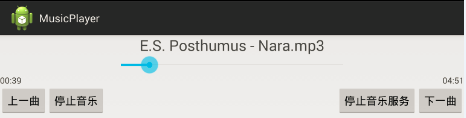
如果只用 Activity 來做這種東西那就太簡單了——播放必須在離開介面後持續進行,所以我們用的是 Service。
動手前先說明幾個關鍵決策:
1. 用 bindService 而非 startService。因為 Activity 需要存取 Service 的屬性與方法(上一曲、下一曲、暫停等),而 bindService() 會回呼 Service 的 onBind(),我們可以在那裡回傳一個 Binder 物件,Activity 透過 ServiceConnection 拿到它之後,就能進一步取得服務實例與 MediaPlayer 進行操作。
2. 兩種儲存位置的差別。Environment.getExternalStorageDirectory() 取得的是外部儲存(無論是手機內建的還是使用者後加的 SD 卡)根目錄;而 getExternalFilesDir() 取得的是應用專屬的外部目錄(/data/data/你的套件名/),會隨應用卸載而被刪除。音樂檔應該從前者掃描。
3. Service 與 Activity 的溝通用廣播。播放進度每秒都在變,Service 用廣播把當前時間、總長度、曲目名稱推送出去,Activity 的 BroadcastReceiver 收到後刷新 UI。這樣即使 Activity 被銷毀重建,Service 也不受影響。
 public class MusicService extends Service{
   private List<File> musicList;
   private MediaPlayer player;
   private int curPage;

   public static final String MFILTER = "broadcast.intent.action.text";
   public static final String NAME = "name";
   public static final String TOTALTIME = "totaltime";
   public static final String CURTIME = "curtime";

   @Override
   public IBinder onBind(Intent intent) { // 1
     return new MBinder();
   }

   public class MBinder extends Binder { // 2
     public MusicService getService(){
       return MusicService.this;
     }
     public MediaPlayer getPlayer(){
       return player;
     }
   }

   @Override
   public void onCreate() {
     super.onCreate();
     musicList = new ArrayList<File>();
     File rootDir = Environment.getExternalStorageDirectory(); // 3
     Log.d("rootname", rootDir.getName());
     Log.d("rootname", rootDir.getAbsolutePath());
     fillMusicList(rootDir);
     Log.d("musiclist", String.valueOf(musicList.size()));
     player = new MediaPlayer();
     if (musicList.size() != 0) {
       startPlay();
     }
     player.setOnCompletionListener(new OnCompletionListener() {
       @Override
       public void onCompletion(MediaPlayer mp) {
         player.reset();
         curPage = curPage == musicList.size()-1 ? (curPage+1)%musicList.size() : curPage+1;
         startPlay();
       }
     });
   }

   /* 迭代獲取音樂檔案 */
   private void fillMusicList(File dir){
     File[] sourceFiles = dir.listFiles();
     Log.d("長度", String.valueOf(sourceFiles.length));
     for(File file : sourceFiles){
       if (file.isDirectory()) {
         Log.d("文件夾名稱", String.valueOf(file.getName()));
         fillMusicList(file);
       } else {
         String name = file.getName();
         Log.d("childname", file.getName());
         if (name.endsWith(".mp3") || name.endsWith(".acc")) { // 支援的格式
           musicList.add(file);
         }
       }
     }
   }

   private void startPlay(){
     mSendBroadCast(NAME, musicList.get(curPage).getName()); // 4
     try {
       player.setDataSource(musicList.get(curPage).getAbsolutePath());
       player.prepare();
       player.start();
       player.getDuration();
       mSendBroadCast(TOTALTIME, player.getDuration());
       Timer timer = new Timer();
       timer.schedule(new TimerTask() {
         @Override
         public void run() {
           mSendBroadCast(CURTIME, player.getCurrentPosition());
         }
       }, 0, 1000);
     } catch (IllegalArgumentException e) {
       e.printStackTrace();
     } catch (SecurityException e) {
       e.printStackTrace();
     } catch (IllegalStateException e) {
       e.printStackTrace();
     } catch (IOException e) {
       e.printStackTrace();
     }
   }

   public void playNext(){
     curPage = curPage == musicList.size()-1 ? (curPage+1)%musicList.size() : curPage+1;
     Log.d("curpage", String.valueOf(curPage));
     player.reset();
     startPlay();
   }

   public void playPrevious(){
     curPage = curPage == 0 ? 0 : curPage-1;
     Log.d("curpage", String.valueOf(curPage));
     player.reset();
     startPlay();
   }

   public void parse(){
     player.pause();
   }

   public void restart(){
     player.start();
   }

   private void mSendBroadCast(String key, String value){
     Intent intent = new Intent(MFILTER);
     intent.putExtra(key, value); // 發送廣播
     sendBroadcast(intent);
   }

   private void mSendBroadCast(String key, int value){
     Intent intent = new Intent(MFILTER);
     intent.putExtra(key, value); // 發送廣播
     sendBroadcast(intent);
   }
 }
三個重點:
1. 在 onServiceConnected() 中透過 Binder 取得服務實例。
2. 拿到服務實例後即可直接呼叫它的公開方法。
3. 用 BroadcastReceiver 接收進度並刷新頁面。
 public class MainActivity extends Activity implements OnClickListener{
   SeekBar seekBar;
   TextView curTime, totalTime;
   TextView title;
   private ServiceConnection sc;
   private MusicService ms;
   private boolean isStop;
   private double totalTimeInt;

   @Override
   protected void onCreate(Bundle savedInstanceState) {
     super.onCreate(savedInstanceState);
     setContentView(R.layout.activity_main);
     IntentFilter filter = new IntentFilter(MusicService.MFILTER);
     registerReceiver(new MusicReceiver(), filter);

     sc = new ServiceConnection() {
       @Override
       public void onServiceDisconnected(ComponentName name) {
         ms = null;
       }
       @Override
       public void onServiceConnected(ComponentName name, IBinder service) {
         ms = ((MBinder)service).getService(); // 1
       }
     };

     Button previous = (Button) findViewById(R.id.previous);
     Button next = (Button) findViewById(R.id.next);
     Button stop = (Button) findViewById(R.id.stop);
     Button stopService = (Button) findViewById(R.id.stopService);
     seekBar = (SeekBar) findViewById(R.id.mSeekbar);
     curTime = (TextView) findViewById(R.id.curTime);
     totalTime = (TextView) findViewById(R.id.totalTime);
     title = (TextView) findViewById(R.id.title);

     previous.setOnClickListener(this);
     next.setOnClickListener(this);
     stop.setOnClickListener(this);
     stopService.setOnClickListener(this);
   }

   @Override
   public void onClick(View v) {
     switch (v.getId()) {
       case R.id.previous:
         ms.playPrevious(); // 2
         break;
       case R.id.next:
         ms.playNext();
         break;
       case R.id.stop:
         if (isStop) {
           ms.restart();
         } else {
           ms.parse();
         }
         isStop = !isStop;
         break;
       case R.id.stopService:
         Intent intent = new Intent("com.intent.musicplayer.MusicService");
         unbindService(sc);
         stopService(intent);
         break;
       default:
         break;
     }
   }

   @Override
   protected void onStart() {
     super.onStart();
     Intent intent = new Intent("com.intent.musicplayer.MusicService");
     bindService(intent, sc, Context.BIND_AUTO_CREATE);
   }

   private String transferMilliToTime(int millis){
     DateFormat format = new SimpleDateFormat("mm:ss");
     return format.format(new Date(millis));
   }

   private class MusicReceiver extends BroadcastReceiver{ // 3
     @Override
     public void onReceive(Context context, Intent intent) {
       if (intent.getIntExtra(MusicService.CURTIME, 0) != 0) {
         double curTimeInt = intent.getIntExtra(MusicService.CURTIME, 0);
         curTime.setText(transferMilliToTime((int)curTimeInt));
         double result = curTimeInt/totalTimeInt*100;
         seekBar.setProgress((int) Math.floor(result));
       } else if(intent.getIntExtra(MusicService.TOTALTIME, 0) != 0) {
         totalTimeInt = intent.getIntExtra(MusicService.TOTALTIME, 0);
         totalTime.setText(transferMilliToTime((int)(totalTimeInt)));
       } else if (!TextUtils.isEmpty(intent.getStringExtra(MusicService.NAME))) {
         title.setText(intent.getStringExtra(MusicService.NAME));
       }
     }
   }
 }
 <LinearLayout xmlns:android="https://schemas.android.com/apk/res/android"
   xmlns:tools="https://schemas.android.com/tools"
   android:layout_width="match_parent"
   android:layout_height="match_parent"
   android:orientation="vertical"
   tools:context="${relativePackage}.${activityClass}" >

   <TextView
     android:id="@+id/title"
     android:layout_width="wrap_content"
     android:layout_height="wrap_content"
     android:layout_gravity="center_horizontal"
     android:textSize="25sp"
     android:textColor="#444444" />

   <SeekBar
     android:id="@+id/mSeekbar"
     android:layout_gravity="center_horizontal"
     android:layout_width="400dp"
     android:layout_height="wrap_content"
     android:max="100" />

   <RelativeLayout
     android:layout_width="match_parent"
     android:layout_height="wrap_content" >
     <TextView
       android:id="@+id/curTime"
       android:layout_height="wrap_content"
       android:layout_width="wrap_content"
       android:layout_alignParentLeft="true" />
     <TextView
       android:id="@+id/totalTime"
       android:layout_height="wrap_content"
       android:layout_width="wrap_content"
       android:layout_alignParentRight="true" />
   </RelativeLayout>

   <RelativeLayout
     android:layout_width="match_parent"
     android:layout_height="wrap_content" >
     <Button
       android:id="@+id/previous"
       android:layout_height="wrap_content"
       android:layout_width="wrap_content"
       android:text="上一曲"
       android:layout_alignParentLeft="true" />
     <Button
       android:id="@+id/stop"
       android:layout_height="wrap_content"
       android:layout_width="wrap_content"
       android:text="停止音樂"
       android:layout_toRightOf="@id/previous" />
     <Button
       android:id="@+id/next"
       android:layout_height="wrap_content"
       android:layout_width="wrap_content"
       android:text="下一曲"
       android:layout_alignParentRight="true" />
     <Button
       android:id="@+id/stopService"
       android:layout_height="wrap_content"
       android:layout_width="wrap_content"
       android:text="停止音樂服務"
       android:layout_toLeftOf="@id/next" />
   </RelativeLayout>
 </LinearLayout>
上面的實作把整個播放流程跑通了,是很好的入門練習,但若要 production 級的品質,有幾處值得改造:
改用 MediaSession。真正的音樂播放器需要能被通知列控制、能被藍牙耳機與手錶操作、能在鎖屏時顯示封面。這些都靠 MediaSessionCompat 搭配 MediaBrowserServiceCompat 實作,而非自己發廣播。
別用 Timer 每秒發廣播。每秒一次的廣播會持續喚醒接收器,耗電且效能不佳。改用 Handler 的 postDelayed 並在 Activity 暫停時移除回呼,或直接讓 Activity 用 Runnable 向 Service 拉取進度。
掃描媒體用 MediaStore。遞迴遍歷檔案系統在大量檔案時很慢,MediaStore 有系統維護的媒體索引,查詢更快,也不需要自己過濾格式。
記得清理資源。fillMusicList 遞迴時若遇權限不足目錄,listFiles() 可能回傳 null,需做防呆;onDestroy() 中要 release() 掉 MediaPlayer 並取消 Timer,否則會洩漏。
播放要當前台服務。Android 8.0 之後,僅靠 bindService 的服務在應用退到背景時隨時可能被回收,音樂會斷掉。播放服務應加上 startForeground() 與通知。
以上就是這個播放器的完整程式碼與改進方向,希望對大家的學習有所幫助。
 Android JSON 解析實戰:從 API 回傳資料到畫面顯示
JSON 的全名是 JavaScript Object Notation(JavaScript 物件符號法),它是一種與程式語言無關的輕量級資料交換格式,因為語法簡潔、可
 Android Intent 啟動其他應用的實現方法
Intent 除了可以在同一個應用內切換 Activity,也可以用來啟動其他應用。最常見的方式是透過 ComponentName 明確指定目標應用的套件名稱與啟動 Ac
 Android JSON 解析教學:用 JSONObject 擷取所需資料
JSON 是 JavaScript Object Notation 的縮寫,它是一種與語言無關的資料交換格式,也是 XML 廣受歡迎的替代方案。本章將說明如何在 Andr
 Android 登入功能實作:三個關鍵元件與錯誤鎖定機制
登入畫面是所有需要帳號服務的 App 的第一道門。使用者在此輸入一組憑證,App 驗證通過後才放行。本章拆解它的三個關鍵元件:帳號欄、密碼欄,以及防止無限嘗試的鎖定機制。