

編輯:Android 開發實例
本文整理 Android 上的字型設定方式,包含載入自訂 TTF 字型、讓中文呈現粗體效果,以及系統內建 Roboto 字型的用法。
可以先把 ttf 字型檔放進 assets,再在程式碼中建立 Typeface 套用。
第一步,在 assets 目錄下新增 fonts 資料夾,把 ttf 檔放進去。
第二步,在程式中載入並套用:
AssetManager mgr = getAssets();// 取得 AssetManager
Typeface tf = Typeface.createFromAsset(mgr, "fonts/ttf.ttf");// 依路徑取得 Typeface
tv = findViewById(R.id.textview);
tv.setTypeface(tf);// 設定字型
在 XML 中使用 android:textStyle="bold" 可以讓英文變粗體,但對中文無效。中文要達到視覺上的粗體效果,得靠 TextPaint 的模擬粗體:
TextView tv = (TextView)findViewById(R.id.TextView01);
tv.getPaint().setFakeBoldText(true);// 中文模擬粗體
注意:部分字型套用後中文不會有任何變化,而且不會報錯,測試時容易漏掉。
從 Android 4.0 起,系統預設字型改為 Roboto。在 XML 中透過 fontFamily 即可切換不同字重:
android:fontFamily="sans-serif"             // roboto regular
android:fontFamily="sans-serif-light"       // roboto light
android:fontFamily="sans-serif-condensed"   // roboto condensed
android:fontFamily="sans-serif-thin"        // roboto thin (android 4.2)
// 可搭配
android:textStyle
可搭配的字重選項如下:
若需要更細緻的控制(例如 Medium、Black 字重), Roboto 家族在 5.0 之後可以透過字型家族 XML 精確指定,不必再依賴 fontFamily 的別名寫法。
 Android 載入 Spinner 範例:控制顯示與隱藏
載入 Spinner 是常見的等待提示元件。它會持續旋轉,直到任務完成或使用者離開頁面。 實作方式 在版面配置加入 ProgressBar,並在 Java 中控制可見性。
 Android 進度條教學:用 Spinner 顯示不確定載入狀態
App 在等待網路回應或讀取大量資料時,如果畫面完全靜止,使用者很可能以為程式當掉了。一個持續旋轉的載入指示器,就能有效安撫這種焦慮。 Android 用 Progre
 Android Spinner 載入提示:從使用者等待心理談 ProgressBar 的用法
當一個操作無法預估還要多久時,使用者需要的不是精確的百分比,而是一個持續存在的「我沒死掉」訊號。Android 把這件事交給 ProgressBar 的不確定模式,也就是
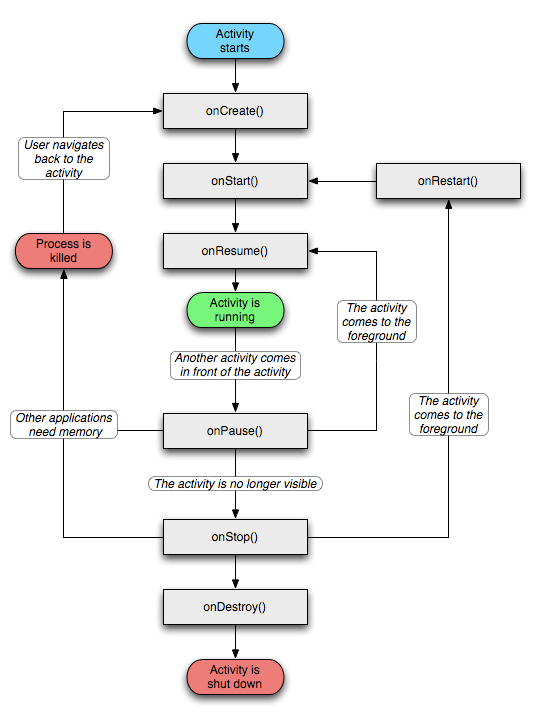 Android Activity 生命週期完整解析
Activity 啟動時通常依序經過 onCreate、onStart、onResume。按 BACK 鍵會走 onPause、onStop、onDestroy;按 HO