

編輯:Android 開發實例
Android 的設定介面實作起來相當輕鬆,簡單到一個 XML 檔就能搞定。宣告容易,但想從 PreferenceScreen 或 PreferenceCategory 中「刪掉」某一項,為什麼有些人寫的程式怎麼都刪不掉?本文從原始碼的角度把這件事講清楚。
<?xml version="1.0" encoding="utf-8"?>
<PreferenceScreen xmlns:android="https://schemas.android.com/apk/res/android"
    android:key="root">

  <PreferenceCategory
    android:key="theme"
    android:title="Theme"
    android:summary="Theme Settings"
    >
    <CheckBoxPreference
        android:key="holo_theme"
        android:title="Holo Theme"
        android:summary="Use Holo Theme"
        />

  </PreferenceCategory>

  <CheckBoxPreference
    android:key="rmcache"
    android:title="Auto Clear Cache"
    android:summary="Enable Auto Clear Cache "
    />
</PreferenceScreen>
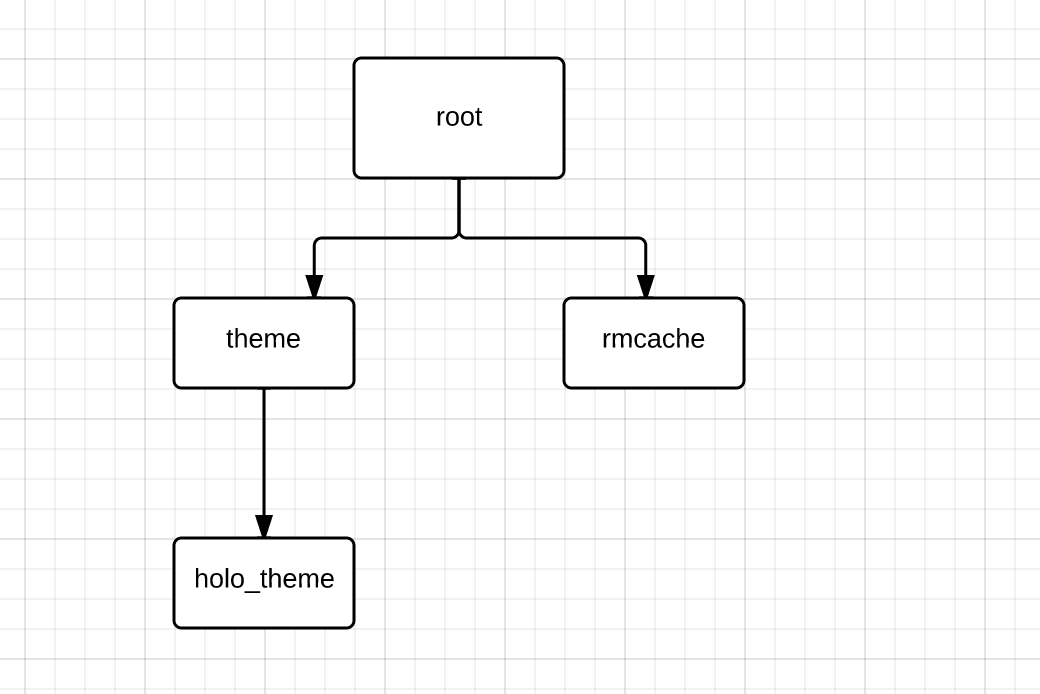
rmcache 是 root 的直接子節點,holo_theme 則是孫節點,中間隔著一層 PreferenceCategory。
刪除直接子節點 rmcache:
PreferenceScreen screen = getPreferenceScreen();
CheckBoxPreference autoClearCheckboxPref = (CheckBoxPreference) screen.findPreference("rmcache");
screen.removePreference(autoClearCheckboxPref);
刪除孫節點 holo_theme,必須先取得它的父親再操作:
PreferenceCategory themePrefCategory = (PreferenceCategory) screen.findPreference("theme");
CheckBoxPreference holoCheckboxPref = (CheckBoxPreference)themePrefCategory.findPreference("holo_theme");
themePrefCategory.removePreference(holoCheckboxPref);
最常見的原因是「拿爺爺節點去刪孫子」:
PreferenceScreen screen = getPreferenceScreen();
CheckBoxPreference holoCheckboxPref = (CheckBoxPreference)screen.findPreference("holo_theme");
screen.removePreference(holoCheckboxPref);
這段程式碼不會報錯,但永遠刪不掉。原因在 removePreference 的實作——PreferenceScreen 與 PreferenceCategory 都是 PreferenceGroup 的子類:
/**
 * Removes a {@link Preference} from this group.
 *
 * @param preference The preference to remove.
 * @return Whether the preference was found and removed.
 */
public boolean removePreference(Preference preference) {
    final boolean returnValue = removePreferenceInt(preference);
    notifyHierarchyChanged();
    return returnValue;
}

private boolean removePreferenceInt(Preference preference) {
    synchronized(this) {
        preference.onPrepareForRemoval();
        return mPreferenceList.remove(preference);
    }
}
關鍵是 mPreferenceList.remove(preference):這個清單裡只放「當前 PreferenceGroup 的直接子 Preference」, therefore 拿錯父節點呼叫時,List 裡找不到該物件,自然甚麼都不會發生。
相較之下,findPreference 卻會遞迴遍歷所有子節點:
/**
 * Finds a {@link Preference} based on its key. If two {@link Preference}
 * share the same key (not recommended), the first to appear will be
 * returned (to retrieve the other preference with the same key, call this
 * method on the first preference). If this preference has the key, it will
 * not be returned.
 * <p>
 * This will recursively search for the preference into children that are
 * also {@link PreferenceGroup PreferenceGroups}.
 *
 * @param key The key of the preference to retrieve.
 * @return The {@link Preference} with the key, or null.
 */
public Preference findPreference(CharSequence key) {
    if (TextUtils.equals(getKey(), key)) {
        return this;
    }
    final int preferenceCount = getPreferenceCount();
    for (int i = 0; i < preferenceCount; i++) {
        final Preference preference = getPreference(i);
        final String curKey = preference.getKey();

        if (curKey != null && curKey.equals(key)) {
            return preference;
        }

        if (preference instanceof PreferenceGroup) {
            final Preference returnedPreference = ((PreferenceGroup)preference)
                    .findPreference(key);
            if (returnedPreference != null) {
                return returnedPreference;
            }
        }
    }

    return null;
}
所以當你同時握有 root 與直接父節點的引用時,用後者呼叫 findPreference 效率更高,不必從頭遞迴整棵樹。
原因大致有三:
 在Android中用ZXing打造條碼與二維碼掃描功能
智慧型手機的攝像鏡頭如今幾乎都支援自動對焦,這也為手機開啟了「掃碼」這扇大門。具備條碼掃描能力的手機,不僅能讓購物結帳更順暢,也能快速讀取電子名片等二維碼資訊。 本文示範
 Android OpenGL 繪圖技巧完整總結
本文重新複習了 Android 上使用 OpenGL ES 繪圖的原理與技巧,並把重點整理如下,方便日後查閱。1. Android 三維座標系統如圖:Android 的三
 深入淺析 Android Fragment(上篇):從誕生到動態操作
曾有一段時間,好像聊什麼都能扯到 Fragment,做什麼都要問一句「Fragment 能不能實現」——現在回想起來確實有點誇張,但它會紅,背後是有明確理由的。 Fra
 Android 應用本地化指南:從 strings.xml 到多語系資源
一支上架到 Google Play 的 App,可能同時服務幾十個語系的使用者。要讓每個人都覺得「這 App 是為我做的」,就得把介面文字、數字格式與其他資源交給 And