

編輯:Android 開發實例
前文介紹了如何用 Java 反射機制調用藍牙的隱藏 API,本文繼續拿反射機制練手,探秘 TelephonyManager 在 Framework 中存在、卻在 SDK 中被隱藏的幾項功能。
先看本文程序的運行效果圖:
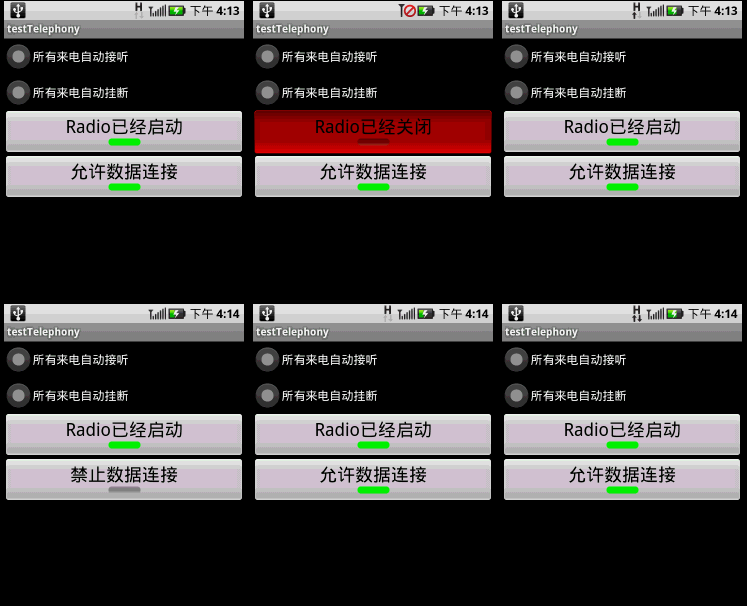
本程序演示了以下四項功能:
1. 所有來電自動接聽;
2. 所有來電自動掛斷;
3. 開啟/關閉 Radio;
4. 開啟/關閉數據連接(WAP 或 NET 連接)。
調用 TelephonyManager 隱藏 API 的思路是:先參考 Framework 的 /base/telephony/java/com/android/internal/telephony/ITelephony.aidl,然後自行實現一個 ITelephony.aidl,最後在 TelephonyManager 中透過反射機制實例化自定義的 ITelephony,實例化之後就能調用其中的函數了。
本程序需要在 AndroidManifest.xml 中添加以下兩行,以獲得相應權限:
<uses-permission android:name="android.permission.CALL_PHONE" /> <uses-permission android:name="android.permission.MODIFY_PHONE_STATE" />
main.xml 源碼如下:
<?xml version="1.0" encoding="utf-8"?> <LinearLayout xmlns:android="https://schemas.android.com/apk/res/android" android:orientation="vertical" android:layout_width="fill_parent" android:layout_height="fill_parent"> <RadioGroup android:layout_height="wrap_content" android:layout_width="fill_parent" android:id="@+id/rGrpSelect"> <RadioButton android:layout_height="wrap_content" android:layout_width="fill_parent" android:id="@+id/rbtnAutoAccept" android:text="所有來電自動接聽"></RadioButton> <RadioButton android:layout_height="wrap_content" android:layout_width="fill_parent" android:id="@+id/rbtnAutoReject" android:text="所有來電自動掛斷"></RadioButton> </RadioGroup> <ToggleButton android:layout_height="wrap_content" android:layout_width="fill_parent" android:id="@+id/tbtnRadioSwitch" android:textOn="Radio已經啟動" android:textOff="Radio已經關閉" android:textSize="24dip" android:text></ToggleButton> <ToggleButton android:layout_height="wrap_content" android:layout_width="fill_parent" android:id="@+id/tbtnDataConn" android:textSize="24dip" android:text android:textOn="允許數據連接" android:textOff="禁止數據連接"></ToggleButton> </LinearLayout>
PhoneUtils.java 是手機功能類,負責從 TelephonyManager 中實例化 ITelephony 並返回,源碼如下:
package com.testTelephony; import java.lang.reflect.Field; import java.lang.reflect.Method; import com.android.internal.telephony.ITelephony; import android.telephony.TelephonyManager; import android.util.Log; public class PhoneUtils { /** * 從TelephonyManager中實例化ITelephony,並返回 */ static public ITelephony getITelephony(TelephonyManager telMgr) throws Exception { Method getITelephonyMethod = telMgr.getClass().getDeclaredMethod("getITelephony"); getITelephonyMethod.setAccessible(true);//私有化函數也能使用 return (ITelephony)getITelephonyMethod.invoke(telMgr); } static public void printAllInform(Class clsShow) { try { // 取得所有方法 Method[] hideMethod = clsShow.getDeclaredMethods(); int i = 0; for (; i < hideMethod.length; i++) { Log.e("method name", hideMethod[i].getName()); } // 取得所有常量 Field[] allFields = clsShow.getFields(); for (i = 0; i < allFields.length; i++) { Log.e("Field name", allFields[i].getName()); } } catch (SecurityException e) { // throw new RuntimeException(e.getMessage()); e.printStackTrace(); } catch (IllegalArgumentException e) { // throw new RuntimeException(e.getMessage()); e.printStackTrace(); } catch (Exception e) { // TODO Auto-generated catch block e.printStackTrace(); } } } testTelephony.java 是主類,使用 PhoneStateListener 監聽通話狀態,並實現上述四種電話控制功能,源碼如下:
package com.testTelephony; import android.app.Activity; import android.os.Bundle; import android.telephony.PhoneStateListener; import android.telephony.TelephonyManager; import android.util.Log; import android.view.View; import android.widget.RadioGroup; import android.widget.ToggleButton; public class testTelephony extends Activity { /** Called when the activity is first created. */ RadioGroup rg;//來電操作單選框 ToggleButton tbtnRadioSwitch;//Radio開關 ToggleButton tbtnDataConn;//數據連接的開關 TelephonyManager telMgr; CallStateListener stateListner; int checkedId=0; @Override public void onCreate(Bundle savedInstanceState) { super.onCreate(savedInstanceState); setContentView(R.layout.main); telMgr= (TelephonyManager)getSystemService(TELEPHONY_SERVICE); telMgr.listen(new CallStateListener(), CallStateListener.LISTEN_CALL_STATE); PhoneUtils.printAllInform(TelephonyManager.class); rg = (RadioGroup)findViewById(R.id.rGrpSelect); rg.setOnCheckedChangeListener(new CheckEvent()); tbtnRadioSwitch=(ToggleButton)this.findViewById(R.id.tbtnRadioSwitch); tbtnRadioSwitch.setOnClickListener(new ClickEvent()); try { tbtnRadioSwitch.setChecked(PhoneUtils.getITelephony(telMgr).isRadioOn()); } catch (Exception e) { Log.e("error",e.getMessage()); } tbtnDataConn=(ToggleButton)this.findViewById(R.id.tbtnDataConn); tbtnDataConn.setOnClickListener(new ClickEvent()); try { tbtnDataConn.setChecked(PhoneUtils.getITelephony(telMgr).isDataConnectivityPossible()); } catch (Exception e) { Log.e("error",e.getMessage()); } } /** * 來電時的操作 * @author GV * */ public class CheckEvent implements RadioGroup.OnCheckedChangeListener{ @Override public void onCheckedChanged(RadioGroup group, int checkedId) { testTelephony.this.checkedId=checkedId; } } /** * Radio和數據連接的開關 * @author GV * */ public class ClickEvent implements View.OnClickListener{ @Override public void onClick(View v) { if (v == tbtnRadioSwitch) { try { PhoneUtils.getITelephony(telMgr).setRadio(tbtnRadioSwitch.isChecked()); } catch (Exception e) { Log.e("error", e.getMessage()); } } else if(v==tbtnDataConn){ try { if(tbtnDataConn.isChecked()) PhoneUtils.getITelephony(telMgr).enableDataConnectivity(); else if(!tbtnDataConn.isChecked()) PhoneUtils.getITelephony(telMgr).disableDataConnectivity(); } catch (Exception e) { Log.e("error", e.getMessage()); } } } } /** * 監視電話狀態 * @author GV * */ public class CallStateListener extends PhoneStateListener { @Override public void onCallStateChanged(int state, String incomingNumber) { if(state==TelephonyManager.CALL_STATE_IDLE)//掛斷 { Log.e("IDLE",incomingNumber); } else if(state==TelephonyManager.CALL_STATE_OFFHOOK)//接聽 { Log.e("OFFHOOK",incomingNumber); } else if(state==TelephonyManager.CALL_STATE_RINGING)//來電 { if(testTelephony.this.checkedId==R.id.rbtnAutoAccept) { try { //需要<uses-permission android:name="android.permission.MODIFY_PHONE_STATE" /> PhoneUtils.getITelephony(telMgr).silenceRinger();//靜鈴 PhoneUtils.getITelephony(telMgr).answerRingingCall();//自動接聽 } catch (Exception e) { Log.e("error",e.getMessage()); } } else if(testTelephony.this.checkedId==R.id.rbtnAutoReject) { try { PhoneUtils.getITelephony(telMgr).endCall();//掛斷 PhoneUtils.getITelephony(telMgr).cancelMissedCallsNotification();//取消未接顯示 } catch (Exception e) { Log.e("error",e.getMessage()); } } } super.onCallStateChanged(state, incomingNumber); } } }有興趣的讀者可以測試一下本文的實例代碼,希望能對大家的 Android 項目開發有所幫助。需要提醒的是,這些接口屬於隱藏 API,在新版系統上可能受限或無法使用。
 Android 天氣 App 教學:JSON 資料到底怎麼讀
做過網路相關的 App 就會知道,伺服器回傳的資料幾乎都是 JSON。它是 JavaScript Object Notation 的縮寫,憑藉著結構清晰、沒有冗餘標籤這兩
 Android 進階性能優化全解析:視圖、記憶體與電量
性能優化是區分初學者與進階開發者的重要分水嶺。本文從視圖、記憶體、電量三大維度出發,梳理 Android 開發中最值得關注的性能問題與應對策略。 一、視圖性能:告別 Ov
 Android MediaPlayer 音訊播放:播放、暫停與快轉
MediaPlayer 是 Android 中常用的多媒體播放類別。除了基本的播放與暫停,也可以透過 seekTo() 實作快轉與快退。 初始化播放器 MediaPlay
 從 API 到畫面:Android 用 JSONObject 解析天氣資料的整條路
行動 App 的資料大多不是自己產生的,而是從伺服器抓回來的。而這些年最主流的傳輸格式,莫過於 JSON——它比 XML 短、比 XML 好讀,解析器幾乎每個語言都內建。