

編輯:Android 開發實例
Android 提供多種播放音訊與影片的方式,而其中最基礎、也最廣泛被使用的一條路徑,就是 MediaPlayer 類別。它能播放本機檔案、應用程式內的資源,也能處理網路串流。
MediaPlayer 提供靜態的 create() 方法,呼叫後即可取得物件實例:
MediaPlayer mediaPlayer = MediaPlayer.create(this, R.raw.song);
第二個參數指定要播放的資源。這裡的 R.raw.song 代表專案中的 res/raw 目錄;如果還沒有這個資料夾,請自行建立並把音樂檔放進去。
mediaPlayer.start();
mediaPlayer.pause();
start() 會開始(或從頭)播放。若先呼叫 pause() 再呼叫 start(),播放會從暫停處接續,而不是回到開頭。想要真正回到歌曲起點,得呼叫 reset():
mediaPlayer.reset();
除此之外,MediaPlayer 還有這些常用方法:
| 方法 | 說明 |
|---|---|
| isPlaying() | 回傳布林值,表示目前是否正在播放 |
| seekTo(int position) | 把播放位置跳到指定的毫秒數 |
| getCurrentPosition() | 回傳目前的播放位置(毫秒) |
| getDuration() | 回傳整段媒體的總時長(毫秒) |
| reset() | 把播放器重設回初始狀態 |
| release() | 釋放 MediaPlayer 占用的所有資源 |
| setVolume(float leftVolume, float rightVolume) | 設定左右聲道音量 |
| setDataSource(FileDescriptor fd) | 設定音訊/影片的資料來源 |
| selectTrack(int index) | 依索引選取指定軌道 |
| getTrackInfo() | 回傳軌道資訊陣列 |
這個範例實作一個能播放、暫停、前跳與後跳 5 秒,並以 SeekBar 顯示即時進度的播放器。
| 步驟 | 說明 |
|---|---|
| 1 | 建立 Android 專案,命名為 MediaPlayer,套件名 com.yiibai.mediaplayer,Target SDK 選擇較新版本 |
| 2 | 修改 src/MainActivity.java,加入 MediaPlayer 程式碼 |
| 3 | 修改 res/layout/activity_main.xml,加入對應元件 |
| 4 | 修改 res/values/string.xml,補上字串資源 |
| 5 | 在專案下新增 raw 資料夾,放入 song.mp3 |
| 6 | 執行 App,選擇真機或模擬器安裝並驗證結果 |
主 Activity src/com.yiibai.mediaplayer/MainActivity.java:
package com.example.mediaplayer;
import java.util.concurrent.TimeUnit;
import android.media.MediaPlayer;
import android.os.Bundle;
import android.os.Handler;
import android.app.Activity;
import android.view.Menu;
import android.view.View;
import android.widget.ImageButton;
import android.widget.SeekBar;
import android.widget.TextView;
import android.widget.Toast;
public class MainActivity extends Activity {
   public TextView songName,startTimeField,endTimeField;
   private MediaPlayer mediaPlayer;
   private double startTime = 0;
   private double finalTime = 0;
   private Handler myHandler = new Handler();
   private int forwardTime = 5000;
   private int backwardTime = 5000;
   private SeekBar seekbar;
   private ImageButton playButton,pauseButton;
   public static int oneTimeOnly = 0;

   @Override
   protected void onCreate(Bundle savedInstanceState) {
      super.onCreate(savedInstanceState);
      setContentView(R.layout.activity_main);
      songName = (TextView)findViewById(R.id.textView4);
      startTimeField = (TextView)findViewById(R.id.textView1);
      endTimeField = (TextView)findViewById(R.id.textView2);
      seekbar = (SeekBar)findViewById(R.id.seekBar1);
      playButton = (ImageButton)findViewById(R.id.imageButton1);
      pauseButton = (ImageButton)findViewById(R.id.imageButton2);
      songName.setText("song.mp3");
      mediaPlayer = MediaPlayer.create(this, R.raw.song);
      seekbar.setClickable(false);
      pauseButton.setEnabled(false);
   }

   public void play(View view){
      Toast.makeText(getApplicationContext(), "Playing sound", Toast.LENGTH_SHORT).show();
      mediaPlayer.start();
      finalTime = mediaPlayer.getDuration();
      startTime = mediaPlayer.getCurrentPosition();
      if(oneTimeOnly == 0){
         seekbar.setMax((int) finalTime);
         oneTimeOnly = 1;
      }
      endTimeField.setText(String.format("%d min, %d sec",
         TimeUnit.MILLISECONDS.toMinutes((long) finalTime),
         TimeUnit.MILLISECONDS.toSeconds((long) finalTime)
         - TimeUnit.MINUTES.toSeconds(TimeUnit.MILLISECONDS.toMinutes((long) finalTime))) );
      startTimeField.setText(String.format("%d min, %d sec",
         TimeUnit.MILLISECONDS.toMinutes((long) startTime),
         TimeUnit.MILLISECONDS.toSeconds((long) startTime)
         - TimeUnit.MINUTES.toSeconds(TimeUnit.MILLISECONDS.toMinutes((long) startTime))) );
      seekbar.setProgress((int)startTime);
      myHandler.postDelayed(UpdateSongTime,100);
      pauseButton.setEnabled(true);
      playButton.setEnabled(false);
   }

   private Runnable UpdateSongTime = new Runnable() {
      public void run() {
         startTime = mediaPlayer.getCurrentPosition();
         startTimeField.setText(String.format("%d min, %d sec",
            TimeUnit.MILLISECONDS.toMinutes((long) startTime),
            TimeUnit.MILLISECONDS.toSeconds((long) startTime)
            - TimeUnit.MINUTES.toSeconds(TimeUnit.MILLISECONDS.toMinutes((long) startTime))) );
         seekbar.setProgress((int)startTime);
         myHandler.postDelayed(this, 100);
      }
   };

   public void pause(View view){
      Toast.makeText(getApplicationContext(), "Pausing sound", Toast.LENGTH_SHORT).show();
      mediaPlayer.pause();
      pauseButton.setEnabled(false);
      playButton.setEnabled(true);
   }

   public void forward(View view){
      int temp = (int)startTime;
      if((temp+forwardTime)<=finalTime){
         startTime = startTime + forwardTime;
         mediaPlayer.seekTo((int) startTime);
      } else{
         Toast.makeText(getApplicationContext(), "Cannot jump forward 5 seconds", Toast.LENGTH_SHORT).show();
      }
   }

   public void rewind(View view){
      int temp = (int)startTime;
      if((temp-backwardTime)>0){
         startTime = startTime - backwardTime;
         mediaPlayer.seekTo((int) startTime);
      } else{
         Toast.makeText(getApplicationContext(), "Cannot jump backward 5 seconds", Toast.LENGTH_SHORT).show();
      }
   }

   @Override
   public boolean onCreateOptionsMenu(Menu menu) {
      getMenuInflater().inflate(R.menu.main, menu);
      return true;
   }
}
版面配置 res/layout/activity_main.xml:
<RelativeLayout xmlns:android="https://schemas.android.com/apk/res/android"
    xmlns:tools="https://schemas.android.com/tools"
    android:layout_width="match_parent"
    android:layout_height="match_parent"
    android:paddingBottom="@dimen/activity_vertical_margin"
    android:paddingLeft="@dimen/activity_horizontal_margin"
    android:paddingRight="@dimen/activity_horizontal_margin"
    android:paddingTop="@dimen/activity_vertical_margin"
    tools:context=".MainActivity" >

    <ImageButton android:id="@+id/imageButton3"
        android:layout_width="wrap_content"
        android:layout_height="wrap_content"
        android:layout_alignParentBottom="true"
        android:layout_alignParentLeft="true"
        android:layout_marginBottom="14dp"
        android:onClick="forward"
        android:src="@android:drawable/ic_media_ff" />

    <ImageButton android:id="@+id/imageButton4"
        android:layout_width="wrap_content"
        android:layout_height="wrap_content"
        android:layout_alignParentRight="true"
        android:layout_alignTop="@+id/imageButton2"
        android:layout_marginLeft="22dp"
        android:layout_toRightOf="@+id/imageButton2"
        android:onClick="rewind"
        android:src="@android:drawable/ic_media_rew" />

    <ImageButton android:id="@+id/imageButton2"
        android:layout_width="wrap_content"
        android:layout_height="wrap_content"
        android:layout_alignTop="@+id/imageButton1"
        android:layout_marginLeft="14dp"
        android:layout_toRightOf="@+id/imageButton1"
        android:onClick="pause"
        android:src="@android:drawable/ic_media_pause" />

    <ImageButton android:id="@+id/imageButton1"
        android:layout_width="wrap_content"
        android:layout_height="wrap_content"
        android:layout_alignTop="@+id/imageButton3"
        android:layout_marginLeft="24dp"
        android:layout_toRightOf="@+id/imageButton3"
        android:onClick="play"
        android:src="@android:drawable/ic_media_play" />

    <SeekBar android:id="@+id/seekBar1"
        android:layout_width="match_parent"
        android:layout_height="wrap_content"
        android:layout_above="@+id/imageButton3"
        android:layout_toLeftOf="@+id/testsView2"
        android:layout_toRightOf="@+id/testsView1" />

    <TextView android:id="@+id/textView1"
        android:layout_width="wrap_content"
        android:layout_height="wrap_content"
        android:layout_alignRight="@+id/imageButton3"
        android:layout_alignTop="@+id/seekBar1"
        android:text="@string/inital_Time"
        android:textAppearance="?android:attr/textAppearanceSmall" />

    <TextView android:id="@+id/textView2"
        android:layout_width="wrap_content"
        android:layout_height="wrap_content"
        android:layout_alignLeft="@+id/imageButton4"
        android:layout_alignTop="@+id/seekBar1"
        android:text="@string/inital_Time"
        android:textAppearance="?android:attr/textAppearanceSmall" />

    <TextView android:id="@+id/testsView3"
        android:layout_width="wrap_content"
        android:layout_height="wrap_content"
        android:layout_alignLeft="@+id/imageButton3"
        android:text="@string/hello_world"
        android:textAppearance="?android:attr/textAppearanceMedium" />

    <ImageView android:id="@+id/imageView1"
        android:layout_width="match_parent"
        android:layout_height="match_parent"
        android:layout_alignParentBottom="true"
        android:layout_alignParentLeft="true"
        android:layout_below="@+id/testsView3"
        android:src="@drawable/ic_launcher" />

    <TextView android:id="@+id/textView4"
        android:layout_width="wrap_content"
        android:layout_height="wrap_content"
        android:layout_alignBaseline="@+id/testsView3"
        android:layout_alignBottom="@+id/testsView3"
        android:layout_toRightOf="@+id/imageButton1"
        android:text="TextView" />
</RelativeLayout>
字串資源 res/values/string.xml:
<?xml version="1.0" encoding="utf-8"?>
<resources>
   <string name="app_name">MediaPlayer</string>
   <string name="action_settings">Settings</string>
   <string name="hello_world">Now Playing:</string>
   <string name="inital_Time">0 min, 0 sec</string>
</resources>
AndroidManifest.xml:
<?xml version="1.0" encoding="utf-8"?>
<manifest xmlns:android="https://schemas.android.com/apk/res/android"
    package="com.yiibai.mediaplayer"
    android:versionCode="1"
    android:versionName="1.0" >

    <uses-sdk android:minSdkVersion="8" android:targetSdkVersion="17" />

    <application android:allowBackup="true"
        android:icon="@drawable/ic_launcher"
        android:label="@string/app_name"
        android:theme="@style/AppTheme" >
        <activity android:name="com.yiibai.mediaplayer.MainActivity"
            android:label="@string/app_name" >
            <intent-filter>
               <action android:name="android.intent.action.MAIN" />
               <category android:name="android.intent.category.LAUNCHER" />
            </intent-filter>
        </activity>
    </application>
</manifest>
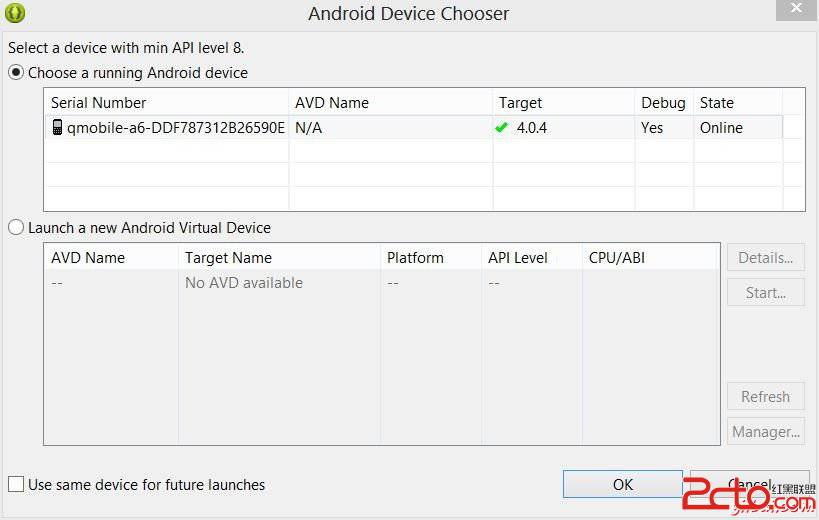
將 Android 手機連上電腦,在 IDE 中開啟 Activity 檔並點擊執行鈕  ,會先跳出視窗讓你選擇執行位置:
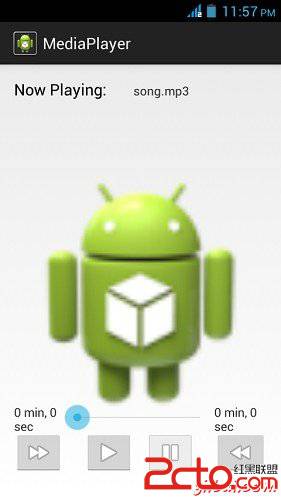
選好裝置後,手機上會出現播放器畫面:
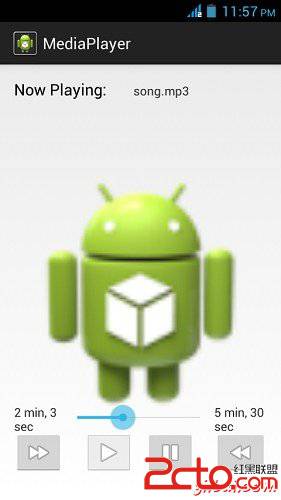
一開始暫停鈕不可用。按下播放鈕後,兩顆按鈕的可用狀態會互換:
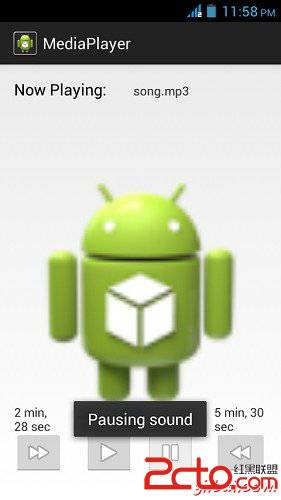
音樂持續播放中,按下暫停鈕會看到暫停提示:
再次按下播放鈕,歌曲會從暫停處續播。此時按快轉或倒轉可前後跳 5 秒;若已達歌曲結尾,就會跳出無法繼續快轉的提示:
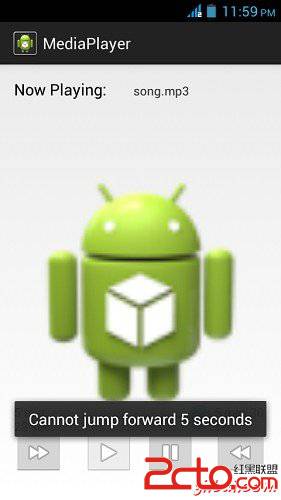
即使切去處理其他事情,音樂仍會在背景繼續播放;要徹底停止,得把這個 App 從背景關閉。從資源管理的角度,正式專案應在 Activity 銷毀時呼叫 release(),並考慮用前景服務(Foreground Service)來維持背景播放,這也是 Android 8.0 以後的強制要求。
 Android 登入實作:帳號密碼驗證與三次錯誤鎖定
登入畫面負責向使用者索取帳號與密碼以驗證身分,是許多應用(如 Facebook、微博)的必備環節。本章說明如何建立登入介面,並處理安全性與錯誤嘗試次數的限制。 首先在版
 深入淺析 Android Fragment(上篇):從誕生到動態操作
曾有一段時間,好像聊什麼都能扯到 Fragment,做什麼都要問一句「Fragment 能不能實現」——現在回想起來確實有點誇張,但它會紅,背後是有明確理由的。 Fra
 Android MediaPlayer 完整指南:從 create() 到快轉快退與資源釋放
要在 App 裡播放音樂,Android 給的第一個答案就是 MediaPlayer。它位於系統媒體播放服務之上,把容器格式解析、音訊解碼、輸出路由這些麻煩事都封裝起來,
 Android 開發技巧:打造專屬風格的自定義菜單
Android SDK 本身提供了一套建立菜單的預設機制,這種方式做出來的菜單功能上雖然完整,但外觀實在有點「土」。當一個畫面絢麗的應用配上一個老氣的菜單,整體質感就會大