

編輯:Android 開發實例
行動 App 的資料大多來自遠端伺服器,而 JSON 是目前最主流的傳輸格式。它的名稱源自 JavaScript Object Notation,但格式本身與語言無關,任何平台都能讀寫。相比 XML,JSON 少了大量標籤冗餘,解析起來更快、檔案更小,因此成為 XML 之外最常被採用的替代方案。
Android 內建的 JSON 支援包含四個類別:JSONArray、JSONObject、JSONStringer 與 JSONTokenizer。解析回應資料時,前兩者是主力。
實務上的第一步,是先把回傳的樣本資料攤開來看,確認你要的欄位藏在哪一層。以下這段天氣資料中,我們鎖定的是溫度:
{ "sys": { "country":"GB", "sunrise":1381107633, "sunset":1381149604 }, "weather":[ { "id":711, "main":"Smoke", "description":"smoke", "icon":"50n" } ], "main": { "temp":304.15, "pressure":1009, } }
| 項目 | 說明 |
|---|---|
Array [ | 一對中括號代表陣列,用來裝多筆同類資料。 |
Object { | 一對大括號代表物件,由多組鍵值構成。 |
| Key | 物件中的鍵,一律是字串形式。鍵與值配對後組成物件。 |
| Value | 鍵對應的值,可能是字串、整數、浮點數、布林,甚至是另一層物件。 |
第一個動作是建立物件。把整段 JSON 文字當作建構子參數傳入:
String in; JSONObject reader = new JSONObject(in);
第二個動作是逐層取值。由於 JSON 是巢狀結構,每一層都有自己的鍵值組合,因此需要對應的方法往下鑽。取子物件用 getJSONObject(),取字串用 getString():
JSONObject sys = reader.getJSONObject("sys"); country = sys.getString("country"); JSONObject main = reader.getJSONObject("main"); temperature = main.getString("temp");
若你知道欄位的型別,直接用對應的方法會更乾淨,不必自己做型別轉換:
| 方法 | 說明 |
|---|---|
get(String name) | 回傳該鍵的值,型別為 Object。 |
getBoolean(String name) | 回傳布林值。 |
getDouble(String name) | 回傳 double 值。 |
getInt(String name) | 回傳整數值。 |
getLong(String name) | 回傳 long 值。 |
length() | 回傳此物件中鍵值對的數量。 |
names() | 回傳一個陣列,內容為此物件的所有鍵名稱。 |
接下來把上述觀念用在真實情境:建立一個查詢天氣的 App,向天氣 API 索取 JSON、解析後把結果呈現在畫面上。
你可以在實機或模擬器上執行驗證。
| 步驟 | 要做的事 |
|---|---|
| 1 | 用 Android Studio 建立專案,命名為 JSONParser。Target SDK 與 Compile With 請設為最新版本,以便使用較新的 API。 |
| 2 | 修改 src/MainActivity.java,加入主要程式碼。 |
| 3 | 修改 res/layout/activity_main.xml,加入對應元件。 |
| 4 | 修改 res/values/string.xml,加入字串資源。 |
| 5 | 新增 src/HandleJSON.java,專責抓取與解析資料。 |
| 6 | 修改 AndroidManifest.xml,加上網路權限。 |
| 7 | 執行 App,安裝到裝置並驗證。 |
主活動檔 src/com.yiibai.jsonparser/MainActivity.java:
package com.example.jsonparser; import android.os.Bundle; import android.app.Activity; import android.view.Menu; import android.view.View; import android.widget.EditText; public class MainActivity extends Activity { private String url1 = "https://api.openweathermap.org/data/2.5/weather?q="; private EditText location,country,temperature,humidity,pressure; private HandleJSON obj; @Override protected void onCreate(Bundle savedInstanceState) { super.onCreate(savedInstanceState); setContentView(R.layout.activity_main); location = (EditText)findViewById(R.id.editText1); country = (EditText)findViewById(R.id.editText2); temperature = (EditText)findViewById(R.id.editText3); humidity = (EditText)findViewById(R.id.editText4); pressure = (EditText)findViewById(R.id.editText5); } @Override public boolean onCreateOptionsMenu(Menu menu) { // Inflate the menu; this adds items //to the action bar if it is present. getMenuInflater().inflate(R.menu.main, menu); return true; } public void open(View view){ String url = location.getText().toString(); String finalUrl = url1 + url; country.setText(finalUrl); obj = new HandleJSON(finalUrl); obj.fetchJSON(); while(obj.parsingComplete); country.setText(obj.getCountry()); temperature.setText(obj.getTemperature()); humidity.setText(obj.getHumidity()); pressure.setText(obj.getPressure()); } }
負責連線與解析的 src/com.yiibai.jsonparser/HandleJSON.java。程式中開了一條背景執行緒做網路請求,避免阻塞主執行緒:
package com.example.jsonparser; import java.io.IOException; import java.io.InputStream; import java.io.InputStreamReader; import java.io.StringWriter; import java.io.UnsupportedEncodingException; import java.net.HttpURLConnection; import java.net.URL; import java.util.ArrayList; import java.util.List; import java.util.Map; import org.json.JSONObject; import org.xmlpull.v1.XmlPullParser; import org.xmlpull.v1.XmlPullParserFactory; import android.annotation.SuppressLint; public class HandleJSON { private String country = "county"; private String temperature = "temperature"; private String humidity = "humidity"; private String pressure = "pressure"; private String urlString = null; public volatile boolean parsingComplete = true; public HandleJSON(String url){ this.urlString = url; } public String getCountry(){ return country; } public String getTemperature(){ return temperature; } public String getHumidity(){ return humidity; } public String getPressure(){ return pressure; } @SuppressLint("NewApi") public void readAndParseJSON(String in) { try { JSONObject reader = new JSONObject(in); JSONObject sys = reader.getJSONObject("sys"); country = sys.getString("country"); JSONObject main = reader.getJSONObject("main"); temperature = main.getString("temp"); pressure = main.getString("pressure"); humidity = main.getString("humidity"); parsingComplete = false; } catch (Exception e) { // TODO Auto-generated catch block e.printStackTrace(); } } public void fetchJSON(){ Thread thread = new Thread(new Runnable(){ @Override public void run() { try { URL url = new URL(urlString); HttpURLConnection conn = (HttpURLConnection) url.openConnection(); conn.setReadTimeout(10000 /* milliseconds */); conn.setConnectTimeout(15000 /* milliseconds */); conn.setRequestMethod("GET"); conn.setDoInput(true); // Starts the query conn.connect(); InputStream stream = conn.getInputStream(); String data = convertStreamToString(stream); readAndParseJSON(data); stream.close(); } catch (Exception e) { e.printStackTrace(); } } }); thread.start(); } static String convertStreamToString(java.io.InputStream is) { java.util.Scanner s = new java.util.Scanner(is).useDelimiter("A"); return s.hasNext() ? s.next() : ""; } }
版面配置 res/layout/activity_main.xml:
<RelativeLayout xmlns:android="https://schemas.android.com/apk/res/android" xmlns:tools="https://schemas.android.com/tools" android:layout_width="match_parent" android:layout_height="match_parent" android:paddingBottom="@dimen/activity_vertical_margin" android:paddingLeft="@dimen/activity_horizontal_margin" android:paddingRight="@dimen/activity_horizontal_margin" android:paddingTop="@dimen/activity_vertical_margin" tools:context=".MainActivity" > <TextView android:id="@+id/textView1" android:layout_width="wrap_content" android:layout_height="wrap_content" android:layout_alignParentLeft="true" android:layout_alignParentTop="true" android:layout_marginTop="15dp" android:text="@string/location" android:textAppearance="?android:attr/textAppearanceMedium" /> <EditText android:id="@+id/editText1" android:layout_width="wrap_content" android:layout_height="wrap_content" android:layout_alignBottom="@+id/textView1" android:layout_alignParentRight="true" android:ems="10" /> <TextView android:id="@+id/textView2" android:layout_width="wrap_content" android:layout_height="wrap_content" android:layout_alignLeft="@+id/textView1" android:layout_below="@+id/textView1" android:layout_marginTop="68dp" android:text="@string/country" android:textAppearance="?android:attr/textAppearanceSmall" /> <TextView android:id="@+id/textView3" android:layout_width="wrap_content" android:layout_height="wrap_content" android:layout_below="@+id/textView2" android:layout_marginTop="19dp" android:text="@string/temperature" android:textAppearance="?android:attr/textAppearanceSmall" /> <TextView android:id="@+id/textView4" android:layout_width="wrap_content" android:layout_height="wrap_content" android:layout_alignLeft="@+id/textView3" android:layout_below="@+id/textView3" android:layout_marginTop="32dp" android:text="@string/humidity" android:textAppearance="?android:attr/textAppearanceSmall" /> <TextView android:id="@+id/textView5" android:layout_width="wrap_content" android:layout_height="wrap_content" android:layout_alignLeft="@+id/textView4" android:layout_below="@+id/textView4" android:layout_marginTop="21dp" android:text="@string/pressure" android:textAppearance="?android:attr/textAppearanceSmall" /> <EditText android:id="@+id/editText2" android:layout_width="wrap_content" android:layout_height="wrap_content" android:layout_above="@+id/textView3" android:layout_toRightOf="@+id/textView3" android:ems="10" > <requestFocus /> </EditText> <EditText android:id="@+id/editText3" android:layout_width="wrap_content" android:layout_height="wrap_content" android:layout_alignBaseline="@+id/textView3" android:layout_alignBottom="@+id/textView3" android:layout_alignLeft="@+id/editText2" android:ems="10" /> <EditText android:id="@+id/editText4" android:layout_width="wrap_content" android:layout_height="wrap_content" android:layout_above="@+id/textView5" android:layout_alignLeft="@+id/editText1" android:ems="10" /> <EditText android:id="@+id/editText5" android:layout_width="wrap_content" android:layout_height="wrap_content" android:layout_alignBaseline="@+id/textView5" android:layout_alignBottom="@+id/findViewById" android:layout_alignRight="@+id/editText4" android:ems="10" /> <Button android:id="@+id/button1" android:layout_width="wrap_content" android:layout_height="wrap_content" android:layout_alignLeft="@+id/editText2" android:layout_below="@+id/editText1" android:onClick="open" android:text="@string/weather" /> </RelativeLayout>
字串資源 res/values/string.xml:
<?xml version="1.0" encoding="utf-8"?> <resources> <string name="app_name">JSONParser</string> <string name="action_settings">Settings</string> <string name="hello_world">Hello world!</string> <string name="location">Location</string> <string name="country">Country:</string> <string name="temperature">Temperature:</string> <string name="humidity">Humidity:</string> <string name="pressure">Pressure:</string> <string name="weather">Weather</string> </resources>
AndroidManifest.xml 中務必加上 INTERNET 權限,這一步經常被遺漏而導致請求失敗:
<?xml version="1.0" encoding="utf-8"?> <manifest xmlns:android="https://schemas.android.com/apk/res/android" package="com.yiibai.jsonparser" android:versionCode="1" android:versionName="1.0" > <uses-sdk android:minSdkVersion="8" android:targetSdkVersion="17" /> <uses-permission android:name="android.permission.INTERNET"/> <application android:allowBackup="true" android:icon="@drawable/ic_launcher" android:label="@string/app_name" android:theme="@style/AppTheme" > <activity android:name="com.yiibai.jsonparser.MainActivity" android:label="@string/app_name" > <intent-filter> <action android:name="android.intent.action.MAIN" /> <category android:name="android.intent.category.LAUNCHER" /> </intent-filter> </activity> </application> </manifest>
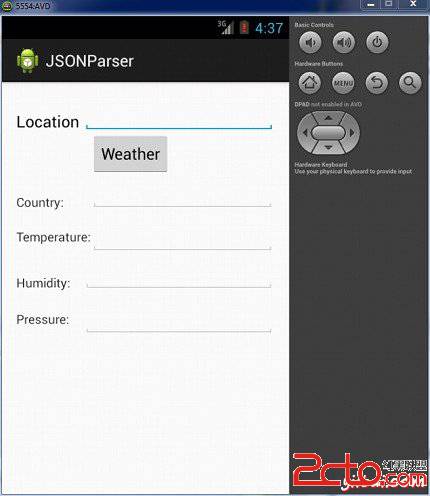
裝到 AVD 並啟動,畫面如下:
在位置欄位輸入任一城市,這裡示範輸入紐約,然後按下 weather 鈕:
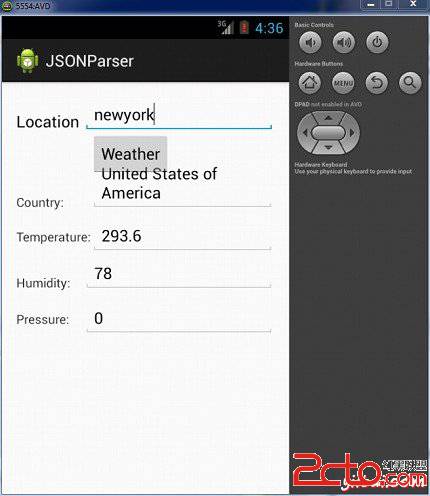
按下按鈕後,App 會向天氣服務提出請求,取回 JSON 並完成解析。若輸入的是紐約,回傳的資料結構與前面看到的樣本類似。
這裡有個實務上常踩到的細節:這個 API 回傳的溫度是開爾文。若要顯示為比較直覺的攝氏溫度,記得先減去 273.15。
 Android 自訂輸入法 IME 開發教程
輸入法編輯器,又稱 IME,是 Android 中讓使用者輸入文字的元件。開發者可自訂軟鍵盤、語音輸入或其他輸入方式,並讓使用者在系統設定中選擇。 基本架構 自訂 IM
 自訂 ProgressBar:用逐幀動畫做出載入中效果
系統內建的 ProgressBar 樣式有限,想要一個有個性的「載入中」動iveness,最簡單的做法就是用動畫——把幾張連續的圖片排成序列,讓它循環播放。這個技巧很早就
 Android 支付寶支付接入實例:從簽約到跑通 Demo
一、前言 移動應用已經是紅海,移動支付更是幾乎成了電商類應用的標配。以前支付模塊不在我負責範圍內,一直覺得這東西門檻很高;最近接了訂單模塊,真正動手之後才發現,實際難度遠
 Android ImageSwitcher:為圖片切換加上轉場動畫
直接讓圖片「啪」地出現在螢幕上,觀感總是略顯生硬。若能在切換的瞬間加上淡入、滑入這類轉場動畫,介面就會流暢許多。Android 為此提供了 ImageSwitcher 元