

編輯:Android 開發實例
一支上架的 Android 應用,可能被義大利的學生、西班牙的通勤族、日本的上班族同時打開。要讓每個人都覺得「這 App 是為我做的」,本地化(Localization)是基本功。文字、數字格式、日期、甚至檔案與圖示,都應該依使用者所在語言環境調整。
好消息是,Android 已經內建了一套以「資源資料夾」為核心的本地化機制。你只要把不同語言的字串放進對應資料夾,系統會依裝置語言自動挑一份來用,完全不需要在程式裡寫 if-else 判斷。
做法是在 res 底下新增一個資料夾,命名規則是 values- 加上語言代碼。例如要支援義大利文,就建立 res/values-it;西班牙文是 values-es;法文則是 values-fr。

資料夾建好之後,把預設的 strings.xml 複製一份進去,然後只翻譯裡面的值,鍵名稱保持不變——這一點很關鍵,因為程式碼是透過鍵名稱取值,改了鍵就會找不到對應字串。
 <?xml version="1.0" encoding="utf-8"?>
<resources>
    <string name="hello_world">Ciao mondo!</string>
</resources>
 <?xml version="1.0" encoding="utf-8"?>
<resources>
    <string name="hello_world">Hola Mundo!</string>
</resources>
 <?xml version="1.0" encoding="utf-8"?>
<resources>
    <string name="hello_world">Bonjour le monde !</string>
</resources>
其他常見語言的代碼與對應資料夾如下,需要時直接照表建立即可:
| 語言 | 代碼 | 資料夾名稱 |
|---|---|---|
| Afrikaans | af | values-af |
| Arabic | ar | values-ar |
| Bengali | bn | values-bn |
| Czech | cs | values-cs |
| Chinese | zh | values-zh |
| German | de | values-de |
| French | fr | values-fr |
| Japanese | ja | values-ja |
補充一個實務觀念:資料夾名稱還可以加上地區限定符,寫成 values-zh-rTW(繁體中文)或 values-pt-rBR(巴西葡萄牙語)。當同一語言在不同地區用詞差異明顯時,這種寫法比單一語言碼精準得多。
這個範例建立一個只顯示一行文字的小應用,並提供英文(預設)與義大利文兩份字串資源。切換裝置語言後重開 App,文字就會跟著改變。可於實機或模擬器測試。
| 步驟 | 做法 |
|---|---|
| 1 | 用 Android Studio 建立專案,命名為 Locals,Target SDK 設為較新版本。 |
| 2 | 修改 src/MainActivity.java(此範例幾乎不需動邏輯)。 |
| 3 | 在 res/layout/activity_main.xml 放入一個 TextView。 |
| 4 | 在 res/values/string.xml 放入預設(英文)字串。 |
| 5 | 新增 res/values-it/string.xml 並放入義大利文翻譯。 |
| 6 | 執行 App,於裝置上驗證。 |
主活動 src/com.yiibai.locals/MainActivity.java:
 package com.example.locals;
import android.os.Bundle;
import android.app.Activity;
import android.view.Menu;
public class MainActivity extends Activity {
    @Override protected void onCreate(Bundle savedInstanceState) {
        super.onCreate(savedInstanceState);
        setContentView(R.layout.activity_main);
    }
    @Override public boolean onCreateOptionsMenu(Menu menu) {
        getMenuInflater().inflate(R.menu.main, menu);
        return true;
    }
}
版面配置 res/layout/activity_main.xml:
 <RelativeLayout xmlns:android="https://schemas.android.com/apk/res/android"
    xmlns:tools="https://schemas.android.com/tools"
    android:layout_width="match_parent" android:layout_height="match_parent"
    android:paddingBottom="@dimen/activity_vertical_margin"
    android:paddingLeft="@dimen/activity_horizontal_margin"
    android:paddingRight="@dimen/activity_horizontal_margin"
    android:paddingTop="@dimen/activity_vertical_margin"
    tools:context=".MainActivity" >
    <TextView android:id="@+id/textView1" android:layout_width="wrap_content"
        android:layout_height="wrap_content" android:layout_alignParentTop="true"
        android:layout_centerHorizontal="true" android:layout_marginTop="174dp"
        android:text="@string/hello_world"
        android:textAppearance="?android:attr/textAppearanceLarge" />
</RelativeLayout>
預設字串 res/values/string.xml:
 <?xml version="1.0" encoding="utf-8"?>
<resources>
    <string name="app_name">Locals</string>
    <string name="hello_world">Hello world!</string>
</resources>
義大利文字串 res/values-it/string.xml:
 <?xml version="1.0" encoding="utf-8"?>
<resources>
    <string name="app_name">Locals</string>
    <string name="hello_world">Ciao mondo!</string>
</resources>
最后是 AndroidManifest.xml:
 <?xml version="1.0" encoding="utf-8"?>
<manifest xmlns:android="https://schemas.android.com/apk/res/android"
    package="com.yiibai.locals" android:versionCode="1" android:versionName="1.0" >
    <application android:allowBackup="true" android:icon="@drawable/ic_launcher"
        android:label="@string/app_name" android:theme="@style/AppTheme" >
        <activity android:name="com.yiibai.locals.MainActivity"
            android:label="@string/app_name" >
            <intent-filter>
                <action android:name="android.intent.action.MAIN" />
                <category android:name="android.intent.category.LAUNCHER" />
            </intent-filter>
        </activity>
    </application>
</manifest>
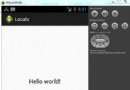
把 App 裝到 AVD 並啟動,畫面會先顯示預設的英文:
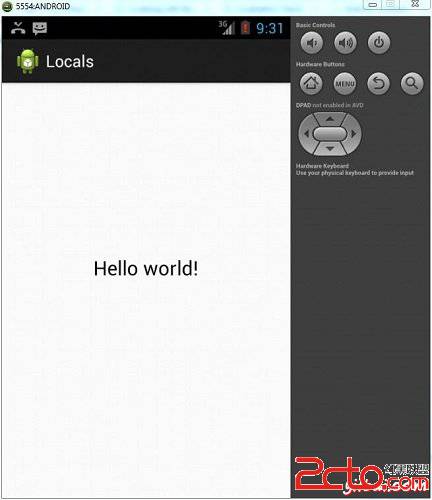
接著到「設定 → 系統 → 語言與輸入法」,把裝置語言改成義大利文。
重新開啟 App,這次同一行文字已經變成義大利文了:
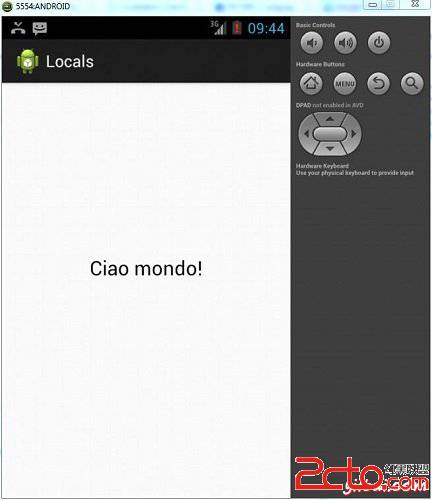
整個過程你沒有改動任何一行 Java 程式碼——這正是資源導向架構的價值所在。日後要增加語言,只要多開一個 values-xx 資料夾,不必重新編譯邏輯。
 Android 二級列表實作:橫向並排的雙 ListView 效果
這次要實作的是大眾點評風格的橫向二級列表:左邊一欄是分類,右邊一欄對應顯示該分類下的子項目,點左邊會換掉右邊的內容。 這種並排式二級列表在手機 App 上還不常見,但在
 Android 載入動畫入門:讓 Spinner 依需求出現
使用者按下按鈕後,如果畫面兩三秒都沒變化,心裡一定會犯嘀咕。Android 用進度條回應這種等待情境,而進度條大致分成兩種:一種看得到百分比的橫向進度列,另一種是不確定長
 Activity 與 Service 互動並播放音樂的實作程式碼
本文示範如何讓 Activity 與 Service 互相溝通,並在後台播放音樂。為了方便說明,範例中的歌曲路徑是直接寫死的,讀者可以依自己的需求靈活調整。 MServ
 Android 多語言應用:本地化字串與 values-it 資料夾怎麼用
一支上架的 App,很可能同時被台灣、日本、德國的使用者打開。要讓每個人都看得懂,App 就得依裝置的語言環境,換上對應的文字、數字與格式。這件事在 Android 裡稱