

編輯:Android 開發實例
Android 應用往往會在多個國家、各種裝置上運行,使用者來自不同語言背景。要讓應用更具親和力,就必須針對當前語言環境妥善處理文字、數字、檔案等內容,這便是本地化的目標。
本章將說明如何依據不同地區對應用進行本地化,重點在於字串資源的定位與翻譯,其他資源也能用相同思路處理。
要讓應用中的字串支援多語,需要在 res 目錄下建立一個名為 values-local 的資料夾,其中 local 要替換成實際的區域代碼。
以義大利為例,就在 res 下建立 values-it 資料夾,如下圖所示:

資料夾建立好之後,把預設資料夾裡的 strings.xml 複製過去,再修改其中內容。舉例來說,我們把 hello world 這個字串換成了義大利文。
<?xml version="1.0" encoding="utf-8"?> <resources> <string name="hello_world">Ciao mondo!</string> </resources>
<?xml version="1.0" encoding="utf-8"?> <resources> <string name="hello_world">Hola Mundo!</string> </resources>
<?xml version="1.0" encoding="utf-8"?> <resources> <string name="hello_world">Bonjour le monde !</string> </resources>
除了這幾種語言,其他常見語言的區域代碼與對應資料夾名稱如下:
以下範例示範如何使用字串本地化,打造一個能依美國與義大利地區顯示不同內容的應用。
你可以選擇在實體裝置或模擬器上執行這個範例。
以下是修改後主活動檔案 src/com.yiibai.locals/MainActivity.java 的內容:
package com.example.locals; import android.os.Bundle; import android.app.Activity; import android.view.Menu; public class MainActivity extends Activity { @Override protected void onCreate(Bundle savedInstanceState) { super.onCreate(savedInstanceState); setContentView(R.layout.activity_main); } @Override public boolean onCreateOptionsMenu(Menu menu) { // Inflate the menu; this adds items to the action bar if it is present. getMenuInflater().inflate(R.menu.main, menu); return true; } } 以下是修改後 res/layout/activity_main.xml 的內容:
<RelativeLayout xmlns:android="https://schemas.android.com/apk/res/android" xmlns:tools="https://schemas.android.com/tools" android:layout_width="match_parent" android:layout_height="match_parent" android:paddingBottom="@dimen/activity_vertical_margin" android:paddingLeft="@dimen/activity_horizontal_margin" android:paddingRight="@dimen/activity_horizontal_margin" android:paddingTop="@dimen/activity_vertical_margin" tools:context=".MainActivity" > <TextView android:id="@+id/text1" android:layout_width="wrap_content" android:layout_height="wrap_content" android:layout_alignParentTop="true" android:layout_centerHorizontal="true" android:layout_marginTop="174dp" android:text="@string/hello_world" android:textAppearance="?android:attr/textAppearanceLarge" /> </RelativeLayout>
以下是 res/values/string.xml 的內容:
<?xml version="1.0" encoding="utf-8"?> <resources> <string name="app_name">Locals</string> <string name="action_settings">Settings</string> <string name="hello_world">Hello world!</string> </resources>
以下是 res/values-it/string.xml 的內容:
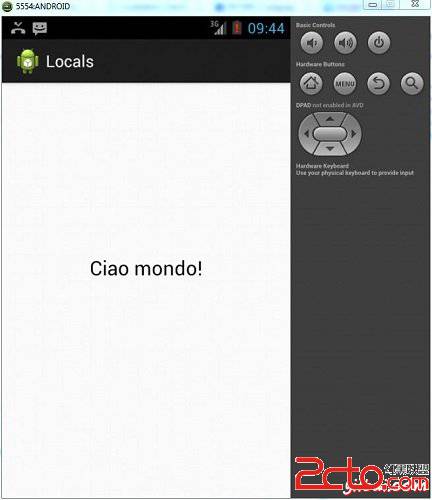
<?xml version="1.0" encoding="utf-8"?> <resources> <string name="app_name">Locals</string> <string name="action_settings">Settings</string> <string name="hello_world">Ciao mondo!</string> </resources>
以下是 AndroidManifest.xml 的內容:
<?xml version="1.0" encoding="utf-8"?> <manifest xmlns:android="https://schemas.android.com/apk/res/android" package="com.yiibai.locals" android:versionCode="1" android:versionName="1.0" > <uses-sdk android:minSdkVersion="8" android:targetSdkVersion="17" /> <application android:allowBackup="true" android:icon="@drawable/ic_launcher" android:label="@string/app_name" android:theme="@style/AppTheme" > <activity android:name="com.yiibai.locals.MainActivity" android:label="@string/app_name" > <intent-filter> <action android:name="android.intent.action.MAIN" /> <category android:name="android.intent.category.LAUNCHER" /> </intent-filter> </activity> </application> </manifest>
接下來執行這個完成本地化的應用。先安裝並啟動 AVD,若一切設定正確且程式沒有問題,就會看到如下的模擬器視窗:
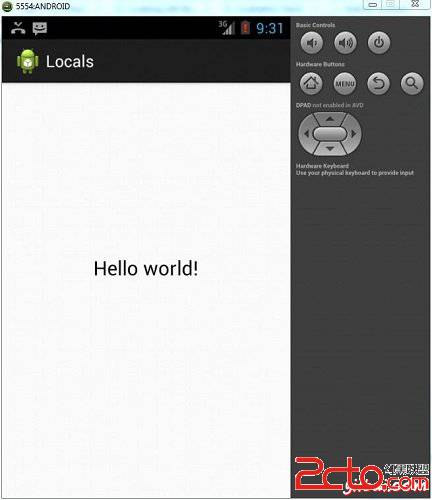
現在透過「設定/系統/語言」把裝置語言切換為義大利語。
再次開啟應用,你會看到 Hello World 已變成義大利文,如下圖所示:
 Android 數字跳動動畫:做出支付寶餘額滾動閃動的效果
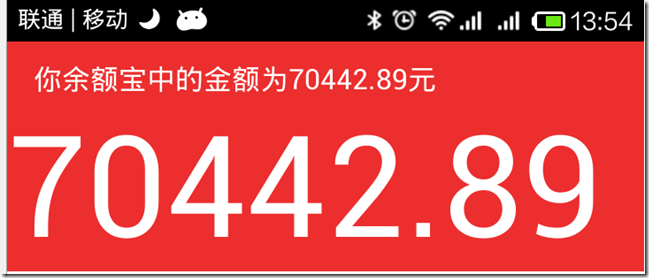
第一次看到支付寶首頁那組餘額數字「呼嚕嚕」從零竄到實際金額的動畫,大概都會有點被煞到。那個效果看起來很花俏,但拆開來看其實非常朴素——本質上就是一個定時器,每隔一小段時間
 Android手機衛士(十九):建立首次密碼設定畫面
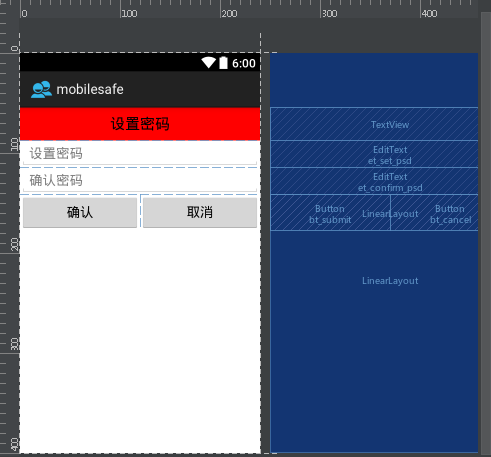
本篇要完成的是手機衛士中「第一次設定密碼」的流程。當使用者首次進入手機防盜功能時,必須先建立一組密碼,後續才能進行驗證與保護。畫面配置這個頁面可以採用垂直 LinearL
 Android 載入 Spinner:為未知的等待時間做一個轉不停的提示
使用者最討厭的不是慢,而是「不知道還要慢多久」。當一個操作沒有明確的完成百分比時,我們需要的不只是一個進度數字,而是一個持續轉動、告訴使用者「系統還活著」的提示。Andr
 Genymotion:高效 Android 模擬器介紹
Genymotion 是一款以速度與真機模擬能力著稱的 Android 模擬器,適合日常開發、測試與展示。它相較傳統模擬器啟動更快,操作也更接近真實設備。主要特色Geny