

編輯:Android 開發實例
一支上架 Google Play 的 App,潛在使用者分布在全球上百個地區,語系、數字格式、日期寫法各不相同。若把「Hello world!」這類文字硬寫在程式碼或版面檔裡,韓國使用者打開時也只會看到英文。本地化(Localization)要解決的正是這件事:讓 App 依裝置的語言環境自動換上合適的內容。
Android 的資源系統會在執行階段比對裝置設定與資源資料夾名稱,挑出最相符的一組。對字串而言,做法是在 res 底下建立以 values- 為前綴、後接語言碼的資料夾:
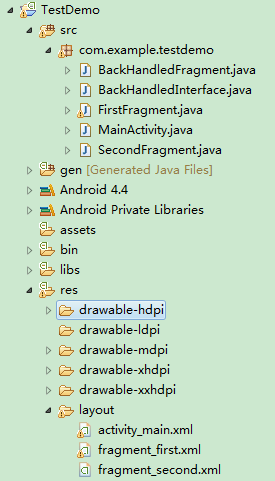
res/values/:預設值,也是所有語系的後盾。res/values-it/:義大利語。res/values-zh-rTW/:繁體中文(台灣)。地區需用 -r 連接。以義大利語為例,專案結構會長得像這樣:

建立好資料夾後,把預設的 strings.xml 複製一份進去,只改內容、不改鍵名稱——鍵名稱必須完全一致,否則執行時會找不到資源而拋出 Resources$NotFoundException。
<?xml version="1.0" encoding="utf-8"?>
<resources>
    <string name="hello_world">Ciao mondo!</string>
</resources>
<?xml version="1.0" encoding="utf-8"?>
<resources>
    <string name="hello_world">Hola Mundo!</string>
</resources>
<?xml version="1.0" encoding="utf-8"?>
<resources>
    <string name="hello_world">Bonjour le monde !</string>
</resources>
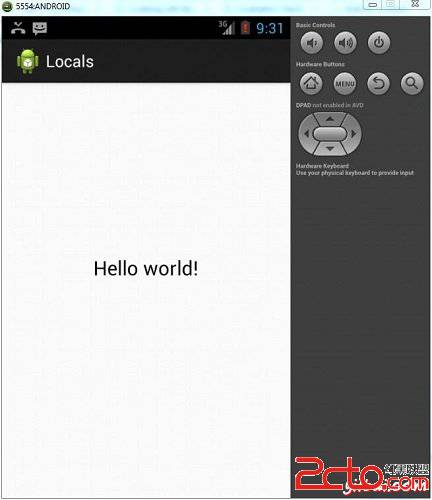
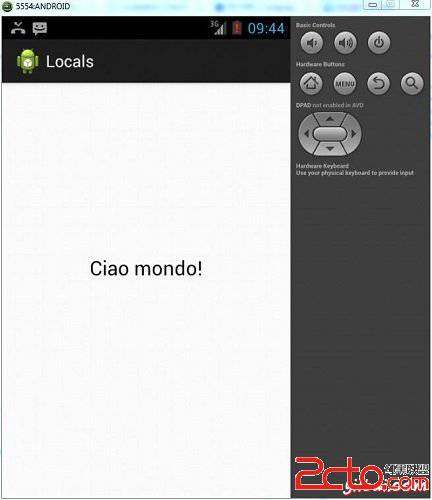
values-afvalues-ar(屬 RTL 由右至左語言,需留意版面鏡像)values-bnvalues-csvalues-zhvalues-devalues-frvalues-javalues-kovalues-ptvalues-ru這個範例只有一行文字,但同時準備了英文與義大利文兩套資源,用來示範 Android 的自動挑選行為。
src/MainActivity.java(此範例邏輯極簡,幾乎不需更動)。res/layout/activity_main.xml。res/values/strings.xml 放入英文預設值。res/values-it/strings.xml 放入義大利文譯本。主程式 src/com.example.locals/MainActivity.java:
package com.example.locals;

import android.os.Bundle;
import android.app.Activity;
import android.view.Menu;

public class MainActivity extends Activity {
    @Override
    protected void onCreate(Bundle savedInstanceState) {
        super.onCreate(savedInstanceState);
        setContentView(R.layout.activity_main);
    }

    @Override
    public boolean onCreateOptionsMenu(Menu menu) {
        getMenuInflater().inflate(R.menu.main, menu);
        return true;
    }
}
版面配置 res/layout/activity_main.xml:
<RelativeLayout xmlns:android="https://schemas.android.com/apk/res/android"
    xmlns:tools="https://schemas.android.com/tools"
    android:layout_width="match_parent"
    android:layout_height="match_parent"
    android:paddingBottom="@dimen/activity_vertical_margin"
    android:paddingLeft="@dimen/activity_horizontal_margin"
    android:paddingRight="@dimen/activity_horizontal_margin"
    android:paddingTop="@dimen/activity_vertical_margin"
    tools:context=".MainActivity" >

    <TextView android:id="@+id/textView1"
        android:layout_width="wrap_content"
        android:layout_height="wrap_content"
        android:layout_alignParentTop="true"
        android:layout_centerHorizontal="true"
        android:layout_marginTop="174dp"
        android:text="@string/hello_world"
        android:textAppearance="?android:attr/textAppearanceLarge" />
</RelativeLayout>
預設字串 res/values/strings.xml:
<?xml version="1.0" encoding="utf-8"?>
<resources>
    <string name="app_name">Locals</string>
    <string name="action_settings">Settings</string>
    <string name="hello_world">Hello world!</string>
</resources>
義大利文 res/values-it/strings.xml:
<?xml version="1.0" encoding="utf-8"?>
<resources>
    <string name="app_name">Locals</string>
    <string name="action_settings">Settings</string>
    <string name="hello_world">Ciao mondo!</string>
</resources>
AndroidManifest.xml:
<?xml version="1.0" encoding="utf-8"?>
<manifest xmlns:android="https://schemas.android.com/apk/res/android"
    package="com.yiibai.locals"
    android:versionCode="1"
    android:versionName="1.0" >

    <uses-sdk android:minSdkVersion="8" android:targetSdkVersion="17" />

    <application android:allowBackup="true"
        android:icon="@drawable/ic_launcher"
        android:label="@string/app_name"
        android:theme="@style/AppTheme" >
        <activity android:name="com.yiibai.locals.MainActivity"
            android:label="@string/app_name" >
            <intent-filter>
                <action android:name="android.intent.action.MAIN" />
                <category android:name="android.intent.category.LAUNCHER" />
            </intent-filter>
        </activity>
    </application>
</manifest>
安裝啟動後,在系統預設的英文環境下畫面如下:
接著從「設定 → 系統 → 語言」把裝置語言改成義大利文。
重新開啟 App,同一行文字已經換成 Ciao mondo!,而程式碼一個字都沒改:
字串只是入門。真正完整的本地化還要處理:日期與時間格式(用 DateFormat 而非手寫格式字串)、數字與貨幣(用 NumberFormat)、排序規則、量測單位,以及支援雙向文字時的版面鏡像(在 AndroidManifest.xml 加上 android:supportsRtl="true")。若需要在程式碼中動態指定語環境,可使用 Locale 搭配 Configuration 重建 Context。
 Android 自訂圓角 ListView:讓列表四角落下圓弧的完整做法
系統內建的 ListView 是矩形,點擊回饋也是整齊的方塊。若希望列表呈現「上圓角、下圓角」的卡片造型,需要自訂一個 ListView 子類,依點擊位置切換不同的 se
 Android MediaPlayer 完整指南:從 create() 到快轉快退與資源釋放
要在 App 裡播放音樂,Android 給的第一個答案就是 MediaPlayer。它位於系統媒體播放服務之上,把容器格式解析、音訊解碼、輸出路由這些麻煩事都封裝起來,
 Android Fragment 多級跳轉與逐級返回的完整實現方案
Fragment 的返回鍵管理是個經典難題:頁面一層層往下跳,按返回要一級級退回去,中間某一層可能還想攔截返回事件做別的事(比如先關菜單而不是退出)。本文給出一套接口 +
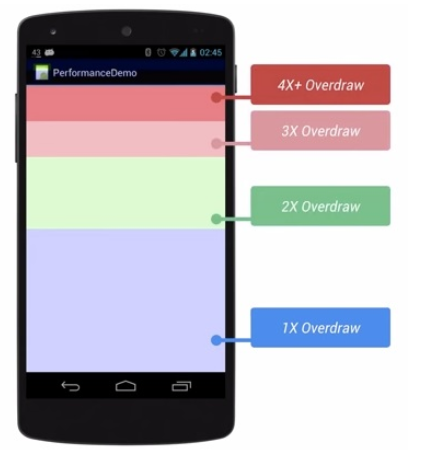 Android 進階性能優化全解析:視圖、記憶體與電量
性能優化是區分初學者與進階開發者的重要分水嶺。本文從視圖、記憶體、電量三大維度出發,梳理 Android 開發中最值得關注的性能問題與應對策略。 一、視圖性能:告別 Ov