

編輯:Android 開發實例
SDK 對 Bundle 的描述是:A mapping from String values to various Parcelable types——一個從字串鍵值對應到各種 Parcelable 型別的映射表。它的價值在於幫你把資料打包塞進 Intent,讓跨 Activity 傳值變得乾淨俐落。
protected void onListItemClick(ListView l, View v, int position, long id) {
    super.onListItemClick(l, v, position, id);

    // 取得被點選項的 HashMap
    HashMap<String, String> map =
        (HashMap<String, String>) lv.getItemAtPosition(position);
    String type = map.get("Type");

    Intent i = new Intent(this, TitleActivity.class);
    Bundle mBundle = new Bundle();
    mBundle.putString("type", type);
    i.putExtras(mBundle);
    startActivity(i);
}
整段程式碼其實只有三步:
bundle = getIntent().getExtras();
if (bundle != null) {
    Type = bundle.getString("type");
    if (Type != null) {
        // 依型別從資料庫讀出對應內容
        cur = myDBadapter.getTitle(new String[] { Type });
    }
}
這裡有兩個重點:
這就是 Bundle 最經典的用法:把資料包裹起來放進 Intent,目的就是為了傳輸。
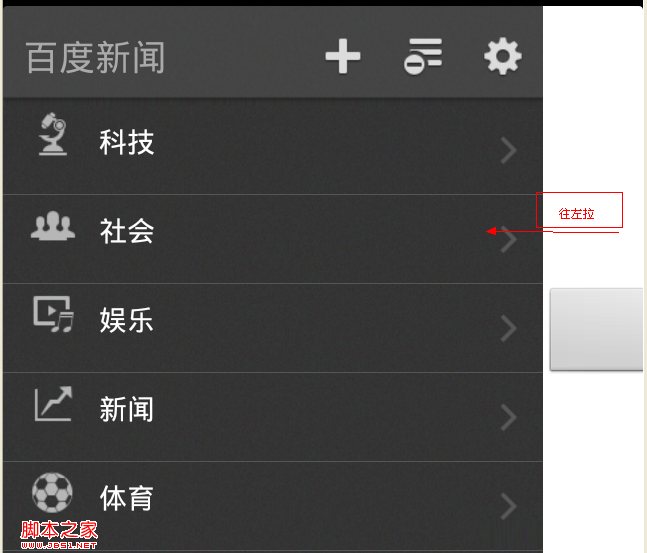 Android 介面設計趨勢:左側隱藏菜單、右側顯示內容
相關文章:android popwindow 實現左側彈出菜單層https://www.jb51.net/article/33533.htm移動 App 設計的 13 大
 Android 四種動畫效果實作:Alpha、Scale、Translate、Rotate
main.xml:宣告四個按鈕 <?xml version=1.0 encoding=utf-8?> <AbsoluteLayout android:
 Android 仿微信朋友圈九宮格圖片查看器實現
打開微信朋友圈,你會發現一個經典的「九宮格」圖片區域,點擊任意一張圖就能進入大圖查看頁,還支援滑動切換與縮放。這樣的交互幾乎是所有社交類應用的標配。本文就帶你從零實現一個
 Android 登入表單的錯誤回饋怎麼設計?Toast、剩餘次數與按鈕狀態
登入流程的成敗,往往不在「帳密對不對」,而在「錯了的時候使用者知不知道錯在哪」。一個好的登入畫面會即時告訴你三件事:帳密錯誤、還剩幾次機會、以及機會用完了。本章就用一個小