

編輯:Android 開發實例
版面配置(layout)資源定義 Activity 的使用者介面,或介面中某個控制項的排列結構。本文對應 Android 3.2 r1。
<?xml version="1.0" encoding="utf-8"?>
<ViewGroup xmlns:android="https://schemas.android.com/apk/res/android"
    android:id="@+[package:]id/resource_name"
    android:layout_height=["dimension" | "fill_parent" | "wrap_content"]
    android:layout_width=["dimension" | "fill_parent" | "wrap_content"]
    [ViewGroup-specific attributes] >

    <View
        android:id="@+[package:]id/resource_name"
        android:layout_height=["dimension" | "fill_parent" | "wrap_content"]
        android:layout_width=["dimension" | "fill_parent" | "wrap_content"]
        [View-specific attributes] >
        <requestFocus/>
    </View>

    <ViewGroup>
        <View/>
    </ViewGroup>

    <include layout="@layout/layout_resource"/>
</ViewGroup>
注意:根元素可以是 ViewGroup、View 或 <merge>,但只能有一個根元素,且必須帶上 xmlns:android 命名空間屬性。
作為 View 的容器,不同的 ViewGroup 種類以不同方式排列子元素,常見的有 LinearLayout、RelativeLayout 與 FrameLayout。
並非所有 ViewGroup 的派生類別都能容納任意嵌套的 View:有些 ViewGroup 是 AdapterView 的實作,只能容納 Adapter 類型的子元素。
主要屬性:
寬高可用度量值、度量資源(dimension resource),或 "fill_parent"、"wrap_content" 兩個關鍵字。基類與各子類別另有許多專屬屬性,完整清單請查閱對應類別的參考文件,例如 LinearLayout XML attributes。
一個獨立的 UI 控制項,通常即所謂的 widget,常見種類有 TextView、Button 與 CheckBox。屬性與 ViewGroup 的 android:id、android:layout_height、android:layout_width 相同,另外各子類別還有自己的專屬屬性,例如 TextView XML 屬性。
把螢幕的初始焦點設在父元素上。任何代表 View 的元素都能包含這個空元素,但同一個檔案中只能出現一次。
把另一個版面檔案包含進來。屬性如下:
凡是根元素支援的屬性,都能寫在 <include> 中並覆寫原值。
重要提醒:要覆寫版面的長寬,必須同時覆寫 android:layout_height 與 android:layout_width,只改其中一邊不會生效。其他版面屬性(例如 weight)仍舊繼承自原本的版面。
另一種動態包含版面的方式是 ViewStub。它是輕量級的 View,在真正被填充之前不佔用版面空間;填充時才把 android:layout 指定的版面動態載入。
這個元素不會顯示在版面的層次結構圖中。當明確知道本版面會被放進某個父 View 時,可以用 <merge> 當根元素來包住子元素;若希望本版面被其他版面用 <include> 引入時不再多產生一層 ViewGroup 容器,這個做法特別有用。
通常寫成 "@+id/name",其中的加號表示這是一個新的資源 ID;若 R.java 中還不存在,aapt 工具會自動新增一個整數常數:
<TextView android:id="@+id/nameTextbox"/>
此後 nameTextbox 就成為這個元素的資源 ID,可在程式中引用:
findViewById(R.id.nameTextbox);
回傳值即為該 TextView 物件。若 ID 資源已經定義過(且尚未被使用),則可以去掉加號,直接把既有 ID 指派給 View 元素。
當然也可以直接使用 Android 支援的度量單位:px、dp、sp、pt、in、mm。
自訂的 View 與 ViewGroup 可以像標準版面元素一樣放進 layout,也能在 XML 元素中定義其支援的屬性。
存放於 res/layout/main_activity.xml:
<?xml version="1.0" encoding="utf-8"?>
<LinearLayout xmlns:android="https://schemas.android.com/apk/res/android"
android:layout_width="fill_parent"
android:layout_height="fill_parent"
android:orientation="vertical" >
<TextView android:id="@+id/text"
android:layout_width="wrap_content"
android:layout_height="wrap_content"
android:text="Hello, I am a TextView" />
<Button android:id="@+id/button"
android:layout_width="wrap_content"
android:layout_height="wrap_content"
android:text="Hello, I am a Button" />
</LinearLayout>
在 Activity 的 onCreate() 中載入版面:
public void onCreate(Bundle savedInstanceState) {
super.onCreate(savedInstanceState);
setContentView(R.layout.main_activity);
}
延伸閱讀:Declaring Layout、View、ViewGroup。
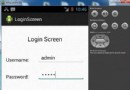 Android 登錄頁面實作:表單驗證與錯誤次數控制
登錄頁面的基本需求 登錄畫面通常包含使用者名稱、密碼與登錄按鈕。為了避免暴力嘗試,還可以加入錯誤次數限制。當次數用完時,停用登錄按鈕或提示使用者稍後再試。 建立輸入欄位
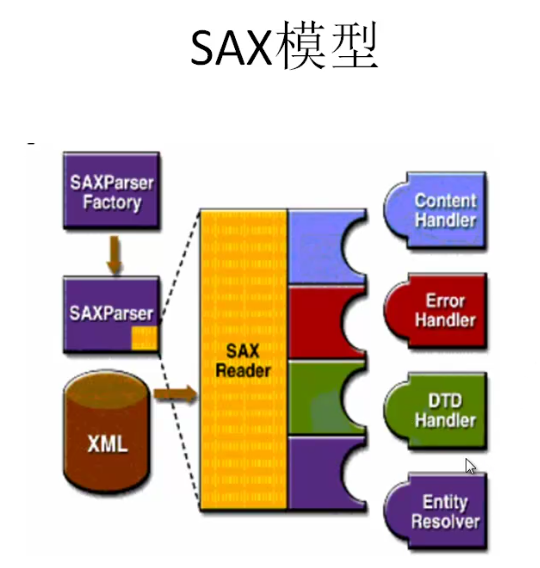 Android XML 解析實戰:SAX 機制與 ContentHandler 的使用
Android 中解析 XML 主要有兩條路:DOM 與 SAX。 DOM 需要先把整個文檔讀入內存並構建樹結構,操作直觀,但文檔過大時內存吃不消。SAX 則是逐行流式解
 Android MediaPlayer:打造可播放、暫停與快轉的音樂播放器
要在 Android 上播放音訊或影片,最直接的方式就是使用 MediaPlayer 類別。它封裝了底層的媒體播放服務,讓你能播放本機檔案、資源目錄中的音檔,甚至網路串流
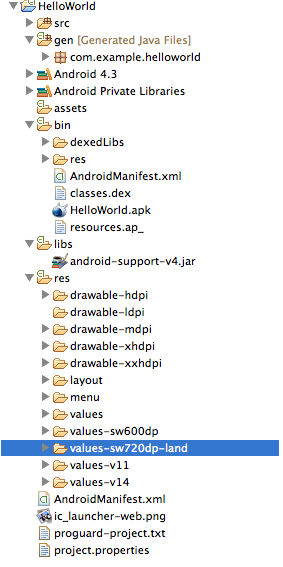 Android 專案目錄結構全解析:每個資料夾放什麼
剛建立 Android 專案時,左側那一長串資料夾往往讓人困惑:哪些是自己寫的、哪些是自動產生的、哪些不能動?搞懂這份結構,之後除錯與重構都會順手很多。 原始碼與產物