

編輯:Android 開發實例
Style(樣式)是一組格式化屬性的集合,可以當成一個單位套用到版面 XML 中的單一元素。例如定義一種樣式來固定文字大小與顏色,然後套用在某個 View 上。
Theme(主題)同樣是一組屬性集合,但作用範圍是整個應用程式的所有 Activity,或指定某一個 Activity。例如定義一個 Theme 來決定 window 外框與 panel 的前景/背景顏色、選單文字大小與顏色,套上之後所有 Activity 的外觀都會跟著改變。
一句話總結:style 作用於 view,theme 作用於 application 或 activity。
每個 style 或 theme 都在 <style> 元素上取一個全域唯一的 name,也可選擇加上 parent 屬性來表明它繼承自哪個樣式。在 <style> 內部則放一個或多個 <item>,每個 item 用 name 指定要覆寫的屬性,內容就是該屬性的值。
<?xml version="1.0" encoding="utf-8"?>
<resources>
    <!-- 定義 style -->
    <style name="myTextStyle">
        <item name="android:textSize">20px</item>
        <item name="android:textColor">#EC9237</item>
    </style>

    <style name="myTextStyle2">
        <item name="android:textSize">14px</item>
        <item name="android:textColor">#FF7F7C</item>
    </style>

    <!-- 定義 theme -->
    <style name="myTheme">
        <item name="android:windowNoTitle">true</item>
        <item name="android:textSize">14px</item>
        <item name="android:textColor">#FFFF7F7C</item>
    </style>
</resources>
從寫法可以看出,定義 style 與 theme 幾乎一模一樣,差別只在套用位置與部分專屬屬性(例如 windowNoTitle 這類只對 Activity/theme 有意義)。
<LinearLayout xmlns:android="https://schemas.android.com/apk/res/android"
    android:id="@+id/linear"
    android:orientation="vertical"
    android:layout_width="fill_parent"
    android:layout_height="fill_parent">

    <TextView
        style="@style/myTextStyle"
        android:layout_width="fill_parent"
        android:layout_height="wrap_content"
        android:gravity="center_vertical|center_horizontal"
        android:text="hello" />

    <TextView
        style="@style/myTextStyle2"
        android:layout_width="fill_parent"
        android:layout_height="wrap_content"
        android:gravity="center_vertical|center_horizontal"
        android:text="www.google.cn"
        android:autoLink="all" />
</LinearLayout>
這份版面同時用了 style 與 theme(theme 在 Activity 或 manifest 中套用)。兩者若同時定義了同一個屬性就會衝突,實測後的結論是 style 的優先級高於 theme——因為 style 是直接綁在該 View 上的,比全域性的 theme 更接近元素本身。
順帶一提 android:autoLink:加上這個屬性後,該 View 的文字會變成藍色帶底線的可點擊連結,點擊時會呼叫系統瀏覽器開啟網址。
1. 程式碼中動態套用,注意必須在 setContentView 之前呼叫:
@Override
public void onCreate(Bundle savedInstanceState) {
    super.onCreate(savedInstanceState);
    setTheme(R.style.myTheme);
    setContentView(R.layout.main);
}
2. 套用到整個應用程式:在 AndroidManifest.xml 的 <application> 標籤加上 android:theme 屬性,例如 <application android:theme="@style/NewTheme">。
3. 只套用到某個 Activity:修改該 <activity> 標籤。Android 本身內建了不少現成主題可直接切換,例如讓 Activity 看起來像對話框:<activity android:theme="@android:style/Theme.Dialog">。
如果喜歡某個內建主題,只想做小幅調整,把它設為 parent 即可:
<style name="NewDialogTheme" parent="@android:style/Theme.Dialog">
    <!-- 覆寫想改的 item -->
</style>
繼承之後,你可以逐一覆寫 Theme.Dialog 中定義的 item 值,然後在 manifest 裡改用 NewDialogTheme 取代 Theme.Dialog,就能得到一個「大致相同、細節不同」的新主題。
官方文件特別提醒,自訂 style 在套用時前面不加 android: 命名空間(寫成 style="@style/xxx"),因為它是應用程式自己的資源,而非平台提供的資源。
Themes can be defined in exactly the same <style> and <item> structure as styles are. To apply a theme you simply associate a style with an entire Activity, such as android:theme="@android:style/[stylename]".
實務上的建議是:把重複出現的屬性組合(例如標題列的樣式、按鈕的間距與字級)抽成 style,让整个 App 的視覺基調(底色、字型、選單外觀、是否顯示標題列)交給 theme。這樣在換機型、換解析度或做深色模式時,只需改一層定義即可。
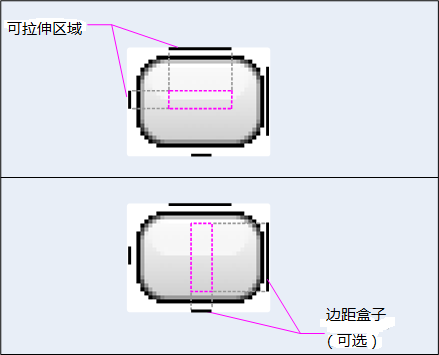 Android 自適應背景圖片的正解:NinePatch(.9.png)完整實戰
做 Android UI,幾乎每個人遲早都會撞上同一堵牆:一張背景圖怎麼才能在各種尺寸下都不變形。這篇文章把 NinePatch 從原理、製作到源碼層面的處理流程完整梳理
 Android MediaPlayer:打造自己的音樂播放器
Android 在音訊與影片播放上提供了相當完整的支援,而其中最常被直接使用的一條路徑,就是 MediaPlayer 這個類別。它被封裝在 android.media 套
 從 trace 檔案追兇:一次死鎖導致 ANR 的完整分析過程
對 Android 開發者而言,ANR(Application Not Responding)幾乎是必經之路。好消息是系統會留下線索:一旦發生 ANR,/data/anr
 Android 多語系支援:建立 values-it 等本地化資源
Android 的資源系統可以依裝置語言自動選擇合適的字串。開發者只需要在 res 目錄中建立對應語言代碼的 values 資料夾即可。 以義大利語為例 若要提供義大利語