

編輯:Android 開發實例
WebView 是 Android 中用來顯示網頁內容的控件,等於在 App 內嵌了一個瀏覽器視圖。以下從概念、常用方法到完整程式碼,一次梳理清楚。
WebView 讓你能在自己的應用中嵌入網頁內容,或直接打造一個簡易瀏覽器。它採用 WebKit 渲染引擎來繪製頁面,並支援前進後退的歷史導航、網頁放大縮小、文字搜尋以及內建的縮放手勢。
<?xml version="1.0" encoding="utf-8"?>
<ScrollView xmlns:android="https://schemas.android.com/apk/res/android"
    android:layout_width="match_parent"
    android:layout_height="wrap_content"
    android:orientation="vertical">

    <LinearLayout
        android:orientation="vertical"
        android:layout_width="match_parent"
        android:layout_height="wrap_content">

        <WebView android:id="@+id/wv1"
            android:layout_height="wrap_content"
            android:layout_width="match_parent" />

        <WebView android:id="@+id/wv2"
            android:layout_height="wrap_content"
            android:layout_width="match_parent" />

        <WebView android:id="@+id/wv3"
            android:layout_height="wrap_content"
            android:layout_width="match_parent" />

    </LinearLayout>

</ScrollView>
public class WebViewDemo extends Activity {

    @Override
    public void onCreate(Bundle icicle) {
        super.onCreate(icicle);
        setContentView(R.layout.webviewpage);

        final String mimeType = "text/html";
        final String encoding = "utf-8";

        WebView wv;

        // 以 baseURL 為基準,可正確解析相對連結
        wv = (WebView) findViewById(R.id.wv1);
        wv.loadDataWithBaseURL("https://www.google.com",
                "<a href='https://www.example.com'>Example 網站</a>",
                mimeType, encoding, "");

        wv = (WebView) findViewById(R.id.wv2);
        wv.loadDataWithBaseURL("https://www.google.com",
                "<a href='www.example.org'>相對路徑連結</a>",
                mimeType, encoding, "");

        // loadData 在部分情境會出現亂碼,實務上建議改用 loadDataWithBaseURL
        wv = (WebView) findViewById(R.id.wv3);
        wv.loadData("<a href='x'>示例連結</a>", mimeType, encoding);
    }
}
使用 WebView 時務必記得在 AndroidManifest.xml 中加入 android.permission.INTERNET 權限,否則頁面無法載入。若要在原生與網頁之間雙向溝通,除了 addJavascriptInterface,也需要搭配 WebChromeClient 與 WebViewClient 處理進度、錯誤與導航行為。另外,基於安全性考量,載入外部內容時應關閉不必要的 JavaScript 與檔案存取權限。
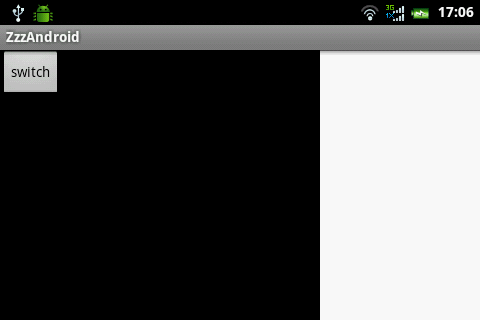 Android 實現局部界面動態切換:固定骨架 + 可替換區域
本文示範一個常見的介面結構:外層版面固定不動,其中某塊區域可以動態替換內容。實作效果如下: 整個畫面由三個 layout 檔組成。 main.xml:外層骨架 &
 Android JSON 解析器完整實作
JSON 是 JavaScript Object Notation 的縮寫,它是一種與語言無關的資料交換格式,被廣泛視為 XML 的理想替代品。本章將說明如何在 Andr
 Android 本地化入門:讓 App 跟著語系切換文字
Android App 常需要在不同語言環境下顯示不同文字。Android 的資源系統會依裝置語言自動選擇對應的 values 目錄,因此只要準備好各語言的 string
 Android ContentProvider 使用指南:共享資料與 URI 設計
ContentProvider 用於對外共享資料,其他應用可透過 ContentResolver 進行增刪改查。註冊時需設定 authorities,外部則以 conte