

編輯:Android 開發實例
CheckBox 是複選的雙狀態控制項,使用者可以自由勾選或取消勾選,彼此之間不互斥。
public class CheckBox extends CompoundButton繼承鏈:Object → View → TextView → Button → CompoundButton → CheckBox
它是一種特殊型態的雙狀態按鈕,共用 CompoundButton 提供的 setChecked()、isChecked() 與 OnCheckedChangeListener。由於每個 CheckBox 各自獨立,同一個畫面上放多個也不會互相影響,很適合「多選一組條件」的情境,例如通知設定、興趣勾選。
<CheckBox android:id="@+id/checkbox_meat"
    android:layout_width="wrap_content"
    android:layout_height="wrap_content"
    android:text="我同意接收通知" />
CheckBox cb = (CheckBox) findViewById(R.id.checkbox_meat);
cb.setOnCheckedChangeListener(new CompoundButton.OnCheckedChangeListener() {
@Override
public void onCheckedChanged(CompoundButton buttonView, boolean isChecked) {
// isChecked 為 true 代表已勾選
}
});需要「可以多選、且能隨時反悔」時用 CheckBox;需要「只能選一個」時改用 RadioButton 並包在 RadioGroup 裡。兩者的外觀與事件模型相近,差別主要在於互斥與否。
資料來源:Android 官方 API 文件整理(Android 2.2 r1)。
 Android 進階:打造手機模擬信號示波器
前面我們簡單介紹過 Android 開發中 AudioRecord 與 AudioTrack 的用法,這次結合 SurfaceView,動手做一個 Android 版的手
 Android 仿網易客戶端頂部導航欄:滑動指示條動畫實作
本文分享一個網易客戶端首頁導航條動畫的實作,重點在於點擊某個分類後,底下的指示條(ImageView)能平滑滑動到該項目下方,同時文字顏色跟著切換。 版面結構 先來
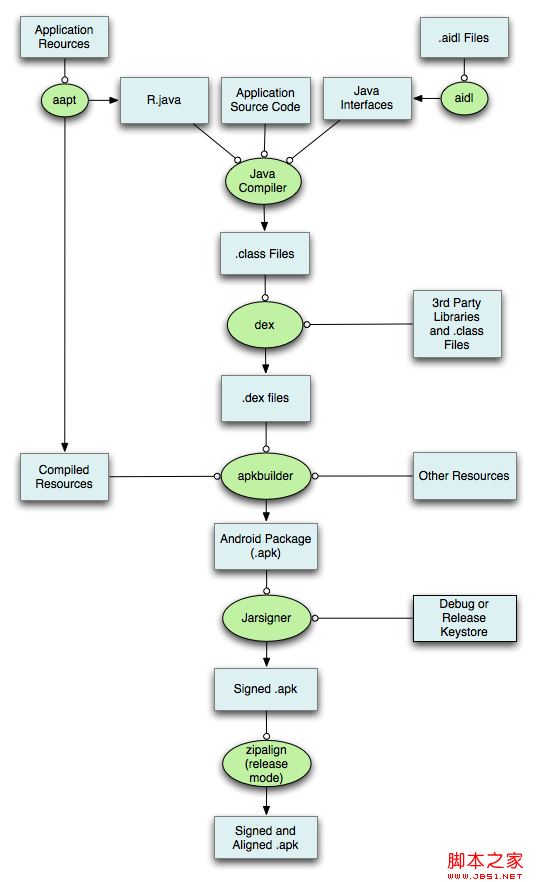 Android 編譯與運行過程深入分析
Android 應用從原始碼到 APK 的過程,包含資源編譯、Java 編譯、dex 轉換、打包與簽名等步驟。理解這些流程有助於排查建置問題。 資源與 R 檔案 aap
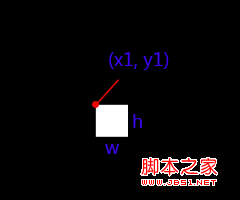 ClipRect 局部繪圖與大圖切割總整理:Android 圖像繪製系列(七)
閒話一句:看多了工程師寫部落格的習慣,我也想練練筆,學到什麼、體會到什麼就寫下來。 這幾天開始接觸遊戲地圖製作,來小結一下 Canvas 的 clipRect() 用法。