

編輯:Android 開發實例
在 ListView 的列表項裡塞入可點擊的子控制項(Button、CheckBox 這類),是新手最容易踩到的坑:一旦 row 裡出現了 Button,整行的 onItemClick 就再也觸發不了。原因其實很單純——Button 預設是 focusable 的,會把焦點與觸摸事件整包吃掉,事件自然冒不到 ListView 這層。
只要在这些具有点击能力的子控制项上明确加上 android:focusable="false",事件传递就会恢复正常。下面这份布局同时做到了两件事:点击非 CheckBox、非 Button 的空白区域时会触发 onItemClick;点击 Button 本身时则由它自己的 onClick 接手。
<?xml version="1.0" encoding="utf-8"?>
<LinearLayout xmlns:android="https://schemas.android.com/apk/res/android"
    android:orientation="horizontal"
    android:layout_height="fill_parent"
    android:id="@+id/LinearLayoutGameListItem"
    android:layout_width="fill_parent"
    android:gravity="center_vertical"
    android:layout_marginLeft="@dimen/mygamecenter_common_margin"
    android:layout_marginRight="@dimen/mygamecenter_common_margin">

    <CheckBox android:id="@+id/CheckBoxGameListItem"
        android:focusable="false"
        android:layout_width="wrap_content"
        android:layout_height="wrap_content"></CheckBox>

    <Button android:text="@string/top" android:id="@+id/ButtonTop"
        android:textColor="#FFFFFF"
        android:focusable="false"
        android:layout_width="wrap_content"
        android:layout_height="@dimen/game_list_item_button_height"
        android:layout_marginRight="@dimen/game_list_item_button_margin_right"
        android:paddingLeft="@dimen/game_list_item_button_padding_left"
        android:paddingRight="@dimen/game_list_item_button_padding_right"
        android:background="@drawable/button_cool_small_selector"></Button>
</LinearLayout>
focusable,有些情境還要一併把 android:focusableInTouchMode 設為 false,或改用 android:descendantFocusability="blocksDescendants" 從父容器層面阻斷子控制項搶焦點。getView() 中直接呼叫 button.setFocusable(false),避免每個 layout 都重複宣告。OnItemClickListener,按鈕動作則在 getView() 裡綁定 OnClickListener,兩者並不衝突。這個設定看起來只是少少一行屬性,卻是 ListView 互動設計的分水嶺。網路上仍有不少人卡在同一步,因此特別整理出來分享。
 Android 正確匯入第三方 jar 包方法
在 Android 專案匯入第三方 jar 時,若出現找不到類別的錯誤,常與 ADT 版本及 jar 存放位置有關。 ADT 17 前後差異 ADT 17 之前,通常需
 Android 應用本地化指南:讓 App 依語言環境顯示正確文字
Android 應用常會在不同語言環境中使用。若希望介面文字能依使用者地區自動切換,可利用資源系統建立多語系字串檔。 建立語言資源資料夾 在 res 目錄下建立 valu
 Android 登入範例:安全提示、錯誤處理與按鈕停用
登入功能通常包含使用者名稱、密碼與登入按鈕。Android 中可用 EditText 建立輸入欄位,並將密碼欄位的 inputType 設為 textPassword。
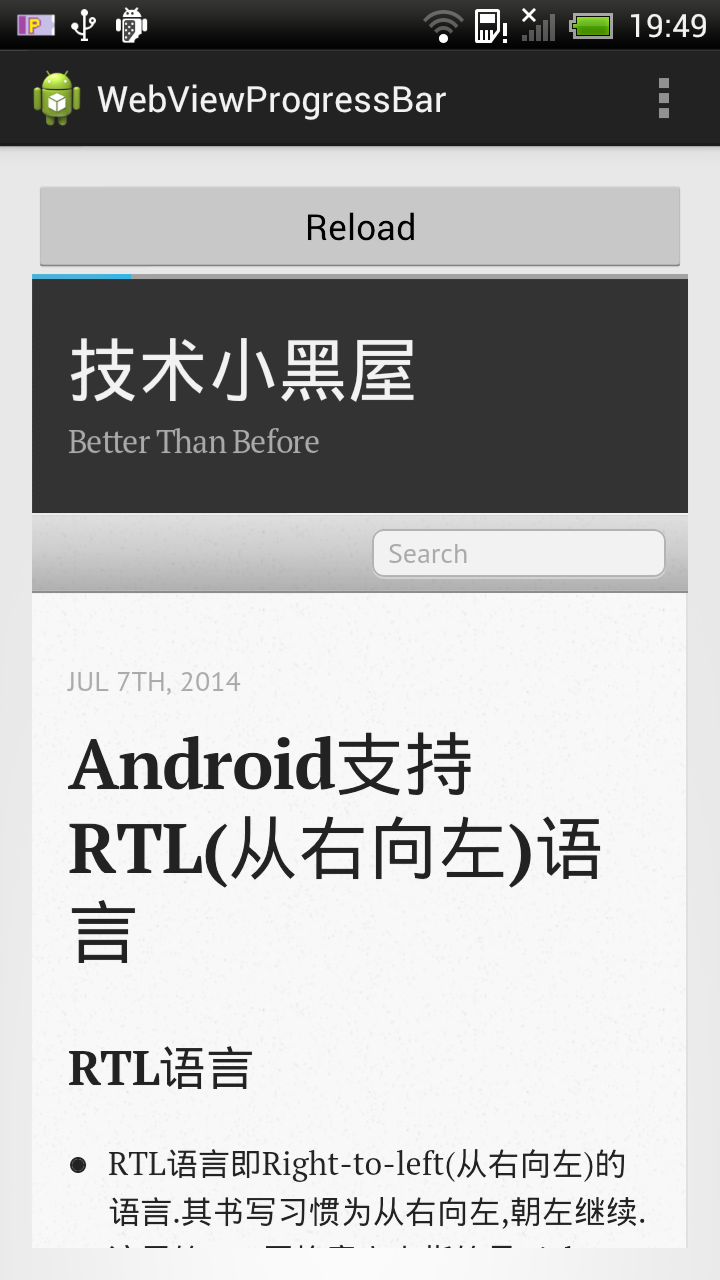 Android 為 WebView 加上頂部進度條的實作
寫這篇純粹做備忘,示範一個在 WebView 上方顯示載入進度條的簡易寫法。 效果如下: 版面配置 由上到下依序是:重新載入按鈕、進度條、WebView。用 Rela