

編輯:Android 開發實例
先前介紹過可多選的 CheckBox,這次要說的是它的相對概念:只能單選的 RadioButton。單選鈕通常不單獨使用,而必須與分組元件 RadioGroup 搭配——RadioGroup 負責讓同一組內的選項互斥,選了 A 就自動取消 B。
<RadioGroup android:id="@+id/fengflyGroup"
    android:layout_width="fill_parent" android:layout_height="fill_parent"
    android:checkedButton="@+id/fengfly3" android:orientation="horizontal"
    android:gravity="center_vertical|center_horizontal">
    <RadioButton android:text="rad1" android:id="@+id/fengfly1"
        android:layout_width="wrap_content" android:layout_height="wrap_content"></RadioButton>
    <RadioButton android:text="rad2" android:id="@+id/fengfly2"
        android:layout_width="wrap_content" android:layout_height="wrap_content"></RadioButton>
    <RadioButton android:text="rad3" android:id="@+id/fengfly3"
        android:layout_width="wrap_content" android:layout_height="wrap_content"></RadioButton>
</RadioGroup>
android:checkedButton 用來指定預設被勾選的那一項。
這裡與 CheckBox 最大的不同——單選鈕只要對父層的 RadioGroup 掛監聽即可,不必逐一處理:
RadioGroup group = (RadioGroup) this.findViewById(R.id.fengflyGroup);
// 響應單選鈕組內選中項變化的時間
group.setOnCheckedChangeListener(new RadioGroup.OnCheckedChangeListener() {
    @Override
    public void onCheckedChanged(RadioGroup group, int checkedId) {
        // doing actions
    }
});
回呼中的 checkedId 就是被選中項的資源 id,若全部取消則為 -1,據此即可決定後續行為。
要把選項排版成網格狀時,RadioGroup 不支援 wrap 排列,實務上會改用多個橫向 LinearLayout 巢狀堆疊。另外若只需要「二選一」的開關語意,Switch 或 ToggleButton 會比單選鈕更合適;而動態增減選項時,RadioGroup 的 addView() 需自行處理 index 與 id 的維護,較為麻煩。
 Android 自訂圓角 ListView:讓列表四角落下圓弧的完整做法
系統內建的 ListView 是矩形,點擊回饋也是整齊的方塊。若希望列表呈現「上圓角、下圓角」的卡片造型,需要自訂一個 ListView 子類,依點擊位置切換不同的 se
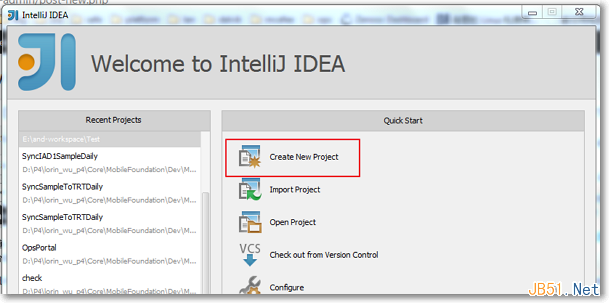 Android 開發自學筆記:第一個 Hello World
本篇文章記錄使用 IntelliJ IDEA 建立第一個 Android 專案並執行 Hello World 的流程,適合初學者快速入門。建立專案開啟 IntelliJ
 Android 應用程式本地化實作
Android 應用程式可能會在不同語言與地區的裝置上執行。為了提升使用者體驗,應用程式應根據系統語言顯示對應的文字、數字與資源。Android 的本地化機制主要透過不同
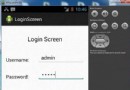 Android 登入畫面從零實作:完整程式碼與流程驗證
登入畫面是所有需要帳號的 App 的第一道門。它要處理的事情比看起來多:輸入欄的型別設定、點擊事件的綁定、字串比對、錯誤提示,還有一個常被省略的安全設計——限制連續嘗試次