編輯:Android開發教程
有的時候,可能需要彈出一個對話框,以便從用戶的輸入來獲取某些確認信息。這種情況下,可以重寫 Activity基類中的受保護方法(protected)onCreateDialog()。
1. 創建一個工程:Dialog。
2. main.xml中的代碼。
<?xml version="1.0" encoding="utf-8"?>
<LinearLayout xmlns:android="http://schemas.android.com/apk/res/android"
    android:layout_width="fill_parent"
    android:layout_height="fill_parent"

    android:orientation="vertical" >

<Button
    android:id="@+id/btn_dialog"
    android:layout_width="fill_parent"
    android:layout_height="wrap_content"
    android:text="Click to display a dialog"
    android:onClick="onClick" />

</LinearLayout>
3. DialogActivity.java中的代碼。
public class

DialogActivity extends Activity {
    CharSequence[] items = { "Google", "Apple", "Microsoft" };
    boolean[] itemsChecked = new boolean[items.length];

    /** Called when the activity is first created. */
    @Override
    public void onCreate(Bundle savedInstanceState) {
        super.onCreate(savedInstanceState);
        setContentView(R.layout.main);
    }

    public void onClick(View v) {
        showDialog(0);
    }

    @Override
    protected Dialog onCreateDialog(int id) {
        switch (id) {
        case 0:
            return new AlertDialog.Builder(this)
                    .setIcon(R.drawable.ic_launcher)
                    .setTitle("This is a dialog with some simple text...")
                    .setPositiveButton("OK",
                            new DialogInterface.OnClickListener() {
                                public void onClick(DialogInterface dialog,
                                        int whichButton) {
                                    Toast.makeText(getBaseContext(),
                                            "OK clicked!", Toast.LENGTH_SHORT)
                                            .show();
                                }
                            })
                    .setNegativeButton("Cancel",
                            new DialogInterface.OnClickListener() {
                                public void onClick(DialogInterface dialog,
                                        int whichButton) {
                                    Toast.makeText(getBaseContext(),
                                            "Cancel clicked!",
                                            Toast.LENGTH_SHORT).show();
                                }
                            })
                    .setMultiChoiceItems(items, itemsChecked,
                            new DialogInterface.OnMultiChoiceClickListener() {
                                public void onClick(DialogInterface dialog,
                                        int which, boolean isChecked) {
                                    Toast.makeText(
                                            getBaseContext(),
                                            items[which]
                                                    + (isChecked ? " checked!"
                                                            : " unchecked!"),
                                            Toast.LENGTH_SHORT).show();

                                }
                            }).create();
        }
        return null;
    }
}
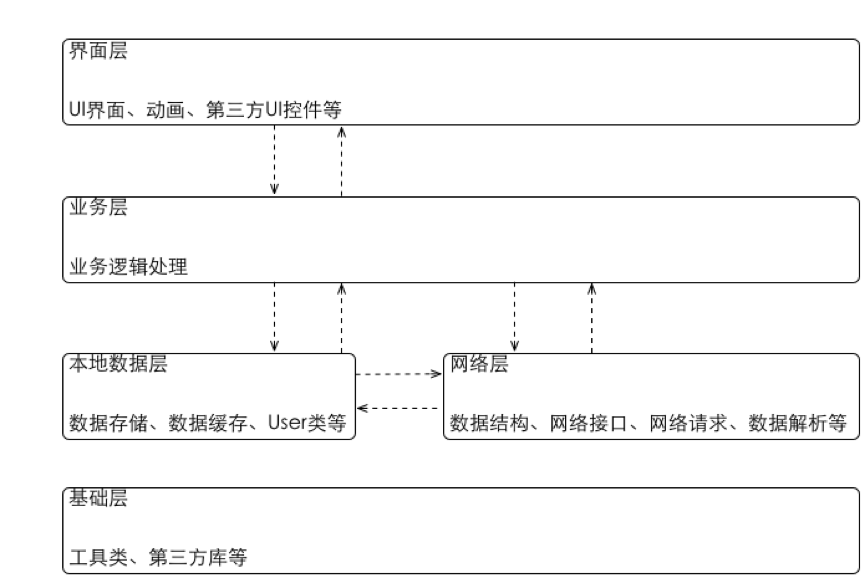 KJFrameForAndroid框架簡介
android app一般性架構設計一.UI層(Activity+Fragment基類設計+部分自定義控件)KJActivity(Activity繼承鏈的規范)I_KJA
 Android開發入門(十五)使用菜單 15.1 輔助方法
菜單可以用來顯示額外的選項,這些選項也不必出現在主界面中。在Android框架中,主要有2種菜單:選項菜單 —— 顯示與當前活動有關的信息。使用M
 android tesseract-ocr實例教程
1.介紹快過年了,博主的新應用-屏幕取詞之了老花鏡的編碼工作也在緊鑼密鼓的進行中。下面分享一下這個應用中的核心功能ocr,也就是圖片識詞功能。先來看下我的實現效果。上圖是
 android中子線程更新UI的方式
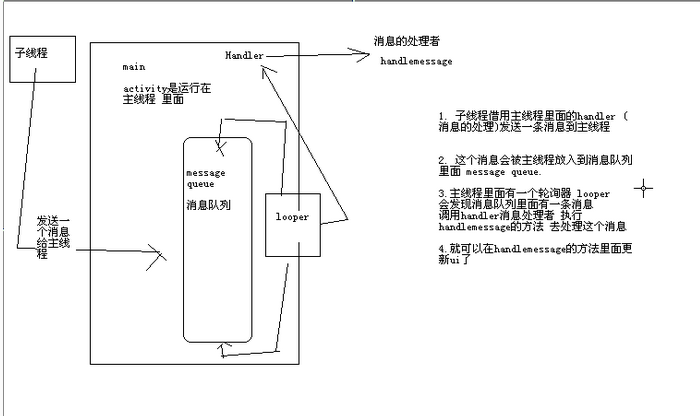
一、為何寫作此文你是不是經常看到很多書籍中說:不能在子線程中操作ui,不然會報錯。你是不是也遇到了如下的疑惑(見下面的代碼): (Bundle savedI