編輯:Android開發教程
Android --- 圖片處理的方法
轉換 - drawable To bitmap
縮放 - Zoom
圓角 - Round Corner
倒影 - Reflected
bitmapPrcess code:
package com.learn.games;

import android.graphics.Bitmap;
import android.graphics.Canvas;
import android.graphics.LinearGradient;
import android.graphics.Matrix;
import android.graphics.Paint;
import android.graphics.PixelFormat;
import android.graphics.PorterDuffXfermode;
import android.graphics.Rect;
import android.graphics.RectF;
import android.graphics.Bitmap.Config;
import android.graphics.PorterDuff.Mode;
import android.graphics.Shader.TileMode;
import android.graphics.drawable.Drawable;

public class bitmapProcess {

    // zoom
    public static Bitmap zoomBitmap(Bitmap bitmap, int w, int h){
        int width = bitmap.getWidth();
        int height = bitmap.getHeight();
        Matrix matrix = new Matrix();

        float scaleWidth = w/(float)width;
        float scaleHeight = h/(float)height;
        matrix.postScale(scaleWidth, scaleHeight);

        Bitmap bitmap2 = Bitmap.createBitmap(bitmap, 0, 0, width, height, matrix, true);
        return bitmap2;
    }


    // drawable to bitmap
    public static Bitmap drawable2Bitmap(Drawable drawable){
        int width = drawable.getIntrinsicHeight();
        int height = drawable.getIntrinsicHeight();

        Bitmap bitmap = Bitmap.createBitmap(width, height, drawable.getOpacity()
                != PixelFormat.OPAQUE ? Bitmap.Config.ARGB_8888 : Bitmap.Config.RGB_565);

        Canvas canvas = new Canvas(bitmap);
        drawable.setBounds(0, 0, width, height);
        drawable.draw(canvas);

        return bitmap;
    }


    // Round Corner Bitmap
    public static Bitmap getRoundCornerBitmap(Bitmap bitmap, float roundPX){
        int width = bitmap.getWidth();
        int height = bitmap.getHeight();

        Bitmap bitmap2 = Bitmap.createBitmap(width, height, Config.ARGB_8888);
        Canvas canvas = new Canvas(bitmap2);

        final int color = 0xff424242;
        final Paint paint = new Paint();
        final Rect rect = new Rect(0, 0, width, height);
        final RectF rectF = new RectF(rect);

        paint.setColor(color);
        paint.setAntiAlias(true);
        canvas.drawARGB(0, 0, 0, 0);
        canvas.drawRoundRect(rectF, roundPX, roundPX, paint);

        paint.setXfermode(new PorterDuffXfermode(Mode.SRC_IN));
        canvas.drawBitmap(bitmap, rect, rect, paint);

        return bitmap2;
    }

    // Reflect Bitmap
    public static Bitmap createReflectedBitmap(Bitmap bitmap){
        final int reflectedGap = 4;
        int width = bitmap.getWidth();
        int height = bitmap.getHeight();

        Matrix matrix = new Matrix();
        matrix.preScale(1, -1);

        Bitmap reflectedImage = Bitmap.createBitmap(bitmap, 0, height/2, width, height/2, matrix, false);
        Bitmap reflectedBitmap = Bitmap.createBitmap(width, (height + height/2), Config.ARGB_8888);

        Canvas canvas = new Canvas(reflectedBitmap);
        canvas.drawBitmap(bitmap, 0, 0, null);
        Paint defaultPaint = new Paint();
        canvas.drawRect(0, height, width, height + reflectedGap, defaultPaint);
        canvas.drawBitmap(reflectedImage, 0, height + reflectedGap, null);

        Paint paint = new Paint();
        LinearGradient shader = new LinearGradient(0, bitmap.getHeight(), 0,
                                reflectedBitmap.getHeight() + reflectedGap, 0x70ffffff, 0x00ffffff, TileMode.CLAMP);
        paint.setShader(shader);
        paint.setXfermode(new PorterDuffXfermode(Mode.DST_IN));
        canvas.drawRect(0, height, width, reflectedBitmap.getHeight() + reflectedGap, paint);

        return reflectedBitmap;
    }

}
 Android平台調用WebService詳解
上篇文章已經對Web Service及其相關知識進行了介紹(Android開發之WebService介紹 ),相信有的朋友 已經忍耐不住想試試在Android應用中調用W
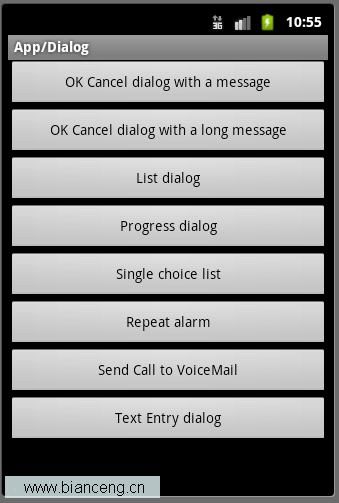 Android ApiDemos示例解析(22) App->Dialog
這個例子的主Activity定義在AlertDialogSamples.java 主要用來介紹類AlertDialog的用法,AlertDialog提供的功能是多 樣的:
 Android Studio中如何修改字體(font)大小(size)
Android Studio 默認編輯器(Editor)的方案(Scheme)是無法修改字體的, 可以Save as, 保存為新的方案(Scheme), 然後更改字體大小
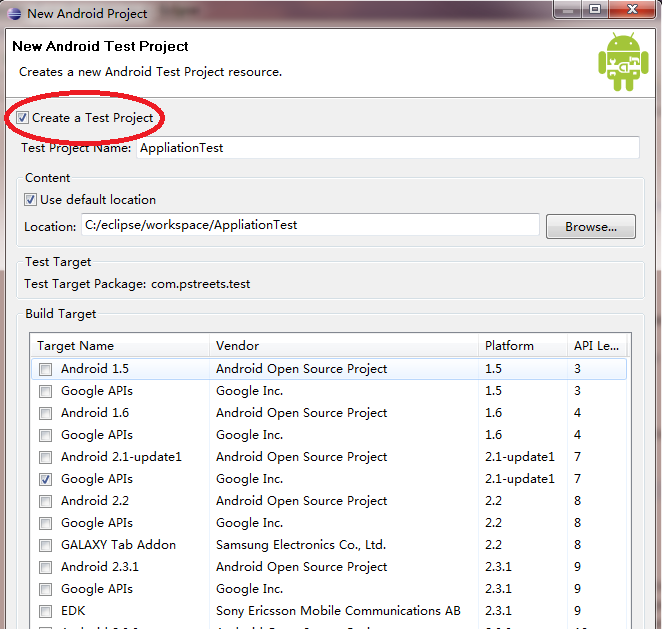 Android測試教程(3):測試項目
Android的編譯和測試工具需要測試項目組織符合預訂的結構:分別為Test case 類,Test case 包以及測試項目。JUnit 為Android的測試的基礎,