編輯:Android開發教程
在Android應用程序中,很多地方需要引用到Context對象(Activity, Application,Service等)。Roboguice 使得引用Context對象變得非常容易。
可以參見下面例子,這裡定義一個不在Activity中的類ContextInfo,需 要引用Context對象:
class ContextInfo{

 final Context context;
 @Inject
 ContextInfo(Context context){
 this.context=context;
 }

 String getPackageName(){
 return context.getApplicationInfo().packageName;
 }
}
需要應用Context對象時,使用@Inject 標記,Roboguice會自動注入 所需Context對象。
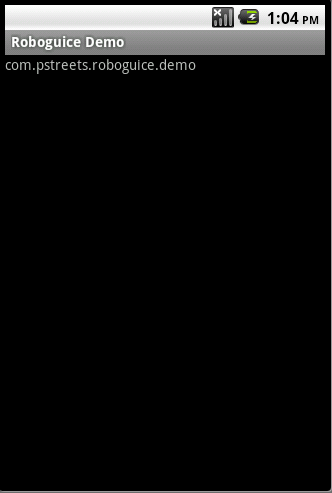
定義一個InjectContextDemo,使用一個TextView來顯 示ContextInfo的getPackageName內容。
public class

InjectContextDemo extends RoboActivity {

 @InjectView (R.id.textview) TextView textView;
 @Inject ContextInfo contextInfo;

 @Override
 public void onCreate(Bundle savedInstanceState) {
 super.onCreate(savedInstanceState);

 setContentView(R.layout.injectcontext);
 textView.setText(contextInfo.getPackageName());

 }

}
在InjectContextDemo中定義一個InjectContextDemo,也使用@Inject 通知Roboguice自動創建它的一個實例。Roboguice在創建這個對象時,調用其 Injectable 構造函數(參見Android RoboGuice 使用指南(10): Just-in-time Bindings ),自動傳入Context對象。
如果需要應用Application對象,可以將構造函數改為
@Inject
 ContextInfo(RoboguiceDemoApplication context){
 this.context=context;
}
或引用Activity
@Inject
 ContextInfo(Activity context){
  this.context=context;
}
本例下載: http://www.imobilebbs.com/download/android/roboguice/InjectContextDemo. zip
查看全套文章:http://www.bianceng.cn/OS/extra/201301/34950.htm
 Android GUI系統之SurfaceFlinger(3)
Android中的本地窗口FramebufferNativewindow 1.1 Android中的本地窗口在OpenGL的學習過程中,我們不斷提及&ldquo
 Android簡明開發教程六:用戶界面設計
Activity是Android應用用戶界面的基本組成部件。但Activity本身並不提供用戶界面(User Interface)。從程序結構層次上 來說,一個Andro
 Android開發入門(十九)數據庫 19.2 使用數據庫
DBAdapter已經創建好了,現在我們可以去使用數據庫了。下面的章節,將介紹常規的CRUD(增加,讀取, 更新,刪除)。往表中添加聯系人。1. 使用之前的項目,在Dat
 android源碼出現的@字符代表什麼意思
1.背景在android源碼中我們能看到各種以@開頭的字符,他們大多出現在注釋中,如下圖所示但是可不要小看了它們地作用,昨天當我編譯源碼的時候,就在一個“@l