編輯:Android開發教程
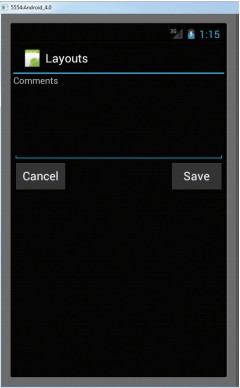
使用RelativeLayout,可以通過設置“相對位置”(每個View相對於另一個view的位置),來指定它所包 含的子view的位置。看下面main.xml中的代碼:
<?xml version="1.0" encoding="utf-8"?>


<RelativeLayout xmlns:android="http://schemas.android.com/apk/res/android"
    android:id="@+id/RLayout"
    android:layout_width="fill_parent"
    android:layout_height="fill_parent" >

    <TextView
        android:id="@+id/lblComments"
        android:layout_width="wrap_content"
        android:layout_height="wrap_content"
        android:layout_alignParentLeft="true"
        android:layout_alignParentTop="true"
        android:text="Comments" />

    <EditText
        android:id="@+id/txtComments"
        android:layout_width="fill_parent"
        android:layout_height="170px"
        android:layout_alignLeft="@+id/lblComments"
        android:layout_below="@+id/lblComments"
        android:layout_centerHorizontal="true"
        android:textSize="18sp" />

    <Button
        android:id="@+id/btnSave"
        android:layout_width="125px"
        android:layout_height="wrap_content"
        android:layout_alignRight="@+id/txtComments"
        android:layout_below="@+id/txtComments"
        android:text="Save" />

    <Button
        android:id="@+id/btnCancel"
        android:layout_width="124px"
        android:layout_height="wrap_content"
        android:layout_alignLeft="@+id/txtComments"
        android:layout_below="@+id/txtComments"
        android:text="Cancel" />

</RelativeLayout>
可以觀察到,這些views都被嵌在了RelativeLayout裡面,每個view都有 一些特有的屬性去和其他view對准位置。這些屬性是:
layout_alignParentTop
layout_alignParentLeft
layout_alignRight
layout_below
layout_centerHorizontal
這些屬性的值,就是每個被引用的view的id。
效果圖:
查看本欄目更多精彩內容:http://www.bianceng.cn/OS/extra/
 Android GUI系統之SurfaceFlinger(13) VSync信號的處理
1.1.1 VSync信號的處理經過上一小節的分析,現在我們已經明白了系統是如何通過硬件設備或者軟件模擬來產生VSync信號的,也明白了它的流轉過程。VSync最終會被E
 Android Library Project的使用問題
1. 當新建Android Library Project 工程或將已有工程轉化為Android Library Project, 如果工程源代碼中有如下語句:int i
 Android ApiDemos示例解析(20) App->Alarm->Alarm Service
Alarm Service和Alarm Controller 例子非常類似,只是Alarm Service是用來Schedule一個Service,而前面的例子是來 Sc
 Android創建與解析XML(六) 比較與使用
前面介紹了四種創建、解析XML的方式:0、 Android 創建與解析XML(一)—— 概述1、 Android 創建與 解析XML(二)&mda