編輯:Android開發教程
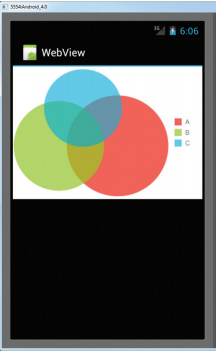
如圖:

代碼:
public class Util {

	/****
	 * 計算文件大小
	 *
	 * @param length
	 * @return
	 */
	public static String ShowLongFileSzie(Long length) {
		if (length >= 1048576) {
			return (length / 1048576) + "MB";
		} else if (length >= 1024) {
			return (length / 1024) + "KB";
		} else if (length < 1024) {
			return length + "B";
		} else {
			return "0KB";
		}
	}

	/***
	 *
	 * 更具路徑得到該路徑下的全部圖片信息
	 * @return
	 */

	public static List<AddFileInfo> getSDPathFrom() {
        // 圖片列表
        List<AddFileInfo> imagePathList = new ArrayList<AddFileInfo>();
        // 得到sd卡內image文件夾的路徑
        String filePath = Environment.getExternalStorageDirectory().toString() + File.separator+"BigNoxHD/cache/";
        //得到該路徑文件夾下所有的文件
        File fileAll = new File(filePath);
        File[] files = fileAll.listFiles();
        // 將所有的文件存入ArrayList中,並過濾所有圖片格式的文件
        for (int i = 0; i < files.length; i++) {
            File file = files[i];
            if (checkIsFile(file.getPath())) {
            	String time = new SimpleDateFormat("yyyy-MM-dd")
				.format(new Date(file.lastModified()));
            	AddFileInfo info=new AddFileInfo(file.getName(), Util.ShowLongFileSzie(file.length()), time, file.getAbsolutePath());
                imagePathList.add(info);
            }
        }
        // 返回得到的圖片列表
        return imagePathList;
    }

	/****
	 * 驗證文件格式
	 * @param fName
	 * @return
	 */
	public static boolean checkIsFile(String fName) {
        boolean isImageFile = false;
        // 獲取擴展名
        String FileEnd = fName.substring(fName.lastIndexOf(".") + 1,
                fName.length()).toLowerCase();
        if (FileEnd.equals("jpg") || FileEnd.equals("png") || FileEnd.equals("gif")|| FileEnd.equals("jpeg") ) {
            isImageFile = true;
        } else {
            isImageFile = false;
        }
        return isImageFile;
    }

	/****
	 * 根據文件路徑獲取圖片
	 * 其中w和h你需要轉換的大小
	 * @param path
	 * @param w
	 * @param h
	 * @return
	 */
	public static Bitmap convertToBitmap(String path, int w, int h) {
		BitmapFactory.Options opts = new BitmapFactory.Options();
		// 設置為ture只獲取圖片大小
		opts.inJustDecodeBounds = true;
		opts.inPreferredConfig = Bitmap.Config.ARGB_8888;
		// 返回為空
		BitmapFactory.decodeFile(path, opts);
		int width = opts.outWidth;
		int height = opts.outHeight;
		float scaleWidth = 0.f, scaleHeight = 0.f;
		if (width > w || height > h) {
			// 縮放
			scaleWidth = ((float) width) / w;
			scaleHeight = ((float) height) / h;
		}
		opts.inJustDecodeBounds = false;
		float scale = Math.max(scaleWidth, scaleHeight);
		opts.inSampleSize = (int)scale;
		WeakReference<Bitmap> weak = new WeakReference<Bitmap>(BitmapFactory.decodeFile(path, opts));
		return Bitmap.createScaledBitmap(weak.get(), w, h, true);
	}
}
MainActivity.java
public class MainActivity extends Activity {

	private ListView mListview;
	private List<AddFileInfo> list;

	@Override
	protected void onCreate(Bundle savedInstanceState) {
		super.onCreate(savedInstanceState);
		setContentView(R.layout.activity_main);
		initView();
	}

	private void initView() {
		// TODO Auto-generated method stub
		mListview = (ListView) findViewById(R.id.listview);
		list = Util.getSDPathFrom();
		mListview.setAdapter(new Adapter(MainActivity.this));
	}

	class Adapter extends BaseAdapter {
		private LayoutInflater inflater;
		private Context context;

		public Adapter(Context context) {
			this.context = context;
			this.inflater = LayoutInflater.from(context);
		}

		@Override
		public int getCount() {
			return list.size();
		}

		@Override
		public Object getItem(int position) {
			return list.get(position);
		}

		@Override
		public long getItemId(int position) {
			return 0;
		}

		@Override
		public View getView(int position, View convertView, ViewGroup parent) {
			ViewHolder holder;
			if (null == convertView) {
				convertView = inflater.inflate(
						R.layout.item_mytask_file_listview, null);
				holder = new ViewHolder(convertView);
				convertView.setTag(holder);
			} else {
				holder = (ViewHolder) convertView.getTag();
			}
			AddFileInfo info = (AddFileInfo) getItem(position);
			holder.img.setImageBitmap(Util.convertToBitmap(info.getPath(), 99, 99));
			holder.tv_name.setText("文件名稱:" + info.getName());
			holder.size.setText("文件大小:" + info.getSize());
			holder.time.setText("文件創建時間:" + info.getTime());
			return convertView;
		}

	}

	class ViewHolder {

		private TextView tv_name;
		private TextView size;
		private TextView time;
		private ImageView img;

		public ViewHolder(View view) {
			img = (ImageView) view.findViewById(R.id.img);
			tv_name = (TextView) view.findViewById(R.id.item_file_name);
			size = (TextView) view.findViewById(R.id.item_file_size);
			time = (TextView) view.findViewById(R.id.item_file_time);
		}
	}
}
不要忘記在AndroidManifest.xml加權限哦!
 <!-- SD卡權限 -->
    <uses-permission android:name="android.permission.WRITE_EXTERNAL_STORAGE" />
    <uses-permission android:name="android.permission.MOUNT_UNMOUNT_FILESYSTEMS" />
 詳解Cocos2dx 3.0正式版本開發環境搭建(Win32/Android)
cocos2d-x 3.0發布有一段時間了,作為一個初學者,我一直覺得cocos2d-x很坑。每個比較大的版本變動,都會有不一樣的項目創建方式,每次的跨度都挺大&hell
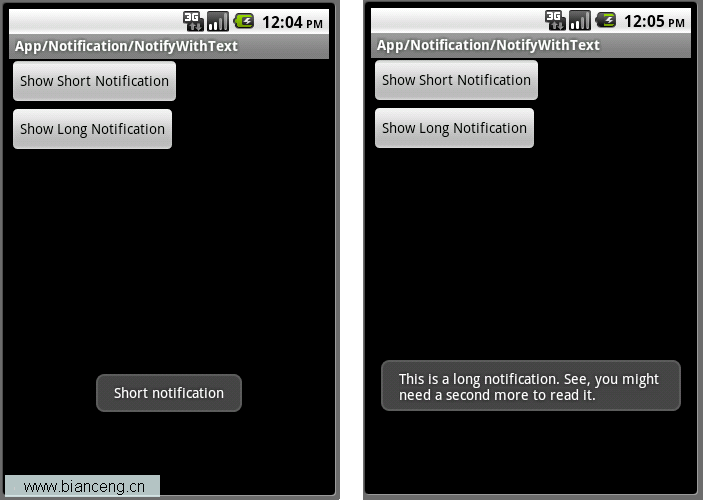 Android ApiDemos示例解析(28):App->Notification->NotifyWithText
除了使用Notification之外,Toast也可以用來通知用戶某件事發生了,Toast為一個透明的對話框,可以在屏幕上顯示幾秒 鐘後自動消失。功能上有點類似Tool
 android裝置使用usb串口傳輸數據
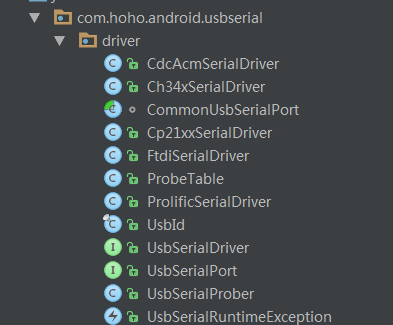
android設備使用usb串口傳輸數據 首先介紹兩個開源項目一個是Google的開源項目:https://code.google.com/archive/p/andr
 Android ApiDemos示例解析 (27)
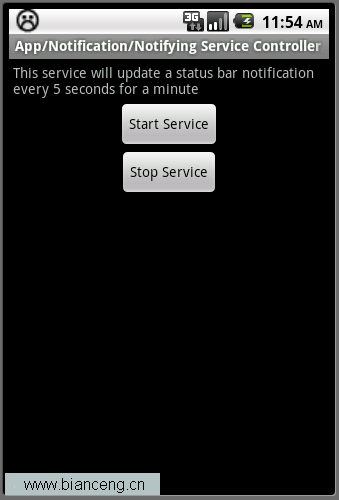
App->Notification->Notifying Service Controller這個例子介紹了如何在Service中使用Notification