編輯:Android開發教程
我們已經了解了如何在自己的單個應用中調用activity。但是,android開發中比較重要的一點,就是使 用intent調用其他應用的activity。特別地,你的應用可以調用系統中的許多“內置”應用。所謂的“內置 ”應用,指的就是系同級別的應用,比如Browser,Phone,Sms等等。舉個例子,如果你的應用需要打開一個 網頁,可以使用Intent對象去調用浏覽器,浏覽器把網頁顯示出來,而不是要自己創建一個浏覽器。。。
下面的例子展示如何調用系統中的幾個比較常用的“內置”應用。
1. 創建一個工程,Intents。
2. main.xml中的代碼。
<?xml version="1.0" encoding="utf-8"?>
<LinearLayout xmlns:android="http://schemas.android.com/apk/res/android"
    android:layout_width="fill_parent"
    android:layout_height="fill_parent"
    android:orientation="vertical" >

    <Button
        android:id="@+id/btn_webbrowser"
        android:layout_width="fill_parent"
        android:layout_height="wrap_content"
        android:onClick="onClickWebBrowser"
        android:text="Web Browser" />

    <Button
        android:id="@+id/btn_makecalls"
        android:layout_width="fill_parent"
        android:layout_height="wrap_content"
        android:onClick="onClickMakeCalls"
        android:text="Make Calls" />

    <Button
        android:id="@+id/btn_showMap"
        android:layout_width="fill_parent"
        android:layout_height="wrap_content"
        android:onClick="onClickShowMap"
        android:text="Show Map" />

    <Button
        android:id="@+id/btn_launchMyBrowser"
        android:layout_width="fill_parent"
        android:layout_height="wrap_content"
        android:onClick="onClickLaunchMyBrowser"
        android:text="Launch My Browser" />

</LinearLayout>
3. IntentsActivity.java中的代碼。
public class

IntentsActivity extends Activity {

    int request_Code = 1;

    /** Called when the activity is first created. */
    @Override
    public void onCreate(Bundle savedInstanceState) {
        super.onCreate(savedInstanceState);
        setContentView(R.layout.main);
    }

    public void onClickWebBrowser(View view) {
        Intent i = new Intent("android.intent.action.VIEW");
        i.setData(Uri.parse("http://www.amazon.com"));
        startActivity(i);
    }

    public void onClickMakeCalls(View view) {
        Intent i = new Intent(android.content.Intent.ACTION_DIAL,
                Uri.parse("tel:+651234567"));
        startActivity(i);

    }

    public void onClickShowMap(View view) {
        Intent i = new Intent(android.content.Intent.ACTION_VIEW,
                Uri.parse("geo:37.827500,-122.481670"));
        startActivity(i);

    }

}
4. 調試。
程序啟動之後:
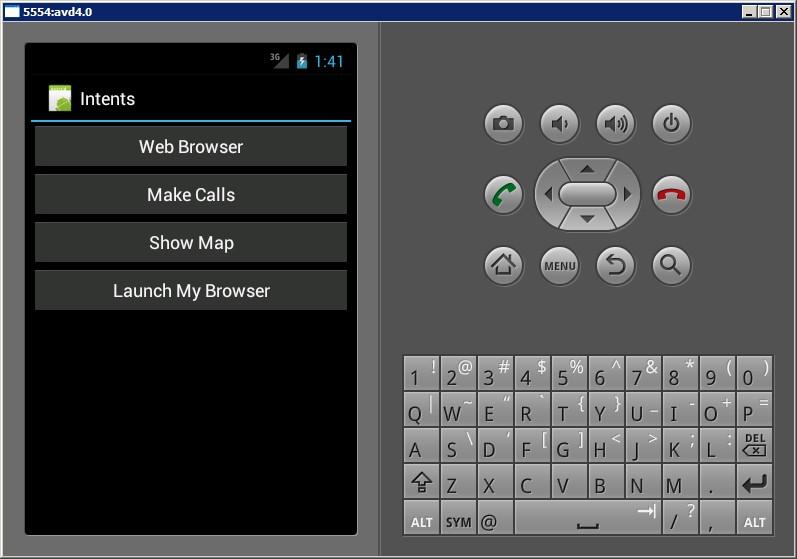
 Android中升級ADT 22 引發的錯誤
今天心血來潮,又把ADT升級了一下,升級到了ADT 22,悲催的發現項目用不了了(能編譯通過,運行出錯)。錯誤一:(警告)Unable to resolve superc
 Android中如何實現Socket大文件斷點上傳
什麼是Socket?所謂Socket通常也稱作“套接字”,用於描述IP地址和端口,是一個通信連的句柄,應用程序通常通過“套接字&rdq
 android技巧:如何在android應用中插入百度廣告
1.介紹現在游戲中的廣告基本上已經成為了游戲創作者的一個重要的收入來源。其實插入廣告還是挺簡單的,本文選擇百度廣告聯盟作為案例(總覺得百度不會拖欠工資)。注:不過,插入廣
 面向Android應用程序的基於Parse雲的服務
Parse 移動 SDK 為 iOS、Android 和 Windows 應用程序提供了基於雲的 API 和服務。Parse SDK 還提供 了 JavaScript 和