

編輯:Android 遊戲開發
上一篇把遊戲流程與畫面配置談過了,這篇直接進到實作。版面部分 LinearLayout 或 TableLayout 都能勝任:最上面一列放 4 個 TextView 顯示分數與剩餘時間,下面的 12 個地洞則用 ImageButton。無論打中與否,點擊後都會替對應按鈕換上不同的背景圖。
打中地鼠的效果如下圖左,沒打中則是下圖右:
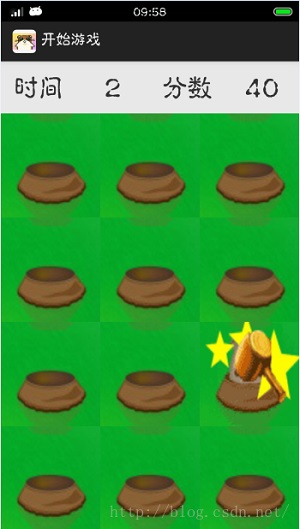
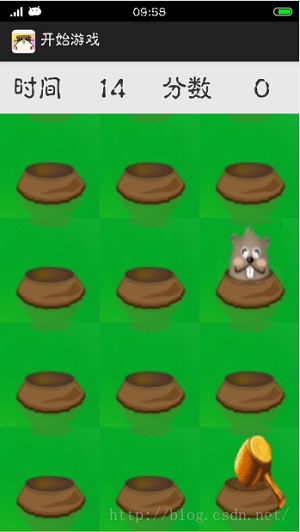
遊戲計時需要一個獨立執行緒。每 0.5 秒醒一次,總長 30 秒,所以更新次數是遊戲秒數的兩倍——這一點決定了「用取餘數判斷是否該遞減秒數」的寫法。
同一個執行緒每一輪順手產生一個 1~12 的隨機數,決定地鼠這次要從哪個洞冒出來。但子執行緒不能直接碰 UI,必須透過 Handler 發訊息,由主執行緒改畫面。
更新畫面時的策略是「先全部重置、再畫地鼠」:把 12 個按鈕的背景都設回地洞圖,接著只替地鼠所在的按鈕換上地鼠圖。這樣做一次就清掉了上一次的地鼠位置,也清掉了玩家先前點擊留下的錘子或叉叉圖,不必逐一還原。
玩家點擊時判斷有沒有打中:打中就換成命中圖、加分並播放命中音效;沒打中則換成落空圖並播放另一個音效(前提是音效開關是開的)。最後別忘了在遊戲畫面不可見時把執行緒停掉,否則計時會在背景繼續跑。
package cn.com.cyj.mouse.services;

import java.util.HashMap;
import java.util.Random;

import android.content.Intent;
import android.os.Bundle;
import android.os.Handler;
import android.view.View;
import android.view.View.OnClickListener;
import android.widget.ImageButton;
import android.widget.TextView;
import cn.com.cyj.mouse.R;
import cn.com.cyj.mouse.ui.BaseActivity;

/**
 * 遊戲進行畫面:畫面上有 12 個 ImageButton,背景先設為地洞,
 * 另有一條執行緒負責控制遊戲時間與地鼠位置。
 */
public class GameRun extends BaseActivity {

    /** 執行緒睡眠時間(毫秒) */
    public static final int THREAD_SLEEP_TIME = 500;
    /** 遊戲總長(秒) */
    public static final int TIME = 30;

    private ImageButton one, two, three, four, five, six;
    private ImageButton seven, eight, nine, ten, eleven, twleve;

    private TextView showTime;   // 剩餘時間
    private TextView score;      // 分數

    private MyClick click;
    private Random random;

    private int time;            // 已經過的更新次數
    private int totalTime;       // 剩餘秒數
    private int next;            // 地鼠下一次出現的洞位編號
    private int nowScore;        // 目前分數

    private Thread t;            // 遊戲執行緒

    /** 按鈕 → 洞位編號 */
    HashMap<ImageButton, Integer> battle;
    /** 洞位編號 → 按鈕 */
    HashMap<Integer, ImageButton> nextMap;

    public Handler handler = new Handler() {
        public void handleMessage(android.os.Message msg) {
            changeUI();
        }
    };

    @Override
    protected void onCreate(Bundle savedInstanceState) {
        super.onCreate(savedInstanceState);
        setContentView(R.layout.activity_gamerun);

        battle = new HashMap<ImageButton, Integer>();
        nextMap = new HashMap<Integer, ImageButton>();

        initImageButton();
        initOnClick();
        initbattleMap();
        initNextMap();

        next = -1;
        random = new Random();
        totalTime = TIME;
        time = 0;
        nowScore = 0;
        showTime.setText(TIME + "");
    }

    @Override
    protected void onResume() {
        super.onResume();
        if (t == null) {
            // 控制遊戲時間
            t = new Thread(new Runnable() {
                @Override
                public void run() {
                    try {
                        while (totalTime != 0) {
                            Thread.sleep(THREAD_SLEEP_TIME);
                            next = random.nextInt(12) + 1;
                            time++;
                            handler.sendEmptyMessage(1);
                        }
                    } catch (Exception e) {
                        e.printStackTrace();
                    }
                    if (totalTime == 0) {
                        Intent intent = new Intent(GameRun.this, GameOver.class);
                        // 加上這個旗標,跳頁時不會觸發 onUserLeaveHint()(避免誤判為進入背景而暫停音樂)
                        intent.addFlags(Intent.FLAG_ACTIVITY_NO_USER_ACTION);
                        intent.putExtra("score", "" + nowScore);
                        GameRun.this.startActivity(intent);
                        finish();
                    }
                }
            });
        }
        t.start();
    }

    // 初始化 12 個地洞按鈕與兩個文字方塊
    private void initImageButton() {
        one = (ImageButton) findViewById(R.id.first);
        two = (ImageButton) findViewById(R.id.second);
        three = (ImageButton) findViewById(R.id.three);
        four = (ImageButton) findViewById(R.id.four);
        five = (ImageButton) findViewById(R.id.five);
        six = (ImageButton) findViewById(R.id.six);
        seven = (ImageButton) findViewById(R.id.seven);
        eight = (ImageButton) findViewById(R.id.eight);
        nine = (ImageButton) findViewById(R.id.nine);
        ten = (ImageButton) findViewById(R.id.ten);
        eleven = (ImageButton) findViewById(R.id.eleven);
        twleve = (ImageButton) findViewById(R.id.twelve);
        showTime = (TextView) findViewById(R.id.showtime);
        score = (TextView) findViewById(R.id.score);
    }

    // 12 個按鈕共用同一個監聽器
    private void initOnClick() {
        click = new MyClick();
        one.setOnClickListener(click);
        two.setOnClickListener(click);
        three.setOnClickListener(click);
        four.setOnClickListener(click);
        five.setOnClickListener(click);
        six.setOnClickListener(click);
        seven.setOnClickListener(click);
        eight.setOnClickListener(click);
        nine.setOnClickListener(click);
        ten.setOnClickListener(click);
        eleven.setOnClickListener(click);
        twleve.setOnClickListener(click);
    }

    // 按鈕 → 洞位編號
    private void initbattleMap() {
        battle.put(one, 1);   battle.put(two, 2);   battle.put(three, 3);
        battle.put(four, 4);  battle.put(five, 5);  battle.put(six, 6);
        battle.put(seven, 7); battle.put(eight, 8); battle.put(nine, 9);
        battle.put(ten, 10);  battle.put(eleven, 11); battle.put(twleve, 12);
    }

    // 洞位編號 → 按鈕
    private void initNextMap() {
        nextMap.put(1, one);      nextMap.put(2, two);     nextMap.put(3, three);
        nextMap.put(4, four);     nextMap.put(5, five);    nextMap.put(6, six);
        nextMap.put(7, seven);    nextMap.put(8, eight);   nextMap.put(9, nine);
        nextMap.put(10, ten);     nextMap.put(11, eleven); nextMap.put(12, twleve);
    }

    /** 更新地鼠位置與剩餘時間 */
    private void changeUI() {
        // 每 0.5 秒更新一次,因此更新兩次才減一秒
        if (time % 2 == 0) {
            showTime.setText(--totalTime + "");
        }
        if (next == -1) {
            return;
        }
        // 每次出地鼠前先把所有按鈕還原成地洞
        reImageButton();
        // 再只把地鼠那一格換成地鼠圖
        ImageButton bt = nextMap.get(next);
        bt.setBackgroundResource(R.drawable.end);
    }

    // 全部按鈕背景還原為地洞
    private void reImageButton() {
        one.setBackgroundResource(R.drawable.start);
        two.setBackgroundResource(R.drawable.start);
        three.setBackgroundResource(R.drawable.start);
        four.setBackgroundResource(R.drawable.start);
        five.setBackgroundResource(R.drawable.start);
        six.setBackgroundResource(R.drawable.start);
        seven.setBackgroundResource(R.drawable.start);
        eight.setBackgroundResource(R.drawable.start);
        nine.setBackgroundResource(R.drawable.start);
        ten.setBackgroundResource(R.drawable.start);
        eleven.setBackgroundResource(R.drawable.start);
        twleve.setBackgroundResource(R.drawable.start);
    }

    /** 點擊事件:判斷有沒有打中 */
    class MyClick implements OnClickListener {
        @Override
        public void onClick(View v) {
            Boolean isScore = false;
            // 用點擊的按鈕反查它對應的洞位編號
            int battleId = battle.get(v);
            if (battleId == next) {
                isScore = true;
            }
            if (isScore) {
                v.setBackgroundResource(R.drawable.zhong);   // 打中
                if (MouseStart.controller.isPlay()) {
                    MouseStart.controller.playSound(R.raw.hathit);
                }
                score.setText((nowScore += 10) + "");
            } else {
                v.setBackgroundResource(R.drawable.meizhong); // 沒打中
                if (MouseStart.controller.isPlay()) {
                    MouseStart.controller.playSound(R.raw.dismistake);
                }
            }
        }
    }

    @Override
    protected void onStop() {
        super.onStop();
        // 畫面不可見時停止執行緒
        if (t != null) {
            t.interrupt();
            t = null;
        }
    }
}這個遊戲裡到處都是「編號對應哪個按鈕」的判斷。直覺的寫法是一長串 if-else 或 switch:隨機數是 1 就抓第一個按鈕、是 2 就抓第二個……寫起來又臭又長,還容易漏。
更漂亮的做法是雙向映射:一個 HashMap 記「按鈕 → 編號」(battle),另一個記「編號 → 按鈕」(nextMap)。產生地鼠時用隨機數直接查出按鈕設圖;玩家點擊時用被點的 View 反查編號,跟目前的 next 比一下就知道有沒有打中。兩邊都不需要任何條件分支,新增或減少地洞也只改映射表就好。
 Android遊戲開發實踐之NDK與JNI開發(02):環境搭建與編譯全解
承接上一篇JNI基礎與開發流程的介紹,這次來談Android環境下的JNI開發,以及相關的NDK操作。本文仍以Eclipse作為開發IDE——雖然Google官方早已不再
 Android遊戲開發實戰(十四):繪製觸摸軌跡曲線
上一章我們已經掌握了如何處理遊戲中的觸摸事件,這一章再往前邁一步——把手指滑過屏幕的軌跡,變成一條流暢的曲線畫出來。在 onTouchEvent 方法裡,我們能實時拿到手
 Android 2048 遊戲開發教學(三):打造遊戲界面
加入滑動手勢在 2048 的遊戲邏輯中,玩家主要透過上下左右滑動來移動方塊。因此第一步,是讓 GameView 能接收觸控事件,並把手指的移動轉換成四個方向。實作時,我們
 23 天從零做一款 Android 遊戲(第 12~14 天):定名 DRONE INVADERS、月亮與 Boss 設計
第 12 天:遊戲定名 DRONE INVADERS名字終於選定了。候選名單很長,但真正可用的只有六、七個,最後這個最貼近遊戲主題。全新的標題圖也做好了,字型同樣選用 R