

編輯:Android 遊戲開發
上一節講了常用 UI 類別與舞台,本節我們就來輕鬆「做出一齣戲」。由於 Actor 類別在繪製時是以 x、y 值為基準,我們可以透過控制 x、y 值的變化來改變演員的位置;但演員的其他效果,則需要搭配 Action 類別來操作。
Action 類別是一個抽象類別,所有具體實作都在 com.badlogic.gdx.scenes.scene2d.actions 套件中。
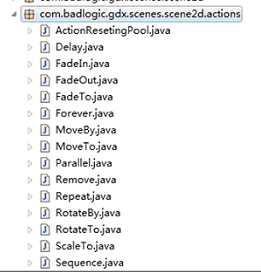
套件中的類別依功能可分為兩類:
1、控制 Action
2、表現 Action
控制 Action 沒有直接的表現效果,它操作的對象是表現 Action,例如 Delay。表現 Action 則是直接呈現效果的,繼承自 AnimationAction,操作對象是 Actor,例如 MoveTo。下面逐一介紹:
Delay$(Action action, float duration)   // 延遲 duration 秒執行 action
Forever$(Action action)                 // 一直執行 action
Parallel$(Action... actions)            // 並行(同時)執行 actions
Repeat$(Action action, int times)       // 重複 action times 次
Sequence$(Action... actions)            // 依序執行 actions
Remove$() // 刪除所有 ActionFadeIn$(float duration) / FadeOut$(float duration) // 淡入淡出
FadeTo$(float alpha, float duration) // duration 秒內改變至 alpha
MoveTo$(float x, float y, float duration) // 移動到 x,y
MoveBy$(float x, float y, float duration) // 相對移動
RotateBy$(float rotation, float duration) // 旋轉 rotation 度
RotateTo$(float rotation, float duration)
ScaleTo$(float scaleX, float scaleY, float duration) // 縮放至指定比例一個一個寫範例太麻煩,而且實務中多半是多重組合運用,下面來看一個綜合性範例。我們的主角是:

透過 action 的組合,實現閃爍、飛動、旋轉等效果。
package com.cnblogs.htynkn.listener;

import com.badlogic.gdx.ApplicationListener;
import com.badlogic.gdx.Gdx;
import com.badlogic.gdx.graphics.GL10;
import com.badlogic.gdx.graphics.Texture;
import com.badlogic.gdx.graphics.Texture.TextureFilter;
import com.badlogic.gdx.math.MathUtils;
import com.badlogic.gdx.scenes.scene2d.Action;
import com.badlogic.gdx.scenes.scene2d.Stage;
import com.badlogic.gdx.scenes.scene2d.actions.FadeIn;
import com.badlogic.gdx.scenes.scene2d.actions.FadeOut;
import com.badlogic.gdx.scenes.scene2d.actions.MoveBy;
import com.badlogic.gdx.scenes.scene2d.actions.MoveTo;
import com.badlogic.gdx.scenes.scene2d.actions.Parallel;
import com.badlogic.gdx.scenes.scene2d.actions.Repeat;
import com.badlogic.gdx.scenes.scene2d.actions.RotateTo;
import com.badlogic.gdx.scenes.scene2d.actions.Sequence;
import com.badlogic.gdx.scenes.scene2d.actors.Image;

public class FirstGame implements ApplicationListener {
    private Stage stage;
    private Texture texture;

    @Override
    public void create() {
        stage = new Stage(Gdx.graphics.getWidth(), Gdx.graphics.getHeight(), true);
        texture = new Texture(Gdx.files.internal("star.png"));
        texture.setFilter(TextureFilter.Linear, TextureFilter.Linear);
        float duration = 4f;
        int maxwidth = Gdx.graphics.getWidth() - texture.getWidth();
        int maxheight = Gdx.graphics.getHeight() - texture.getHeight();
        for (int i = 0; i < 20; i++) {
            Image image = new Image("star" + i, texture);
            image.x = MathUtils.random(0, maxwidth);
            image.y = MathUtils.random(0, Gdx.graphics.getHeight()); // 隨機出現
            Action moveAction = Sequence.$(
                MoveTo.$(MathUtils.random(0, maxwidth),
                    MathUtils.random(0, maxheight), duration / 2),
                MoveBy.$(MathUtils.random(0, maxwidth),
                    MathUtils.random(0, maxheight), duration / 2)); // 移動方向與地點隨機
            Action rotateAction = RotateTo.$(360, duration); // 旋轉
            Action fadeAction = Repeat.$(Sequence.$(
                FadeOut.$(duration / 20), FadeIn.$(duration / 20)), 10); // 閃爍,重複10次
            image.action(Parallel.$(moveAction, rotateAction, fadeAction)); // 所有 action 並行
            stage.addActor(image);
        }
        Gdx.input.setInputProcessor(stage);
    }

    @Override
    public void dispose() {
        texture.dispose();
        stage.dispose();
    }

    @Override
    public void render() {
        Gdx.gl.glClear(GL10.GL_COLOR_BUFFER_BIT);
        stage.act(Gdx.graphics.getDeltaTime());
        stage.draw();
    }

    // 其餘生命週期方法略
}
其實每個 action 的用法都很簡單,真正的問題在於怎麼組合排列,才能呈現符合需求的效果。我發現 libgdx 的更新速度不是普通的快,幾乎每天都有新版本。那個透過設定檔配置 UI 樣式的機制讓我覺得很有意思,不過實際操作時遇到不少問題。
 Android遊戲引擎libgdx使用教學5:常用UI類別與舞台
像是按鈕、下拉選單、列表、標籤、圖片、核取方塊、編輯框、分割面板、滑動面板、滑動條等,都是比較常用的 UI 類別。它們都屬於 Actor,可以很方便地納入舞台管理,而且都
 Android 遊戲開發 7:讓 SurfaceView 真正填滿整個螢幕
上一節我們成功在 SurfaceView 上放進了 Button 與 TextView,功能上已經通了。但如果你要做的是遊戲,畫面被擠在中間一小塊、像個播放視窗一樣,那顯
 Android 遊戲開發 24:觸控方向搖桿的實作
為什麼需要虛擬搖桿 許多 Android 手機沒有實體方向鍵,因此遊戲常使用觸控螢幕打造虛擬搖桿。相較於固定方向按鈕,圓形搖桿能提供更直覺的方向控制,也更美觀。 基本結
 Android 遊戲開發 6:在 SurfaceView 上疊加控制項並完成資料雙向溝通
「怎麼在 SurfaceView 上面放 EditText、TextView、Button?」這個問題在論壇上流傳了很久。許多人一開始都卡在完全不同的地方,所以先把結論講