

編輯:Android 遊戲開發
上一節我們成功在 SurfaceView 上放進了 Button 與 TextView,功能上已經通了。但如果你要做的是遊戲,畫面被擠在中間一小塊、像個播放視窗一樣,那顯然不行——我們要的是全屏。
先看問題長什麼樣:
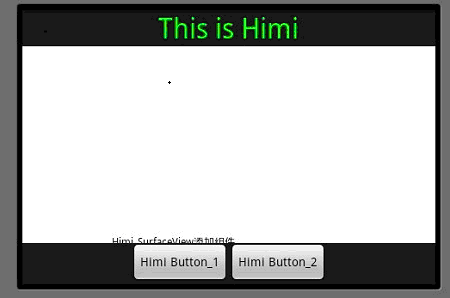
SurfaceView 畫出來的文字被上面那條 Button 區塊硬生生切掉了一截。而且只要畫面上有 Button,就會多出一塊佔位用的長條;就算把 Button 的底色改成白色,也只是讓那條空白變得比較不明顯,遮蔽的問題依然存在。
我們要的效果是這樣:
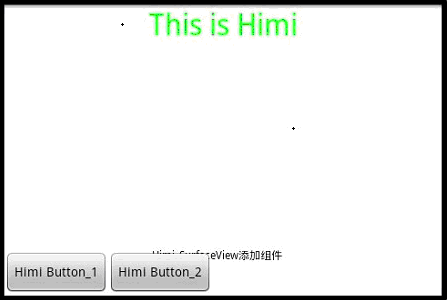
SurfaceView 撐滿整個可用區域,只有 Button 本身佔據它實際需要的高度,不再多出無用的空白帶。
一開始我以為可以在 XML 裡直接把 Button 放進 SurfaceView 節點內,但這行不通——View 裡面不能再放 View。既然不能嵌套,剩下的可能性就是版面配置的問題了。試了幾輪之後才找到正確的組合。
<?xml version="1.0" encoding="utf-8"?>
<LinearLayout xmlns:android="https://schemas.android.com/apk/res/android"
    android:orientation="vertical"
    android:layout_width="fill_parent"
    android:layout_height="fill_parent">

    <RelativeLayout
        android:layout_width="fill_parent"
        android:layout_height="wrap_content"
        android:layout_weight="1">

        <com.himi.MySurfaceView
            android:id="@+id/view3d"
            android:layout_width="fill_parent"
            android:layout_height="fill_parent" />

        <Button
            android:layout_width="wrap_content"
            android:layout_height="wrap_content"
            android:layout_alignParentBottom="true"
            android:text="Himi Button_1"
            android:id="@+id/button1" />

        <Button
            android:layout_width="wrap_content"
            android:layout_height="wrap_content"
            android:layout_alignParentBottom="true"
            android:layout_toRightOf="@id/button1"
            android:text="Himi Button_2"
            android:id="@+id/button2" />

        <TextView
            android:id="@+id/textview"
            android:layout_width="fill_parent"
            android:layout_height="fill_parent"
            android:text="This is Himi"
            android:textSize="32sp"
            android:textColor="#00FF00"
            android:gravity="center_horizontal" />

    </RelativeLayout>
</LinearLayout>改動其實只有一個關鍵:把外層的 LinearLayout 換成 RelativeLayout。
原本的寫法裡,SurfaceView 與 Button 是被垂直排列的兄弟節點,LinearLayout 會老老實實地為 Button 保留它那一列的高度,於是 SurfaceView 只能佔剩下的空間,看起來就像被切了一刀。
改用 RelativeLayout 之後,所有子元件預設重疊在同一個堆疊上,SurfaceView 的 fill_parent 就能吃滿整個父容器;Button 透過 layout_alignParentBottom 與 layout_toRightOf 定位在右下角,只佔自己實際的大小,不再排擠別人。TextView 同樣鋪滿整個容器,用 gravity 決定文字對齊位置。
順帶說明外層那個 android:layout_weight="1":它讓 RelativeLayout 在垂直的 LinearLayout 中吃掉所有剩餘高度。如果你打算在這個結構之外再放狀態列或工具列,這個屬性就顯得必要了。
XML 之外的程式碼與上一節完全相同,不需更動。從此之後,你就能在自己的遊戲畫面上自由疊放任何元件了。
 Android 遊戲開發 20:重力系統與自由落體的模擬
重力遊戲的概念 在物理遊戲中,重力是最常見的效果之一。與直接使用重力感測器不同,這裡要實作的是模擬重力加速度,讓物件能像現實中的球體一樣下落、反彈,並逐漸減速。 效果
 Android遊戲引擎libgdx使用教學12:如何使用TiledMap地圖
如果只是拿 Image 之類的圖片當背景,做個簡單場景還行,但要做 RPG 這類遊戲就顯得有點力不從心。為了追求效率,一般可以採用 libgdx 的 SpriteCach
 23 天從零做一款 Android 遊戲(第 18~20 天):碰撞判定、子彈軌跡與時間計算的惡夢
第 18 天:外星人圖形、圓形碰撞與子彈軌跡今天我實在受夠了「射月球」這個 bug:外星人明明出現在畫面上,卻怎麼打都打不到。我把螢幕鋪滿外星人、再把月亮設成半透明以便定
 Android遊戲開發實戰(十五):重力感應控制小球
重力感應的核心,其實就是手機裡的加速度傳感器(accelerometer)。Android平台一共提供了八類傳感器,