

編輯:Android 遊戲開發
不知大家有沒有注意過 libgdx 顯示漢字的問題?其實這非常值得關注,試想如果 libgdx 不支援中文,使用起來就很不方便了。
我們來看看 BitmapFont 類別,這是與文字繪製相關的。看一下原始碼:
public BitmapFont () {
    this(Gdx.files.classpath("com/badlogic/gdx/utils/arial-15.fnt"),
        Gdx.files.classpath("com/badlogic/gdx/utils/arial-15.png"),
        false, true);
}這是預設的建構方法,可以看出它載入了兩個檔案:arial-15.fnt 和 arial-15.png。
arial-15.fnt 的部分內容:
info face="Arial" size=15 bold=0 italic=0 charset="" unicode=0
     stretchH=100 smooth=1 aa=1 padding=0,0,0,0 spacing=1,1
common lineHeight=18 base=14 scaleW=256 scaleH=256 pages=1 packed=0
page id=0 file="arial-15.png"
chars count=189
char id=32  x=0 y=0 width=0 height=0 xoffset=0 yoffset=14 xadvance=4 page=0 chnl=0
char id=255 x=0 y=0 width=8 height=19 xoffset=-1 yoffset=0 xadvance=7 page=0 chnl=0
...
kernings count=374
kerning first=49 second=49 amount=-1
kerning first=121 second=44 amount=-1
...
再看看 arial-15.png:
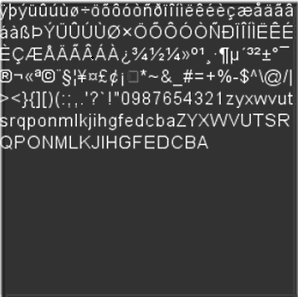
可以明顯看出,libgdx 的文字繪製,是根據 fnt 檔取得對應文字在 png 中的座標位置,然後截取圖片的相應部分來繪製。
那麼要讓 libgdx 支援中文,思路就很簡單了:我們自己建立 fnt 與 png 檔,其中包含我們要使用的中文即可。
作者提供了一個對應的工具:Hiero。下載後雙擊運行,在右側列表中選擇一個可用的字型,然後輸入需要的中文(最好保留自動產生的英文和符號)。
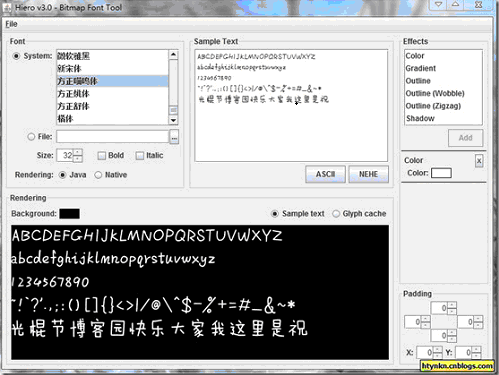
在右側的 Effects 中可以設定效果:
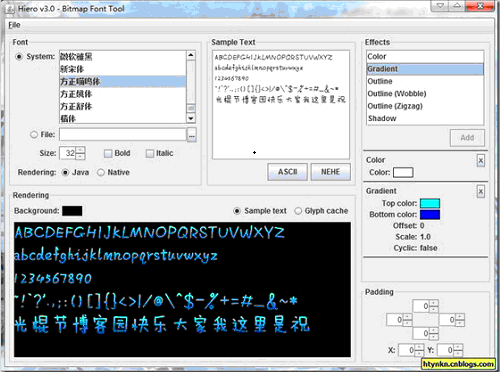
點 File — Save as BMFont Files 產生兩個檔案,把它們複製到 assets 資料夾。
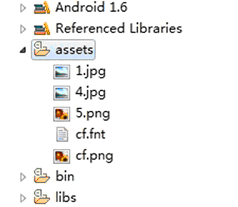
使用時:
bitmapFont = new BitmapFont(Gdx.files.internal("cf.fnt"),
    Gdx.files.internal("cf.png"), false);
指定我們產生的檔案作為繪製參考,然後繪製:
bitmapFont.draw(spriteBatch, "FPS" + Gdx.graphics.getFramesPerSecond(),
    5, Gdx.graphics.getHeight() - 10);
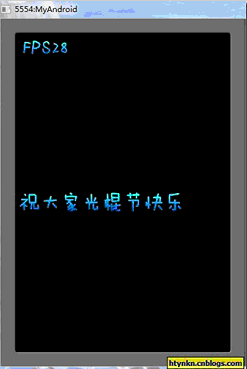
bitmapFont.draw(spriteBatch, "祝大家光棍節快樂",
    0, Gdx.graphics.getHeight() / 2 - 8);
程式運行效果:
關於多行文字,可以呼叫
public TextBounds drawMultiLine (SpriteBatch spriteBatch, CharSequence str,
    float x, float y)
或者
public TextBounds drawMultiLine (SpriteBatch spriteBatch, CharSequence str,
float x, float y, float alignmentWidth, HAlignment alignment) Android 遊戲開發 18:重力感測器在遊戲中的應用
什麼是感測器 感測器是能偵測光線、溫度、方向、重力等環境變化的裝置。Android 支援多種感測器,包括加速度感測器、陀螺儀、光感測器、磁場感測器、方向感測器、壓力感測器
 Android五子棋遊戲開發實戰的親身經驗之一:從構想到需求澄清
從一個簡單想法開始 開發五子棋前,先寫下專案構想:在 15×15 棋盤上進行對戰,讓玩家能透過直覺操作完成連線。這個階段不需要急著寫程式,而是先把規則、功能與體驗描述清楚
 23 天從零做一款 Android 遊戲(第 21~23 天):商業化、音效與上架
第 21 天:遊戲的商業化我做這款遊戲純粹是嘗試,沒指望靠它賺大錢。遊戲免費下載,玩家若願意可以付費買金幣。我喜歡類似布丁怪獸那種做法:不付錢也能玩到全部內容,Drone
 Android 遊戲開發教學:動手做跳躍類遊戲(二)打造會反彈的小球
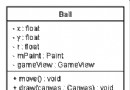
這篇要完成的是小球這個類別——玩家在遊戲裡真正操作的角色。先看類圖:需要確定的成員很清楚:座標 x、y,半徑 r,負責運動的 move 方法,以及把小球畫到螢幕上的 dr