

編輯:Android 遊戲開發
如果只是拿 Image 之類的圖片當背景,做個簡單場景還行,但要做 RPG 這類遊戲就顯得有點力不從心。為了追求效率,一般可以採用 libgdx 的 SpriteCache;不過如果你習慣使用 TiledMap,libgdx 同樣提供了支援。
相關的類別有 TiledMap、TileAtlas、TileMapRenderer,都位於 com.badlogic.gdx.graphics.g2d.tiled 之中。下面我們從頭看看 TiledMap 的用法。
我使用的是 Tile Map editor,下載網址:https://www.mapeditor.org/。先新增一個地圖,尺寸 50×30,每個方塊大小 32×32。
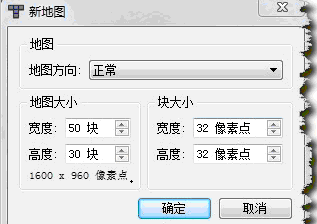
接著使用的圖塊資源是從網路上找來的,具體出處已不可考,在此向無私奉獻素材的作者致謝。
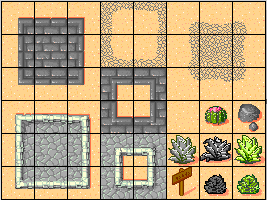
新增一個圖塊:
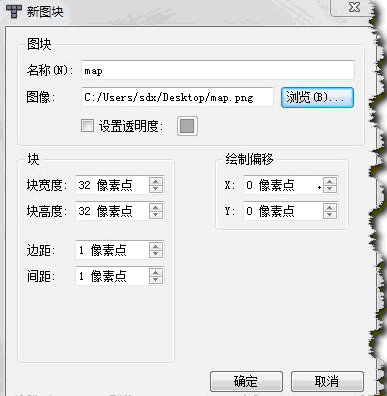
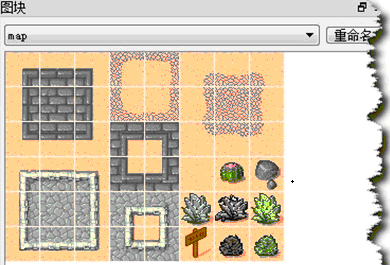
方塊的寬高都是 32,邊距與間距都是 1px,這些數值取決於你的圖塊資源本身。效果如下:
接下來就發揮想像力,畫一幅地圖吧。
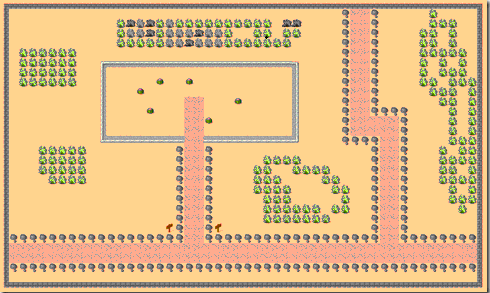
存檔為 tmx 檔,然後用 gdx-tiled-preprocessor 處理一下。處理完成後會多出三個檔案,並覆蓋原本的同名檔案:
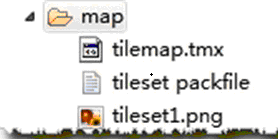
其中 tilest1.png 檔案如下:

終於可以開始繪製了。
map = TiledLoader.createMap(mapHandle);
atlas = new TileAtlas(map, new FileHandle("map/"));
tileMapRenderer = new TileMapRenderer(map, atlas, 10, 10);
最後在 render 中用 tileMapRenderer.render(cam) 繪製。而在 TileMapRenderer(map, atlas, 10, 10) 這句中,後面兩個 10 代表緩衝的方塊數,可以視情況調整(我這裡是隨便寫的)。
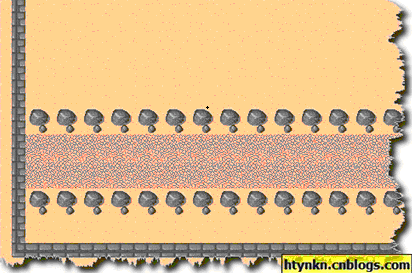
我個人比較喜歡舞台,其實 TiledMap 一樣可以在舞台中使用。我在舞台中繪製一個標籤作為示範。原理很簡單:從 Stage 取得 Camera,交給 Renderer 使用,最後在 Stage 中繪製。關鍵程式碼如下:
Gdx.gl.glClear(GL10.GL_COLOR_BUFFER_BIT);
OrthographicCamera c = (OrthographicCamera) stage.getCamera();
((Label) stage.findActor("fpsLabel")).setText("FPS: "
    + Gdx.graphics.getFramesPerSecond());
stage.act(Gdx.graphics.getDeltaTime());
tileMapRenderer.render(c);
stage.draw();
完整程式碼:
package com.cnblogs.htynkn.game;

import com.badlogic.gdx.ApplicationListener;
import com.badlogic.gdx.Gdx;
import com.badlogic.gdx.files.FileHandle;
import com.badlogic.gdx.graphics.Color;
import com.badlogic.gdx.graphics.GL10;
import com.badlogic.gdx.graphics.OrthographicCamera;
import com.badlogic.gdx.graphics.g2d.BitmapFont;
import com.badlogic.gdx.graphics.g2d.tiled.TileAtlas;
import com.badlogic.gdx.graphics.g2d.tiled.TileMapRenderer;
import com.badlogic.gdx.graphics.g2d.tiled.TiledLoader;
import com.badlogic.gdx.graphics.g2d.tiled.TiledMap;
import com.badlogic.gdx.math.Vector2;
import com.badlogic.gdx.math.Vector3;
import com.badlogic.gdx.scenes.scene2d.Stage;
import com.badlogic.gdx.scenes.scene2d.ui.Label;
import com.badlogic.gdx.scenes.scene2d.ui.Label.LabelStyle;

public class JavaGame implements ApplicationListener {

    Stage stage;
    float width;
    float height;
    private TiledMap map;
    private TileAtlas atlas;
    private TileMapRenderer tileMapRenderer;

    Vector3 camDirection = new Vector3(1, 1, 0);
    Vector2 maxCamPosition = new Vector2(0, 0);

    @Override
    public void create() {
        final String path = "map/";
        final String mapname = "tilemap";
        FileHandle mapHandle = Gdx.files.internal(path + mapname + ".tmx");
        map = TiledLoader.createMap(mapHandle);
        atlas = new TileAtlas(map, new FileHandle("map/"));
        tileMapRenderer = new TileMapRenderer(map, atlas, 10, 10);
        maxCamPosition.set(tileMapRenderer.getMapWidthUnits(),
            tileMapRenderer.getMapHeightUnits());

        width = Gdx.graphics.getWidth();
        height = Gdx.graphics.getHeight();
        stage = new Stage(width, height, true);
        Label label = new Label("FPS:", new LabelStyle(new BitmapFont(Gdx.files
            .internal("font/blue.fnt"),
            Gdx.files.internal("font/blue.png"), false), Color.BLACK),
            "fpsLabel");
        stage.addActor(label);
        Gdx.input.setInputProcessor(stage);
    }

    @Override
    public void render() {
        Gdx.gl.glClear(GL10.GL_COLOR_BUFFER_BIT);
        OrthographicCamera c = (OrthographicCamera) stage.getCamera();
        ((Label) stage.findActor("fpsLabel")).setText("FPS: "
            + Gdx.graphics.getFramesPerSecond());
        stage.act(Gdx.graphics.getDeltaTime());
        tileMapRenderer.render(c);
        stage.draw();
    }

    // 其餘生命週期方法略
}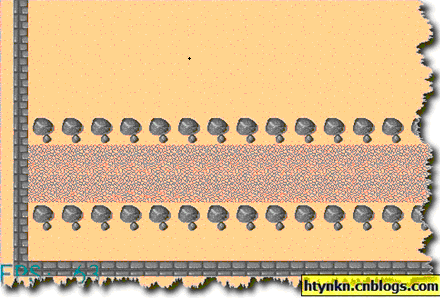
效果不是很明顯,左下角有一個 Label。雖然我們已經把 Map 繪製出來,但還沒有角色,也還沒設定牆壁等障礙,接下來的幾篇文章會一一說明。
1. 做好的 TMX 檔一定要先處理後再使用,要用 TiledMapPacker 處理,而不是 TexturePacker。我起初把兩者搞混了,直到把這段程式碼讀懂才反應過來。
2. Stage 與 TiledMap 混用時,Stage 的繪製一定要放在最後。
3. Stage 的相機可以移動,移動時會產生地圖捲動的效果(例如主角向前走),但一定要同步更新 Stage 中 Actors 的位置。
這篇博文寫了一天半,主要是因為我粗心把 TiledMapPacker 和 TexturePacker 搞錯了。仔細研究 TexturePacker 後,發現它也是很有用的工具,演算法相當有趣,而且還有熱心網友做的 GUI 介面,用它就不必辛苦地手動拼圖了。
 Android遊戲開發實戰(十七):橫屏與豎屏的切換技巧
只要玩過Android手機,對「橫豎屏」這套機制應該都不陌生。仔細觀察你手機裡的遊戲,會發現大多數作品都被鎖死在單一方向上:有的只能豎著握,有的必須橫過來玩,真正允許自由
 Android五子棋遊戲開發實戰的親身經驗之四:從 Swing 思維到 Android 分層實踐
從 Swing 思維到 Android 撰寫 Android 五子棋時,若沿用 Swing 的事件與執行緒思維,容易遇到意料之外的問題。例如物件看似已初始化,卻仍拋出空指
 Android 遊戲開發 8:MediaPlayer 與 SoundPool 播播音訊的完整比較與實作
遊戲沒有音效,體感會直接掉一個檔次。Android 裡能播聲音的 API 主要有 MediaPlayer、SoundPool 與 JetPlayer 三個;JetPlay
 Android遊戲引擎libgdx使用教學8:相機與觀察點
上一節講了 libgdx 引擎框架總觀,本節來談談相機與觀察點。相機也可以稱為觀察者,最簡單的例子就是魂斗羅這類橫向捲軸遊戲。 玩家操作角色前進、後退、跳躍,顯示出來的