

編輯:Android 資訊
合適的工具類能讓代碼更乾淨、開發更快。下面是我日常積累的一批 Android 通用工具類,覆蓋緩存清理、輸入校驗、偏好存儲、服務檢測、日誌與加解密等場景。
按目錄分類清理,避免到處寫路徑字符串。
import java.io.File;
import java.math.BigDecimal;
import android.content.Context;
import android.os.Environment;
import android.text.TextUtils;

/** 本應用數據清除管理器 */
public class DataCleanManager {

    /** 清除內部緩存 /data/data/包名/cache */
    public static void cleanInternalCache(Context context) {
        deleteFilesByDirectory(context.getCacheDir());
    }

    /** 清除所有數據庫 /data/data/包名/databases */
    public static void cleanDatabases(Context context) {
        deleteFilesByDirectory(new File(
                "/data/data/" + context.getPackageName() + "/databases"));
    }

    /** 清除 SharedPreference /data/data/包名/shared_prefs */
    public static void cleanSharedPreference(Context context) {
        deleteFilesByDirectory(new File(
                "/data/data/" + context.getPackageName() + "/shared_prefs"));
    }

    /** 按名字清除指定數據庫 */
    public static void cleanDatabaseByName(Context context, String dbName) {
        context.deleteDatabase(dbName);
    }

    /** 清除 /data/data/包名/files */
    public static void cleanFiles(Context context) {
        deleteFilesByDirectory(context.getFilesDir());
    }

    /** 清除外部 cache /mnt/sdcard/android/data/包名/cache */
    public static void cleanExternalCache(Context context) {
        if (Environment.getExternalStorageState().equals(Environment.MEDIA_MOUNTED)) {
            deleteFilesByDirectory(context.getExternalCacheDir());
        }
    }

    /**
     * 清除自定義路徑下的文件。
     * 使用需謹慎,避免誤刪;僅支持刪除目錄下的文件。
     */
    public static void cleanCustomCache(String filePath) {
        deleteFilesByDirectory(new File(filePath));
    }

    /** 清除本應用所有數據 */
    public static void cleanApplicationData(Context context, String... filepath) {
        cleanInternalCache(context);
        cleanExternalCache(context);
        cleanDatabases(context);
        cleanSharedPreference(context);
        cleanFiles(context);
        if (filepath == null) {
            return;
        }
        for (String filePath : filepath) {
            cleanCustomCache(filePath);
        }
    }

    /**
     * 遞歸刪除文件夾下的內容。
     * 若傳入的 directory 是文件而非目錄,不做處理。
     */
    private static void deleteFilesByDirectory(File directory) {
        if (directory != null && directory.exists()) {
            if (directory.isFile()) {
                directory.delete();
            } else if (directory.isDirectory()) {
                File[] files = directory.listFiles();
                if (files == null) {
                    return;
                }
                for (File item : files) {
                    deleteFilesByDirectory(item);
                }
            }
        }
    }

    /**
     * 計算文件夾大小。
     * getExternalFilesDir() → SDCard/Android/data/包名/files,適合長期數據
     * getExternalCacheDir() → SDCard/Android/data/包名/cache,適合臨時緩存
     */
    public static long getFolderSize(File file) throws Exception {
        long size = 0;
        try {
            File[] fileList = file.listFiles();
            if (fileList == null) {
                return 0;
            }
            for (File child : fileList) {
                if (child.isDirectory()) {
                    size += getFolderSize(child);
                } else {
                    size += child.length();
                }
            }
        } catch (Exception e) {
            e.printStackTrace();
        }
        return size;
    }

    /** 刪除指定目錄下的文件及空目錄 */
    public static void deleteFolderFile(String filePath, boolean deleteThisPath) {
        if (TextUtils.isEmpty(filePath)) {
            return;
        }
        try {
            File file = new File(filePath);
            if (file.isDirectory()) {
                File[] files = file.listFiles();
                if (files != null) {
                    for (File child : files) {
                        deleteFolderFile(child.getAbsolutePath(), true);
                    }
                }
            }
            if (deleteThisPath) {
                if (!file.isDirectory()) {
                    file.delete();
                } else if (file.listFiles() != null && file.listFiles().length == 0) {
                    file.delete();
                }
            }
        } catch (Exception e) {
            e.printStackTrace();
        }
    }

    /** 格式化單位 */
    public static String getFormatSize(double size) {
        double kiloByte = size / 1024;
        if (kiloByte < 1) {
            return size + "Byte";
        }
        double megaByte = kiloByte / 1024;
        if (megaByte < 1) {
            return new BigDecimal(Double.toString(kiloByte))
                    .setScale(2, BigDecimal.ROUND_HALF_UP).toPlainString() + "KB";
        }
        double gigaByte = megaByte / 1024;
        if (gigaByte < 1) {
            return new BigDecimal(Double.toString(megaByte))
                    .setScale(2, BigDecimal.ROUND_HALF_UP).toPlainString() + "MB";
        }
        double teraBytes = gigaByte / 1024;
        if (teraBytes < 1) {
            return new BigDecimal(Double.toString(gigaByte))
                    .setScale(2, BigDecimal.ROUND_HALF_UP).toPlainString() + "GB";
        }
        return new BigDecimal(teraBytes)
                .setScale(2, BigDecimal.ROUND_HALF_UP).toPlainString() + "TB";
    }

    public static String getCacheSize(File file) throws Exception {
        return getFormatSize(getFolderSize(file));
    }
}手機號、郵箱、身份證校驗,包含 15/18 位身份證的省區、生日與校驗位完整算法。
import java.util.HashMap;
import java.util.regex.Matcher;
import java.util.regex.Pattern;

public class VerificationUtils {

    private final static Pattern emailer = Pattern.compile(
            "\\w+([-+.]\\w+)*@\\w+([-.]\\w+)*\\.\\w+([-.]\\w+)*");

    private static String _codeError;

    // wi = 2(n-1) (mod 11)
    final static int[] wi = { 7, 9, 10, 5, 8, 4, 2, 1, 6, 3, 7, 9, 10, 5, 8, 4, 2, 1 };
    // 校驗碼
    final static int[] vi = { 1, 0, 'X', 9, 8, 7, 6, 5, 4, 3, 2 };

    private static int[] ai = new int[18];

    private static String[] _areaCode = {
            "11", "12", "13", "14", "15", "21", "22", "23",
            "31", "32", "33", "34", "35", "36", "37",
            "41", "42", "43", "44", "45", "46",
            "50", "51", "52", "53", "54",
            "61", "62", "63", "64", "65", "71", "81", "82", "91"
    };

    private static HashMap<String, Integer> dateMap;
    private static HashMap<String, String> areaCodeMap;

    static {
        dateMap = new HashMap<>();
        dateMap.put("01", 31);
        dateMap.put("02", null);   // 閏年特殊處理
        dateMap.put("03", 31);
        dateMap.put("04", 30);
        dateMap.put("05", 31);
        dateMap.put("06", 30);
        dateMap.put("07", 31);
        dateMap.put("08", 31);
        dateMap.put("09", 30);
        dateMap.put("10", 31);
        dateMap.put("11", 30);
        dateMap.put("12", 31);

        areaCodeMap = new HashMap<>();
        for (String code : _areaCode) {
            areaCodeMap.put(code, null);
        }
    }

    /** 驗證手機號 */
    public static boolean isMobile(String str) {
        if (str == null) {
            return false;
        }
        Pattern p = Pattern.compile("^[1][3,4,5,7,8][0-9]{9}$");
        Matcher m = p.matcher(str);
        return m.matches();
    }

    /** 驗證郵箱 */
    public static boolean isEmail(String email) {
        if (email == null || email.trim().length() == 0) {
            return false;
        }
        return emailer.matcher(email).matches();
    }

    /** 是否為空或全空白字符 */
    public static boolean isEmpty(String input) {
        if (input == null || "".equals(input)) {
            return true;
        }
        for (int i = 0; i < input.length(); i++) {
            char c = input.charAt(i);
            if (c != ' ' && c != '\t' && c != '\r' && c != '\n') {
                return false;
            }
        }
        return true;
    }

    /** 驗證位數:15 或 18 位 */
    public static boolean verifyLength(String code) {
        int length = code.length();
        return length == 15 || length == 18;
    }

    /** 驗證省區編碼 */
    public static boolean verifyAreaCode(String code) {
        String areaCode = code.substring(0, 2);
        return areaCodeMap.containsKey(areaCode);
    }

    /** 驗證生日段 */
    public static boolean verifyBirthdayCode(String code) {
        String month = code.substring(10, 12);
        if (!dateMap.containsKey(month)) {
            return false;
        }
        String dayCode = code.substring(12, 14);
        Integer day = dateMap.get(month);
        Integer year = Integer.valueOf(code.substring(6, 10));
        if (day != null) {
            return Integer.valueOf(dayCode) <= day && Integer.valueOf(dayCode) >= 1;
        }
        boolean isLeap = (year % 4 == 0 && year % 100 != 0) || (year % 400 == 0);
        int max = isLeap ? 29 : 28;
        return Integer.valueOf(dayCode) <= max && Integer.valueOf(dayCode) >= 1;
    }

    /** 前 17 位必須全為數字 */
    public static boolean containsAllNumber(String code) {
        String str;
        if (code.length() == 15) {
            str = code.substring(0, 15);
        } else if (code.length() == 18) {
            str = code.substring(0, 17);
        } else {
            return false;
        }
        char[] ch = str.toCharArray();
        for (char c : ch) {
            if (!(c >= '0' && c <= '9')) {
                return false;
            }
        }
        return true;
    }

    /** 完整校驗 */
    public static boolean verify(String idcard) {
        if (!verifyLength(idcard) || !containsAllNumber(idcard)) {
            return false;
        }
        String eifhteencard = idcard.length() == 15 ? uptoeighteen(idcard) : idcard;
        return verifyAreaCode(eifhteencard)
                && verifyBirthdayCode(eifhteencard)
                && verifyMOD(eifhteencard);
    }

    /** 校驗校驗位 */
    public static boolean verifyMOD(String code) {
        String verify = code.substring(17, 18);
        if ("x".equals(verify)) {
            code = code.replaceAll("x", "X");
            verify = "X";
        }
        return verify.equals(getVerify(code));
    }

    public static String getVerify(String eightcardid) {
        int remaining = 0;
        if (eightcardid.length() == 18) {
            eightcardid = eightcardid.substring(0, 17);
        }
        if (eightcardid.length() == 17) {
            int sum = 0;
            for (int i = 0; i < 17; i++) {
                ai[i] = Integer.parseInt(eightcardid.substring(i, i + 1));
            }
            for (int i = 0; i < 17; i++) {
                sum += wi[i] * ai[i];
            }
            remaining = sum % 11;
        }
        return remaining == 2 ? "X" : String.valueOf(vi[remaining]);
    }

    /** 15 位升 18 位 */
    public static String uptoeighteen(String fifteencardid) {
        String eightcardid = fifteencardid.substring(0, 6) + "19"
                + fifteencardid.substring(6, 15);
        return eightcardid + getVerify(eightcardid);
    }
}封裝成靜態方法,免去重複的 getSharedPreferences / edit / commit 三步行。並提供按運行時類型分派的通用存取入口。
import android.content.Context;
import android.content.SharedPreferences;
import android.content.SharedPreferences.Editor;

public class SharedPreferencesUtil {

    private static final String SP_NAME = "sp_name";

    /** 保存單個字符串 */
    public static void setStringParam(Context context, String key, String value) {
        SharedPreferences sp = context.getSharedPreferences(SP_NAME, Context.MODE_PRIVATE);
        sp.edit().putString(key, value).apply();
    }

    /** 批量保存字符串 */
    public static void setStringParams(Context context, String[] keys, String[] values) {
        SharedPreferences sp = context.getSharedPreferences(SP_NAME, Context.MODE_PRIVATE);
        Editor edit = sp.edit();
        for (int i = 0; i < keys.length; i++) {
            edit.putString(keys[i], values[i]);
        }
        edit.apply();
    }

    /**
     * 保存任意支持類型。
     * 依運行時實際類型調用對應的 put 方法。
     */
    public static void setParam(Context context, String key, Object object) {
        String type = object.getClass().getSimpleName();
        SharedPreferences sp = context.getSharedPreferences(SP_NAME, Context.MODE_PRIVATE);
        Editor editor = sp.edit();

        if ("String".equals(type)) {
            editor.putString(key, (String) object);
        } else if ("Integer".equals(type)) {
            editor.putInt(key, (Integer) object);
        } else if ("Boolean".equals(type)) {
            editor.putBoolean(key, (Boolean) object);
        } else if ("Float".equals(type)) {
            editor.putFloat(key, (Float) object);
        } else if ("Long".equals(type)) {
            editor.putLong(key, (Long) object);
        }
        editor.apply();
    }

    /** 讀取,依默認值的類型決定調用哪個 get 方法 */
    @SuppressWarnings("unchecked")
    public static <T> T getParam(Context context, String key, T defaultObject) {
        String type = defaultObject.getClass().getSimpleName();
        SharedPreferences sp = context.getSharedPreferences(SP_NAME, Context.MODE_PRIVATE);

        if ("String".equals(type)) {
            return (T) sp.getString(key, (String) defaultObject);
        } else if ("Integer".equals(type)) {
            return (T) (Integer) sp.getInt(key, (Integer) defaultObject);
        } else if ("Boolean".equals(type)) {
            return (T) (Boolean) sp.getBoolean(key, (Boolean) defaultObject);
        } else if ("Float".equals(type)) {
            return (T) (Float) sp.getFloat(key, (Float) defaultObject);
        } else if ("Long".equals(type)) {
            return (T) (Long) sp.getLong(key, (Long) defaultObject);
        }
        return defaultObject;
    }
}
實踐建議:commit() 是同步寫盤,apply() 是異步,除個別需要立刻落盤的場景(如退出前寫入關鍵標記)外,一律用 apply()。
import java.util.List;
import android.app.ActivityManager;
import android.content.Context;

/** 服務是否後台運行檢測幫助類 */
public class ServiceUtil {

    /**
     * 判斷服務是否在運行
     *
     * @param className 服務的完整類名
     * @return true 在運行,false 不在運行
     */
    public static boolean isServiceRun(Context mContext, String className) {
        boolean isRun = false;
        ActivityManager activityManager =
                (ActivityManager) mContext.getSystemService(Context.ACTIVITY_SERVICE);
        List<ActivityManager.RunningServiceInfo> serviceList =
                activityManager.getRunningServices(40);
        for (ActivityManager.RunningServiceInfo info : serviceList) {
            if (info.service.getClassName().equals(className)) {
                isRun = true;
                break;
            }
        }
        return isRun;
    }
}通過切換 NOWSTATE 常量控制不同環境的日誌行為,上線後不必到處刪 log。
import android.util.Log;

/** Log 顯示工具類 */
public class LogUtil {

    private final static int DEVELOP = 0;   // 開發
    private final static int TEST = 1;      // 測試
    private final static int ONLINE = 2;    // 上線

    private final static int NOWSTATE = DEVELOP;

    public static void info(String msg) {
        info("volunteer", msg);
    }

    public static void info(String TAG, String msg) {
        switch (NOWSTATE) {
            case DEVELOP:
                Log.i(TAG, "develop:---" + msg);
                break;
            case TEST:
                Log.i(TAG, "test:---" + msg);
                break;
            case ONLINE:
                break;
        }
    }
}無鹽 MD5,小寫十六進制輸出。這裡給出調用方式與關鍵結構;完整的 md5Transform() 是標準的四輪 64 步壓縮函數(FF/GG/HH/II 各 16 步),屬於固定演算法實現,可參照 RFC 1321 或原始源碼補全。
public final class MD5Utils {

    private static final char[] Digit = {
            '0', '1', '2', '3', '4', '5', '6', '7', '8', '9',
            'a', 'b', 'c', 'd', 'e', 'f'
    };

    private static final byte[] PADDING = new byte[64];   // 首位為 -128,其餘為 0

    private static long[] state = new long[4];
    private static long[] count = new long[2];
    private static byte[] buffer = new byte[64];
    private static byte[] digest = new byte[16];
    private static String digestHexStr;

    private MD5Utils() { }

    /** 無鹽 MD5,小寫輸出 */
    public static String toMD5(String s) {
        md5Init();
        md5Update(s.getBytes(), s.length());
        md5Final();
        digestHexStr = "";
        for (int i = 0; i < 16; i++) {
            digestHexStr += byteHEX(digest[i]);
        }
        return digestHexStr;
    }

    private static void md5Init() {
        count[0] = 0L;
        count[1] = 0L;
        state[0] = 0x67452301L;
        state[1] = 0xefcdab89L;
        state[2] = 0x98badcfeL;
        state[3] = 0x10325476L;
    }

    private static long F(long x, long y, long z) { return (x & y) | ((~x) & z); }
    private static long G(long x, long y, long z) { return (x & z) | (y & (~z)); }
    private static long H(long x, long y, long z) { return x ^ y ^ z; }
    private static long I(long x, long y, long z) { return y ^ (x | (~z)); }

    private static long FF(long a, long b, long c, long d, long x, long s, long ac) {
        a += F(b, c, d) + x + ac;
        a = ((int) a << (int) s) | ((int) a >>> (int) (32L - s));
        return a + b;
    }
    // GG / HH / II 結構相同,分別替換為 G / H / I

    private static void md5Update(byte[] input, int i) {
        byte[] block = new byte[64];
        int k = (int) (count[0] >>> 3) & 0x3f;
        if ((count[0] += i << 3) < (long) (i << 3)) {
            count[1]++;
        }
        count[1] += i >>> 29;
        int l = 64 - k;
        int j;
        if (i >= l) {
            md5Memcpy(buffer, input, k, 0, l);
            md5Transform(buffer);
            for (j = l; j + 63 < i; j += 64) {
                md5Memcpy(block, input, 0, j, 64);
                md5Transform(block);
            }
            k = 0;
        } else {
            j = 0;
        }
        md5Memcpy(buffer, input, k, j, i - j);
    }

    private static void md5Final() {
        byte[] bits = new byte[8];
        Encode(bits, count, 8);
        int i = (int) (count[0] >>> 3) & 0x3f;
        int j = i >= 56 ? 120 - i : 56 - i;
        md5Update(PADDING, j);
        md5Update(bits, 8);
        Encode(digest, state, 16);
    }

    private static void md5Memcpy(byte[] to, byte[] from, int i, int j, int k) {
        for (int l = 0; l < k; l++) {
            to[i + l] = from[j + l];
        }
    }

    private static void Encode(byte[] to, long[] from, int i) {
        int j = 0;
        for (int k = 0; k < i; k += 4) {
            to[k]     = (byte) (int) (from[j] & 255L);
            to[k + 1] = (byte) (int) (from[j] >>> 8 & 255L);
            to[k + 2] = (byte) (int) (from[j] >>> 16 & 255L);
            to[k + 3] = (byte) (int) (from[j] >>> 24 & 255L);
            j++;
        }
    }

    private static void Decode(long[] to, byte[] from, int i) {
        int j = 0;
        for (int k = 0; k < i; k += 4) {
            to[j] = b2iu(from[k]) | (b2iu(from[k + 1]) << 8)
                    | (b2iu(from[k + 2]) << 16) | (b2iu(from[k + 3]) << 24);
            j++;
        }
    }

    private static long b2iu(byte byte0) {
        return byte0 >= 0 ? byte0 : byte0 & 0xff;
    }

    private static String byteHEX(byte byte0) {
        char[] ac = new char[2];
        ac[0] = Digit[byte0 >>> 4 & 0xf];
        ac[1] = Digit[byte0 & 0xf];
        return new String(ac);
    }

    public static void main(String[] args) {
        System.out.println(toMD5("123456"));
    }
}
安全提醒:無鹽 MD5 已不適合存儲口令。密碼類數據請使用加鹽哈希(bcrypt、scrypt、PBKDF2 等),MD5 更適合用於校驗和、緩存 key 這類非敏感場景。
import java.io.UnsupportedEncodingException;

public class Base64Utils {

    private static char[] base64EncodeChars = new char[] {
            'A', 'B', 'C', 'D', 'E', 'F', 'G', 'H', 'I', 'J', 'K', 'L', 'M',
            'N', 'O', 'P', 'Q', 'R', 'S', 'T', 'U', 'V', 'W', 'X', 'Y', 'Z',
            'a', 'b', 'c', 'd', 'e', 'f', 'g', 'h', 'i', 'j', 'k', 'l', 'm',
            'n', 'o', 'p', 'q', 'r', 's', 't', 'u', 'v', 'w', 'x', 'y', 'z',
            '0', '1', '2', '3', '4', '5', '6', '7', '8', '9', '+', '/'
    };

    private static byte[] base64DecodeChars = new byte[] {
            -1, -1, -1, -1, -1, -1, -1, -1, -1, -1, -1, -1, -1, -1, -1, -1,
            -1, -1, -1, -1, -1, -1, -1, -1, -1, -1, -1, -1, -1, -1, -1, -1,
            -1, -1, -1, -1, -1, -1, -1, -1, -1, -1, -1, 62, -1, -1, -1, 63,
            52, 53, 54, 55, 56, 57, 58, 59, 60, 61, -1, -1, -1, -1, -1, -1,
            -1, 0, 1, 2, 3, 4, 5, 6, 7, 8, 9, 10, 11, 12, 13, 14,
            15, 16, 17, 18, 19, 20, 21, 22, 23, 24, 25, -1, -1, -1, -1, -1,
            -1, 26, 27, 28, 29, 30, 31, 32, 33, 34, 35, 36, 37, 38, 39, 40,
            41, 42, 43, 44, 45, 46, 47, 48, 49, 50, 51, -1, -1, -1, -1, -1
    };

    /** 加密 */
    public static String encode(byte[] data) {
        StringBuffer sb = new StringBuffer();
        int len = data.length;
        int i = 0;
        int b1, b2, b3;

        while (i < len) {
            b1 = data[i++] & 0xff;
            if (i == len) {
                sb.append(base64EncodeChars[b1 >>> 2]);
                sb.append(base64EncodeChars[(b1 & 0x3) << 4]);
                sb.append("==");
                break;
            }
            b2 = data[i++] & 0xff;
            if (i == len) {
                sb.append(base64EncodeChars[b1 >>> 2]);
                sb.append(base64EncodeChars[((b1 & 0x03) << 4) | ((b2 & 0xf0) >>> 4)]);
                sb.append(base64EncodeChars[(b2 & 0x0f) << 2]);
                sb.append("=");
                break;
            }
            b3 = data[i++] & 0xff;
            sb.append(base64EncodeChars[b1 >>> 2]);
            sb.append(base64EncodeChars[((b1 & 0x03) << 4) | ((b2 & 0xf0) >>> 4)]);
            sb.append(base64EncodeChars[((b2 & 0x0f) << 2) | ((b3 & 0xc0) >>> 6)]);
            sb.append(base64EncodeChars[b3 & 0x3f]);
        }
        return sb.toString();
    }

    /** 解密 */
    public static byte[] decode(String str) {
        try {
            return decodePrivate(str);
        } catch (UnsupportedEncodingException e) {
            e.printStackTrace();
        }
        return new byte[] {};
    }

    private static byte[] decodePrivate(String str) throws UnsupportedEncodingException {
        StringBuffer sb = new StringBuffer();
        byte[] data = str.getBytes("US-ASCII");
        int len = data.length;
        int i = 0;
        int b1, b2, b3, b4;

        while (i < len) {
            do {
                b1 = base64DecodeChars[data[i++]];
            } while (i < len && b1 == -1);
            if (b1 == -1) {
                break;
            }
            do {
                b2 = base64DecodeChars[data[i++]];
            } while (i < len && b2 == -1);
            if (b2 == -1) {
                break;
            }
            sb.append((char) ((b1 << 2) | ((b2 & 0x30) >>> 4)));

            do {
                b3 = data[i++];
                if (b3 == 61) {
                    return sb.toString().getBytes("iso8859-1");
                }
                b3 = base64DecodeChars[b3];
            } while (i < len && b3 == -1);
            if (b3 == -1) {
                break;
            }
            sb.append((char) (((b2 & 0x0f) << 4) | ((b3 & 0x3c) >>> 2)));

            do {
                b4 = data[i++];
                if (b4 == 61) {
                    return sb.toString().getBytes("iso8859-1");
                }
                b4 = base64DecodeChars[b4];
            } while (i < len && b4 == -1);
            if (b4 == -1) {
                break;
            }
            sb.append((char) (((b3 & 0x03) << 6) | b4));
        }
        return sb.toString().getBytes("iso8859-1");
    }
}
需要強調的是:Base64 是編碼而非加密,任何人都能一行代碼還原,不要用它保護敏感數據。若項目已依賴 Android API 26 以上,直接改用 java.util.Base64 即可,無需自帶實現。
工具類能省事,但積累到一定數量後,需要定期複盤:
 Gradle for Android 第一篇:從 Gradle 與 Android Studio 說起
這本原書是英文的,而國內的 Gradle 中文資料一直不算完整,所以索性開個專欄把《Gradle for Android》好好翻一遍,中間穿插自己的理解與實際項目中的經驗
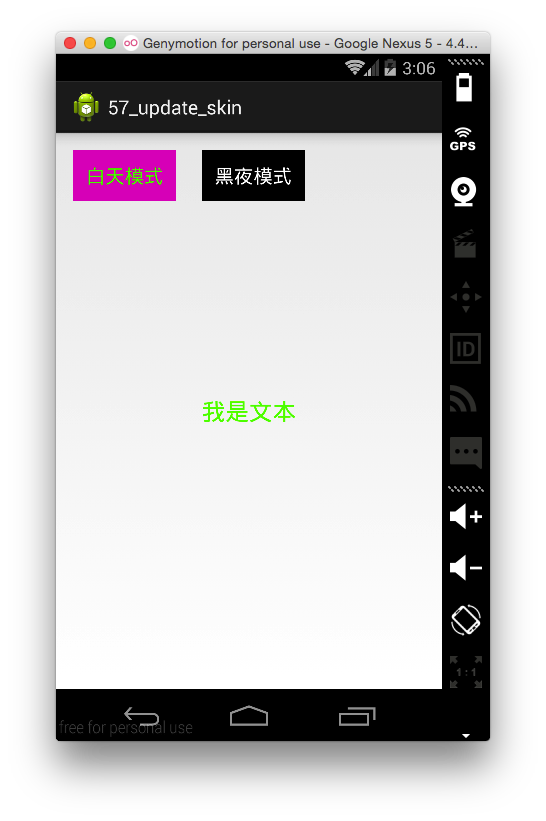 Android 換膚方案實作:把皮膚做成獨立 APK 動態載入
這篇筆記分享一個 Android 換膚的 Demo 思路與完整實作,程式碼已整理上傳到我的 GitHub,後續文章涉及的程式碼也都會統一放在那裡管理。 GitHub 位址
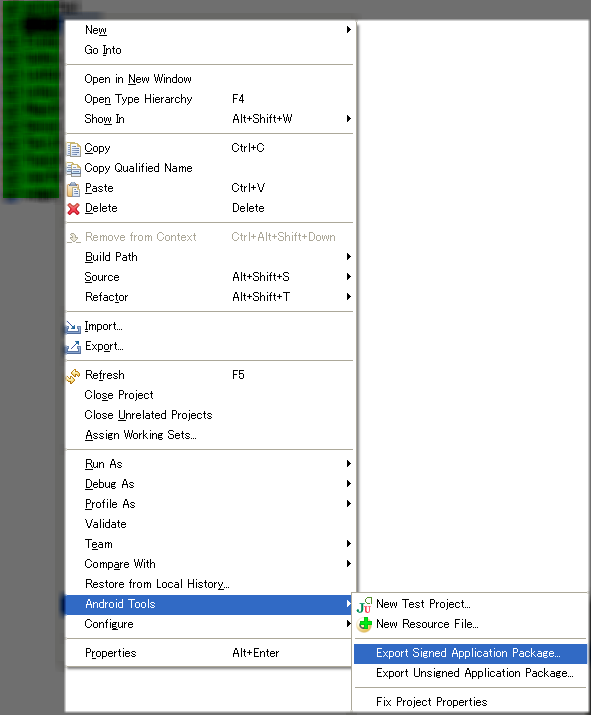 Android APK 簽名原理與過程詳解
在 Android 系統裡,所有安裝進系統的應用都必須帶有一個數位憑證,用來標識應用的作者,並在應用之間建立信任關係。若某個 permission 的 protectio
 Android 粒子爆炸特效:把動畫流程與粒子運動徹底解耦
出發點閒逛時看到一款粒子爆炸控件,效果不錯,但代碼擴展性很差——想換一種爆炸效果,要改的地方太多。於是我把源碼重構了一遍,核心思路是把「爆炸流程」和「粒子怎麼動」徹底分開