

編輯:Android 資訊
在輸入框裡加一個清除按鈕,是相當常見的互動設計。本文示範如何自己封裝一個這樣的控件。
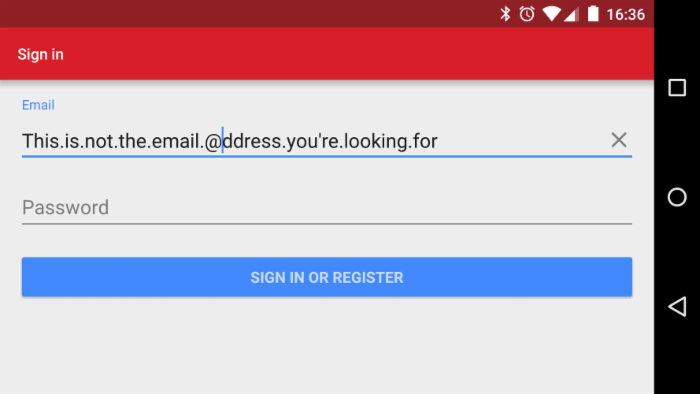
先拆一下需求,這個控件要做到四件事:
第一點靠 TextWatcher 監聽 EditText 的變化,再配合焦點變化控制按鈕的可見性。第二點則要用 compound drawable 承載清除圖標,並在 OnTouch 裡攔截點擊。
基類選用 AppCompatEditText:
public class ClearableEditText extends AppCompatEditText
        implements View.OnTouchListener, View.OnFocusChangeListener, TextWatcher {
接著補上構造函數:
public ClearableEditText(final Context context) {
    super(context);
    init(context);
}

public ClearableEditText(final Context context, final AttributeSet attrs) {
    super(context, attrs);
    init(context);
}

public ClearableEditText(final Context context, final AttributeSet attrs, final int defStyleAttr) {
    super(context, attrs, defStyleAttr);
    init(context);
}
init 方法要做的事:
private void init(final Context context) {
    final Drawable drawable = ContextCompat.getDrawable(context, R.drawable.abc_ic_clear_mtrl_alpha);
    final Drawable wrappedDrawable = DrawableCompat.wrap(drawable);
    //Wrap the drawable so that it can be tinted pre Lollipop
    DrawableCompat.setTint(wrappedDrawable, getCurrentHintTextColor());
    mClearTextIcon = wrappedDrawable;
    mClearTextIcon.setBounds(0, 0,
            mClearTextIcon.getIntrinsicHeight(), mClearTextIcon.getIntrinsicHeight());

    setClearIconVisible(false);

    super.setOnTouchListener(this);
    super.setOnFocusChangeListener(this);
    addTextChangedListener(this);
}
預設用 setClearIconVisible(false) 把按鈕藏起來,等到有輸入時才顯示:
private void setClearIconVisible(final boolean visible) {
    mClearTextIcon.setVisible(visible, false);
    final Drawable[] compoundDrawables = getCompoundDrawables();
    setCompoundDrawables(
            compoundDrawables[0],
            compoundDrawables[1],
            visible ? mClearTextIcon : null,
            compoundDrawables[3]);
}
private Drawable mClearTextIcon;
private OnFocusChangeListener mOnFocusChangeListener;
private OnTouchListener mOnTouchListener;

@Override
public void setOnFocusChangeListener(final OnFocusChangeListener onFocusChangeListener) {
    mOnFocusChangeListener = onFocusChangeListener;
}

@Override
public void setOnTouchListener(final OnTouchListener onTouchListener) {
    mOnTouchListener = onTouchListener;
}
最後把三個 Listener 補完。先看焦點變化:
@Override
public void onFocusChange(final View view, final boolean hasFocus) {
    if (hasFocus) {
        setClearIconVisible(getText().length() > 0);
    } else {
        setClearIconVisible(false);
    }
    if (mOnFocusChangeListener != null) {
        mOnFocusChangeListener.onFocusChange(view, hasFocus);
    }
}
拿到焦點時判斷內容長度是否大於 0,有的話就把清除按鈕露出來。
接著是 onTouch:
@Override
public boolean onTouch(final View view, final MotionEvent motionEvent) {
    final int x = (int) motionEvent.getX();
    if (mClearTextIcon.isVisible() &&
            x > getWidth() - getPaddingRight() - mClearTextIcon.getIntrinsicWidth()) {
        if (motionEvent.getAction() == MotionEvent.ACTION_UP) {
            setText("");
        }
        return true;
    }
    return mOnTouchListener != null && mOnTouchListener.onTouch(view, motionEvent);
}
邏輯分兩層:先確認清除按鈕處於顯示狀態,再判斷觸摸點是否落在按鈕範圍內。若命中,就在 ACTION_UP 時清空內容並消費事件;否則把事件交回給外部的 mOnTouchListener。
最後是 TextWatcher:
@Override
public final void onTextChanged(final CharSequence s, final int start,
                                final int before, final int count) {
    if (isFocused()) {
        setClearIconVisible(s.length() > 0);
    }
}

@Override
public void beforeTextChanged(CharSequence s, int start, int count, int after) {
}

@Override
public void afterTextChanged(Editable s) {
}
同樣是判斷字數,大於 0 顯示按鈕,否則隱藏。
如果你用的是 AutoCompleteTextView,做法完全一致,只要換個基類:
public class ClearableAutoCompleteTextView extends AppCompatAutoCompleteTextView
        implements View.OnTouchListener, View.OnFocusChangeListener, TextWatcher {
控件源碼已上傳到 GitHub:ClearableEditText。
本文譯自:Giving your Edit Texts the All Clear。
 Android 中 Handler、Runnable 與 Thread 的關係詳解
Android 裡常用 Handler 來異步控制 Runnable,那它和 Thread 究竟差在哪?本文從多個角度切入,把這三者的定位與關係一次講清楚。 先回到 Ja
 做了兩年半 Android 開發,這 18 條經驗我想早點告訴你
2014 年決定投入 Android 開發的那一天,我到現在都還記得——那是人生中數一數二正確的決定。一晃兩年半過去了。 剛入行的時候,沒有人告訴我什麼是對的做法。我犯過
 Android FutureTask 原始碼解析:Callable、Future 與非同步結果
FutureTask 是一個可取消的非同步計算任務。它實現 RunnableFuture,因此可當作 Runnable 交給 Thread 或執行緒池執行,也能透過 Fu
 Android 開發者必備資源大全:書、站點、部落格與開源庫
Android 平台的成長幅度一直很驚人,投入其中的開發者只會越來越多,而這個生態也早已告別青澀期。下面這份清單適合剛入門的朋友,也同樣值得已經有幾年經驗的人回頭複習一遍