

編輯:Android 資訊
本文由碼農網 – 小峰原創,轉載請看清文末的轉載要求,歡迎參與我們的付費投稿計劃!
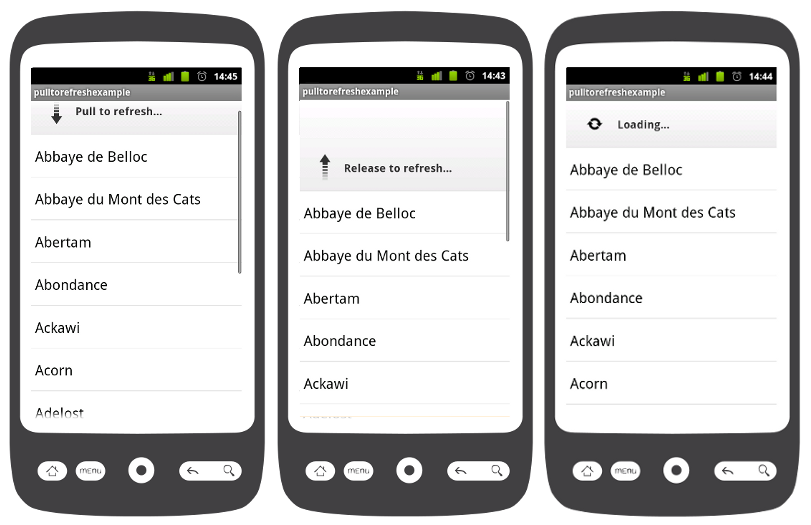
PullToRefresh 是一套經典的開源下拉刷新元件,只要替換原本的 ListView 標籤,就能讓清單具備手勢下拉重新載入的能力,接入成本相當低。
<!-- The PullToRefreshListView replaces a standard ListView widget. -->
<com.markupartist.android.widget.PullToRefreshListView
    android:id="@+id/android:list"
    android:layout_height="fill_parent"
android:layout_width="fill_parent" />// Set a listener to be invoked when the list should be refreshed.
((PullToRefreshListView) getListView()).setOnRefreshListener(new OnRefreshListener() {
@Override
public void onRefresh() {
// Do work to refresh the list here.
new GetDataTask().execute();
}
});
private class GetDataTask extends AsyncTask<Void, Void, String[]> {
...
@Override
protected void onPostExecute(String[] result) {
mListItems.addFirst("Added after refresh...");
// Call onRefreshComplete when the list has been refreshed.
((PullToRefreshListView) getListView()).onRefreshComplete();
super.onPostExecute(result);
}
}關鍵在於兩件事:在 onRefresh() 裡啟動非同步取資料,取回後記得呼叫 onRefreshComplete() 收起刷新指示,否則轉圈動畫不會停止。
這套元件目前已被官方列為不建議使用,新的專案建議改用 AndroidX/v4 support library 內建的 SwipeRefreshLayout。不過對想理解下拉手勢與刷新狀態管理的開發者來說,研讀它的實作仍有相當的學習價值。
 高效改變 Android 按鈕顏色:從 State List 到自定義 RoundButton
Android 的按鈕常需要依狀態改變外觀,例如正常、按下、聚焦與停用。最直接的方式是使用 selector,為每個狀態指定不同背景。但當按鈕數量多、顏色變化多時,維護大
 Android 為何比 iOS 卡?從 1G 記憶體說起
日前一位認證為小米員工的人在微博上說:「iPhone 6 使用者都不在意 1G 記憶體不夠,紅米 2 的 1G 夠用了,保持流暢的秘訣就是少裝 App。」後續發展大家都知
 Android 運算效能優化:從 Traceview 到批次與快取
Android 應用效能不只取決於演算法本身,也與程式碼寫法、執行環境與資料處理方式有關。運算優化的重點,是找出耗時方法、減少重複計算,並避免阻塞主線程。 為什麼相同功能
 Android UI 自動化測試入門:以計算機為例
UI 自動化測試能在沒有手動操作的情況下,模擬使用者點擊、輸入與驗證結果。Android 測試支援庫中的 UI Automator 模組,適合用來做跨應用的黑盒測試。 準