

編輯:初階開發
在很多應用場景中,我們需要在 Android 設備上從遠程服務器下載圖片並顯示。這裡整理出兩種較為可靠的實現方法,供大家參考。
其中 AndroidHttpClient 是 SDK 2.2 新增的方法(API Level 8),使用時需注意版本問題。靜態訪問可直接調用;若 SDK 版本較低,則可考慮 Apache 的 Http 庫,或使用 HttpURLConnection、URLConnection。
static Bitmap downloadBitmap(String url) {
final AndroidHttpClient client = AndroidHttpClient.newInstance("android123");
final HttpGet getRequest = new HttpGet(url);
try {
HttpResponse response = client.execute(getRequest);
final int statusCode = response.getStatusLine().getStatusCode();
if (statusCode != HttpStatus.SC_OK) {
Log.e("cwjDebug", "Error " + statusCode + " while retrieving bitmap from " + url);
return null;
}
final HttpEntity entity = response.getEntity();
if (entity != null) {
InputStream inputStream = null;
try {
inputStream = entity.getContent();
final Bitmap bitmap = BitmapFactory.decodeStream(inputStream);
return bitmap;
} finally {
if (inputStream != null) {
inputStream.close();
}
entity.consumeContent();
}
}
} catch (Exception e) {
getRequest.abort();
Log.e("android123Debug", "Error while retrieving bitmap from " + url, e.toString());
} finally {
if (client != null) {
client.close();
}
}
return null;
}
這裡要特別提醒:BitmapFactory 的 decodeStream 方法在網絡超時或較慢時,可能無法獲取完整數據。為此,我們可以繼承 FilterInputStream 類並重寫其 skip 方法,強制實現流的 flush,其核心原理是檢查是否已到文件末端,並告知 Http 類是否繼續讀取。
static class FlushedInputStream extends FilterInputStream {
public FlushedInputStream(InputStream inputStream) {
super(inputStream);
}
@Override
public long skip(long n) throws IOException {
long totalBytesSkipped = 0L;
while (totalBytesSkipped < n) {
long bytesSkipped = in.skip(n - totalBytesSkipped);
if (bytesSkipped == 0L) {
int byte = read();
if (byte < 0) {
break; // we reached EOF
} else {
bytesSkipped = 1; // we read one byte
}
}
totalBytesSkipped += bytesSkipped;
}
return totalBytesSkipped;
}
}
從 Android 1.5 固件起,Google 提供了 AsyncTask 類來幫助開發者實現異步下載。相對於 Thread,它可以運行在關聯 UI 的線程中,內部實現派生自 Java 5 起的並發包 concurrent,整體較為可靠,只是資源佔用略大,但使用起來更為簡潔。下面的 ImageDownloader 類 download 方法能很好地處理下載與 UI 顯示,第一個參數 url 為遠程文件地址,第二個參數為 ImageView 對象,可直接讓其顯示下載的圖片。
public class ImageDownloader {
public void download(String url, ImageView imageView) {
BitmapDownloaderTask task = new BitmapDownloaderTask(imageView);
task.execute(url);
}
}
考慮到圖片可能較大,為給 JVM 留足空間,這裡推薦使用弱引用以保存 ImageView 對象,避免內存洩漏:
class BitmapDownloaderTask extends AsyncTask<String, Void, Bitmap> {
private String url;
private final WeakReference<ImageView> imageViewReference; //使用WeakReference解決內存問題
public BitmapDownloaderTask(ImageView imageView) {
imageViewReference = new WeakReference<ImageView>(imageView);
}
@Override
protected Bitmap doInBackground(String... params) { //實際的下載線程,內部其實是concurrent線程,所以不會阻塞
return downloadBitmap(params[0]);
}
@Override
protected void onPostExecute(Bitmap bitmap) { //下載完後執行的
if (isCancelled()) {
bitmap = null;
}
if (imageViewReference != null) {
ImageView imageView = imageViewReference.get();
if (imageView != null) {
imageView.setImageBitmap(bitmap); //下載完設置imageView為剛才下載的bitmap對象
}
}
}
}
這兩種方法各有千秋:前者更貼近底層、控制更細,後者則調用簡潔、易於維護。根據實際項目的 SDK 版本與複雜度靈活選用即可。
 Android 採用 PULL 解析 XML 文件
為何選擇 PULL 在 Android 中解析 XML 時,PULL 是相當受歡迎的方案。與 SAX 相比,PULL 會回傳整數事件,讓開發者能依序掌握文件起點、標籤起訖
 Android 執行緒間通信:Handler 與 Looper
Android 提供 Handler 與 Looper 來處理執行緒間的訊息溝通。例如子執行緒從網路下載圖片後,可透過綁定在主執行緒的 Handler 發送訊息,讓 UI
 用 OpenGL ES 在 Android 上畫一個旋轉的圓
這是我在 Android 上用 OpenGL ES 畫的第一個圖形,Render 的覆寫部分參考了其他同學的程式碼。以下完整程式碼可直接運行。 public clas
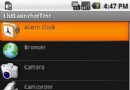 用 PackageManager 取得所有啟動器應用清單
要列出裝置上所有出現在桌面(Launcher)裡的應用,關鍵是 PackageManager 搭配一個特定的 Intent 組合。以下把實作拆成幾個步驟。 1. 定義一