

編輯:更多教學
三星 Galaxy S4(I9500)的多窗口功能默認只支持部分應用。透過修改系統文件,可以讓 FlashBar/多窗口中使用所有安裝在應用抽屜裡的程序,新安裝的應用也能直接使用,無需再逐一添加。
1. 准備好 apktool,並確保你了解 apktool 的反編譯與重新編譯操作。
2. 准備好文本編輯器 Notepad++。
3. 准備好工具 backsmali。
用 apktool 反編譯 system/app 目錄中的 flashbarservice.apk,進入 flashbarservice\smali\com\sec\android\app\FlashBarService\,用 Notepad++ 打開 FlashBarInfo.smali,搜索方法 .method public generateFlashBarList()V。
然後把其中的 category 常量由 MULTIWINDOW_LAUNCHER 改為 LAUNCHER(下面左側 - 為刪除、右側 + 為新增):
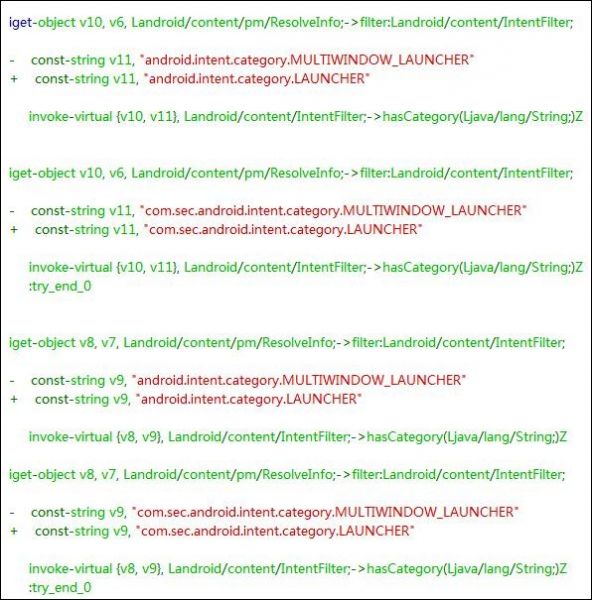
- const-string v11, "android.intent.category.MULTIWINDOW_LAUNCHER"
+ const-string v11, "android.intent.category.LAUNCHER"
- const-string v11, "com.sec.android.intent.category.MULTIWINDOW_LAUNCHER"
+ const-string v11, "com.sec.android.intent.category.LAUNCHER"
- const-string v9, "android.intent.category.MULTIWINDOW_LAUNCHER"
+ const-string v9, "android.intent.category.LAUNCHER"
- const-string v9, "com.sec.android.intent.category.MULTIWINDOW_LAUNCHER"
+ const-string v9, "com.sec.android.intent.category.LAUNCHER"
保存後重新編譯,替換原文件。
反編譯 system/framework 目錄中的 services.jar,進入 services.jar.out\smali\com\android\server\am\,打開 MultiWindowManagerService.smali,搜索方法 .method public isSupportApp(Ljava/lang/String;)Z。
在方法開頭讓其直接返回 true:
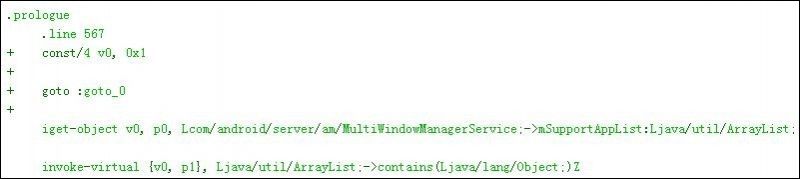
.prologue
.line 567
+ const/4 v0, 0x1
+ goto :goto_0
保存後重新編譯,替換原文件。
完成上述修改並替換好文件後,多窗口列表中就會列出所有應用程序,S4 的多窗口功能便能隨心所欲地使用。本教程僅供參考,修改系統文件有一定風險,請謹慎操作。
 Android L 取得 Root 權限:Recovery 與 SuperSU 刷入教學
Android L 要拿到完整的 Root 權限,核心觀念是「先把第三方 Recovery 刷進去,再透過它安裝授權管理程式」。以下依序說明。 一、準備檔案 下載一個對
 HTC 手機怎麼開啟 WLAN 無線分享,讓其他裝置共用網路
HTC 的 G 系列長年是許多人接觸 Android 的起點,從 G1 一路到 G23,用戶基數不小。以下說明如何把手機的網路分享給其他裝置使用。 什麼是 WLAN 網
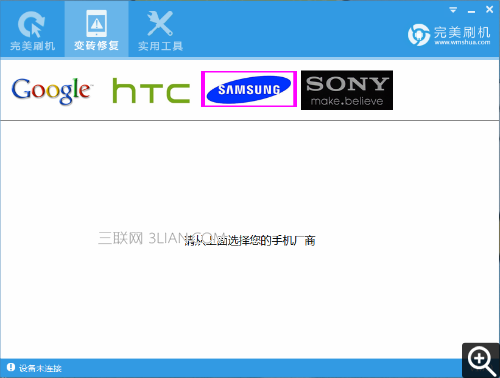 三星 Galaxy S4(i9500)變磚後的救援圖解流程
S4 刷成磚怎麼辦?哪一套工具比較可靠?以下用完美刷機的「變磚修復」功能走一次完整流程,把三個最容易卡住的環節說清楚。 準備 從官網下載完美刷機安裝到桌面。前置條件:手機
 Android 5.1 Lollipop加入了什麼新功能?
Android 5.1在5.0的基礎上針對細節操作進行優化,讓通知、連線與鎖屏體驗更完整。LED通知燈全面可用在無、優先與全部模式下,LED通知燈都能運作,不再僅限全部模