

編輯:進階開發
Android 自推出以來就獲得不少好評,各家手機廠商也相繼投入這個開放平台。實作上,把網路圖片抓下來顯示在畫面上是非常基礎卻又經常被忽略的一環,本文用一個最小範例拆解整個流程。
先建立一個 Activity(本例命名為 ViewWebImageActivity),核心是把圖片網址轉成 Bitmap 後塞進 ImageView:
String imageUrl = "https://example.com/photo.jpg";  // 要顯示的網路圖片
Bitmap bmImg;
ImageView imVIEW;
Button button1;

@Override
public void onCreate(Bundle savedInstanceState) {
    super.onCreate(savedInstanceState);
    setContentView(R.layout.main);
    imVIEW = (ImageView) findViewById(R.id.imVIEW);
    imVIEW.setImageBitmap(returnBitMap(imageUrl));
}

public Bitmap returnBitMap(String url) {
    URL myFileUrl = null;
    Bitmap bitmap = null;
    try {
        myFileUrl = new URL(url);
    } catch (MalformedURLException e) {
        e.printStackTrace();
    }
    try {
        HttpURLConnection conn = (HttpURLConnection) myFileUrl.openConnection();
        conn.setDoInput(true);
        conn.connect();
        InputStream is = conn.getInputStream();
        bitmap = BitmapFactory.decodeStream(is);
        is.close();
    } catch (IOException e) {
        e.printStackTrace();
    }
    return bitmap;
}
其中 returnBitMap(String url) 就是負責把網路圖片轉成 Bitmap 的方法,流程為:建立連線、取得輸入串流、交給 BitmapFactory.decodeStream() 解碼。
在 main.xml 中放一個居中的 ImageView 作為顯示容器:
<?XML version="1.0" encoding="utf-8"?>
<LinearLayout xmlns:android="https://schemas.android.com/apk/res/android"
    android:orientation="vertical"
    android:layout_width="fill_parent"
    android:layout_height="fill_parent">

    <ImageView
        android:id="@+id/imVIEW"
        android:layout_width="wrap_content"
        android:layout_height="wrap_content"
        android:layout_gravity="center" />
</LinearLayout>
Android 對權限控管得相當嚴格。如果沒有宣告網路權限,圖片在模擬器或真機上都不會顯示,只會拿到 null。請在 AndroidManifest.xml 的 </manifest> 之前加入:
<uses-permission android:name="android.permission.INTERNET" />
這個範例把網路 I/O 直接寫在 onCreate() 裡,在單執行緒模型下會阻塞 UI 執行緒,新版 Android 甚至可能直接拋出 NetworkOnMainThreadException。實務上應把下載動作移到背景執行緒(例如 AsyncTask),完成後再回到 UI 執行緒設定圖片,同時加上快取與例外處理,才能避免列表滾動時反覆下載同一張圖。
 Android 應用區域詳解:進程隔離、Zygote 與 APK 的優化產物
Android 平台可以促使行動裝置創新,讓使用者體驗到最優越的行動服務。當年美國運營商 AT&T 和 Verizon 沒有加入,微軟沒有加入,獨樹一幟的加拿大
 Eclipse 開發 Android 入門:重裝上陣(4)用 SQLite 存資料
我們要建的資料表長這樣: +------------+------------------------+ | Column | Description
 Android 開發實作:在 PopupWindow 中呈現 ListView
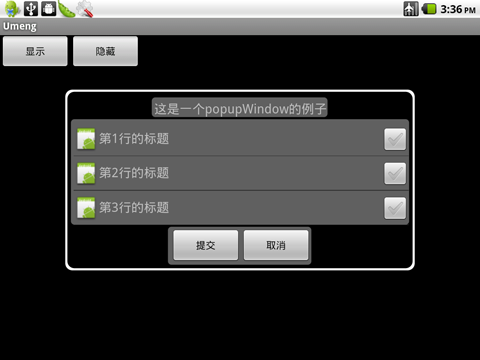
前文我們已經談過如何在 Android 中打造帶圖片與勾選框的 ListView,那麼該怎麼把 ListView 放進 PopupWindow 裡呢?關於 ListVie
 MonoDroid來襲:.NET開發者的Android與Windows Phone移植新路
MonoDroid的意義 隨著Android與Windows Phone相繼成為行動開發重點,跨平台移植需求也越來越高。Novell推出的MonoDroid,正是將Mon