

編輯:進階開發
不少開發者搞不清楚 ArrayAdapter 與 BaseAdapter 的關係。簡單說:ArrayAdapter 是從 BaseAdapter 派生出來的,具備 BaseAdapter 的所有功能,但更強大。
ArrayAdapter 支援泛型,SDK 中可見 android.widget.ArrayAdapter<T> 這樣的宣告。也可以用 ArrayAdapter(Context context, int textViewResourceId) 直接綁定一個 layout。
實務上常需要自訂每一列的樣式。以下範例展示如何繼承 ArrayAdapter 並在 getView 中載入自訂版面:
public class IconListAdapter extends ArrayAdapter<IconListAdapter.IconListItem> {
先宣告 protected LayoutInflater mInflater; 與版面資源 id,在建構子中呼叫 super(context, mResource, items),並以 context.getSystemService(Context.LAYOUT_INFLATER_SERVICE) 取得 inflater。
接著重載 getView(int position, View convertView, ViewGroup parent):若 convertView 為 null 就 inflate 新的 View,否則直接複用(這就是所謂的 View 回收機制,是列表效能的關鍵)。然後用 findViewById() 取出 TextView 與 ImageView,分別設定文字與圖示即可。
補充一個技巧:如果你不想額外放 ImageView,TextView 本身也能顯示圖示,用 setCompoundDrawables() 或 setCompoundDrawablesWithIntrinsicBounds() 就能在文字的左、上、右、下指定 Drawable;其中 int 參數版本接受的是資源 id。
從名稱就能聯想到它與陣列操作密切相關。幾個實用方法:
add(T object) 加入一筆;clear() 清空;insert(T object, int index) 在指定位置插入;remove(T object) 移除;getPosition(T item) 由物件反查位置;sort(Comparator) 直接排序,相當方便;createFromResource() 可從字串陣列資源直接建構;getFilter() 提供正則表達式過濾。
最值得推薦的是 setNotifyOnChange(boolean)。它能暫停 add、insert、remove、clear 這些操作的自動通知,改由你在批次處理完之後,用 notifyDataSetChanged() 或 setNotifyOnChange(true) 統一通知。處理大量資料時,這能大幅降低 UI 的刷新次數。
資料量大(例如超過一百筆)或需要頻繁動態增減時,用 ArrayAdapter 搭配 setNotifyOnChange 更好控制 UI 刷新節奏。若只是單純呈現少量靜態資料,直接從 BaseAdapter 派生反而更省資源。
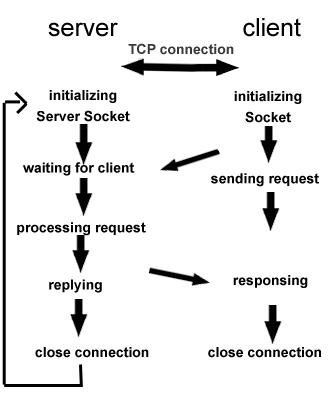 Android 開發實戰:TCP 與 UDP 通訊的完整實現
在行動應用的世界裡,網路通訊幾乎是每一款 App 都繞不開的核心能力,而在 Android 平台上,TCP 與 UDP 這兩大傳輸協議更是扮演著舉足輕重的角色。本文將從基
 Android 2.2 Froyo 登場:凍酸奶如何重塑 Android 生態
2010 年 5 月 20 日晚間 10 點 30 分,Google 在舊金山 Moscone 會議中心舉行的 Google I/O 2010 第二天議程上,正式發表了代
 Android 2.3 SDK 開發文檔同步更新(附各平台下載)
2010 年 12 月 8 日消息,Android 2.3 發布之後,官方開發文檔也已同步更新。Android 應用開發者現在可以到 Android 官方網站下載對應的
 圖解 Dalvik 虛擬機:它為什麼不是 Java 虛擬機
Google 於 2007 年底正式發布了 Android SDK,作為 Android 系統的重要特性,Dalvik 虛擬機也第一次進入了人們的視野。它對記憶體的高效使