

編輯:進階開發
Android 系統內部其實有一個相當實用的檔案工具類 FileUtils,只是沒有開放給標準 SDK 使用。它的原始碼值得一读,特別是文本讀取的部分,能勝任多數 Linux 風格檔案操作的需求。
類別開頭照搬了 POSIX 的權限定義,用八進位表示:
public static final int S_IRWXU = 00700;   // 擁有者:讀寫執行
public static final int S_IRUSR = 00400;   // 擁有者:讀
public static final int S_IWUSR = 00200;   // 擁有者:寫
public static final int S_IXUSR = 00100;   // 擁有者:執行

public static final int S_IRWXG = 00070;   // 同組
public static final int S_IRGRP = 00040;
public static final int S_IWGRP = 00020;
public static final int S_IXGRP = 00010;

public static final int S_IRWXO = 00007;   // 其他人
public static final int S_IROTH = 00004;
public static final int S_IWOTH = 00002;
public static final int S_IXOTH = 00001;
public static final class FileStatus {
    public int dev;
    public int ino;
    public int mode;
    public int nlink;
    public int uid;
    public int gid;
    public int rdev;
    public long size;
    public int blksize;
    public long blocks;
    public long atime;   // 最後存取
    public long mtime;   // 最後修改
    public long ctime;   // 狀態變更
}

public static native boolean getFileStatus(String path, FileStatus status);
這個 FileStatus 結構對應 C 語言的 stat,透過 JNI 直接取得 inode 層級的資訊。一般應用用不到這麼底層,但做檔案管理或同步類工具時很管用。
private static final Pattern SAFE_FILENAME_PATTERN =
        Pattern.compile("[\\w%+,./=_-]+");

public static boolean isFilenameSafe(File file) {
    return SAFE_FILENAME_PATTERN.matcher(file.getPath()).matches();
}
用白名單而非黑名單來驗證路徑,是處理使用者輸入檔名時的正確姿態——凡是含空白、分號、雙點跳層等字元的路徑一律擋掉。
public static boolean copyFile(File srcFile, File destFile) {
    boolean result = false;
    try {
        InputStream in = new FileInputStream(srcFile);
        try {
            result = copyToFile(in, destFile);
        } finally {
            in.close();          // 無論成敗都要關
        }
    } catch (IOException e) {
        result = false;
    }
    return result;
}

public static boolean copyToFile(InputStream inputStream, File destFile) {
    try {
        if (destFile.exists()) destFile.delete();
        OutputStream out = new FileOutputStream(destFile);
        try {
            byte[] buffer = new byte[4096];
            int bytesRead;
            while ((bytesRead = inputStream.read(buffer)) >= 0) {
                out.write(buffer, 0, bytesRead);
            }
        } finally {
            out.close();
        }
        return true;
    } catch (IOException e) {
        return false;
    }
}
兩個方法都靠 try/finally 保證串流被關閉。在行動裝置上,檔案描述符是有限資源,洩漏幾次就會開始出現 Too many open files。
這個方法是整個類別最聰明的地方,用 max 的正負切換三種行為:
public static String readTextFile(File file, int max, String ellipsis)
        throws IOException {
max > 0:讀取前 N 個位元組(「head」模式),不足 N 就讀到結尾。max < 0:保留最後 |N| 個位元組(「tail」模式),用一對輪替的緩衝區實作,適合看日誌結尾。max == 0:整檔讀進 ByteArrayOutputStream,用 1024 位元組一輪迴圈讀完。三種模式都支援 ellipsis:內容被截斷時,會在前段加上前綴、或後段加上後綴,讓呼叫端知道「這不是全部」。
這份實作有幾個值得學的習慣:用固定大小緩衝區而非一次配置整檔記憶體、把「讀多長」與「讀多遠」分離成參數、以及為截斷狀態保留可見的標記。移植到自己專案時,記得補上編碼參數(原始碼用了平台預設編碼,在跨平台情境下建議明確指定 UTF-8)。
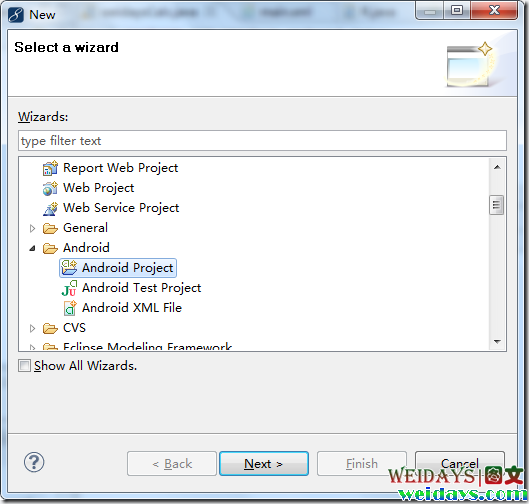 圖文並茂:在 MyEclipse 8.6 上架設 Android 開發環境
繼先前分享《在 Ubuntu 下建立 Eclipse 的 Android 開發環境》之後,這次改以 MyEclipse 8.6 為主體,示範如何從零把 Android 開
 Android 手機作業系統是什麼?從甜点代號到版本演進
Google 有一個廣為人知的習慣:用甜點為 Android 版本命名。這套命名規則本身就是一部濃縮的版本演進史。 C、D、E、F:甜點字母表 歷代版本依序是:1.5
 Eclipse 開發 Android 入門(4):該下載哪個平台
從 Android 1.5 起,可以安裝在裝置上的 SDK 平台有兩種選擇:Android Open Source Project 與 Google。 Android O
 不是蜂巢!Google 公布 Android 3.0 官方標識是一隻蜜蜂
Android 3.0 Honeycomb(蜂巢)已在 2011 年 CES 上亮相,最終預覽版 SDK 也釋出,稍後的 Google I/O 大會還會重點講解。不過在此