

編輯:進階開發
如果後端服務提供的是 JSON 而非 XML,Android 端不必額外引入任何套件——org.json 早已內建。這裡以 Google 官方的「每日一詞」Widget 範例為例,一次涵蓋 HTTP 通訊、正則表達式、JSON 解析與 AppWidget 開發。
public class WordWidget extends AppWidgetProvider {

    @Override
    public void onUpdate(Context context, AppWidgetManager appWidgetManager,
                         int[] appWidgetIds) {
        // 開 Service 避免 ANR
        context.startService(new Intent(context, UpdateService.class));
    }

    public static class UpdateService extends Service {

        @Override
        public void onStart(Intent intent, int startId) {
            RemoteViews updateViews = buildUpdate(this);

            ComponentName thisWidget = new ComponentName(this, WordWidget.class);
            AppWidgetManager manager = AppWidgetManager.getInstance(this);
            manager.updateAppWidget(thisWidget, updateViews);
        }

        public RemoteViews buildUpdate(Context context) {
            Resources res = context.getResources();
            String[] monthNames = res.getStringArray(R.array.month_names);

            Time today = new Time();
            today.setToNow();

            String pageName = res.getString(R.string.template_wotd_title,
                    monthNames[today.month], today.monthDay);

            RemoteViews updateViews = null;
            String pageContent = "";

            try {
                SimpleWikiHelper.prepareUserAgent(context);
                pageContent = SimpleWikiHelper.getPageContent(pageName, false);
            } catch (ApiException e) {
                Log.e("WordWidget", "Couldn't contact API", e);
            } catch (ParseException e) {
                Log.e("WordWidget", "Couldn't parse API response", e);
            }

            // 用正則表達式從頁面內容中擷取需要的欄位
            Pattern pattern = Pattern.compile(SimpleWikiHelper.WORD_OF_DAY_REGEX);
            Matcher matcher = pattern.matcher(pageContent);

            if (matcher.find()) {
                updateViews = new RemoteViews(
                        context.getPackageName(), R.layout.widget_word);

                String wordTitle = matcher.group(1);
                updateViews.setTextViewText(R.id.word_title, wordTitle);
                updateViews.setTextViewText(R.id.word_type, matcher.group(2));
                updateViews.setTextViewText(R.id.definition,
                        matcher.group(3).trim());

                // 點擊 Widget 開啟瀏覽器看定義頁
                String definePage = res.getString(R.string.template_define_url,
                        Uri.encode(wordTitle));
                Intent defineIntent = new Intent(Intent.ACTION_VIEW,
                        Uri.parse(definePage));
                PendingIntent pendingIntent = PendingIntent.getActivity(
                        context, 0, defineIntent, 0);
                updateViews.setOnClickPendingIntent(R.id.widget, pendingIntent);
            } else {
                // 抓不到資料就顯示錯誤訊息
                updateViews = new RemoteViews(
                        context.getPackageName(), R.layout.widget_message);
                updateViews.setTextViewText(R.id.message,
                        context.getText(R.string.widget_error));
            }
            return updateViews;
        }

        @Override
        public IBinder onBind(Intent intent) {
            return null;
        }
    }
}
public class SimpleWikiHelper {
    private static final String TAG = "SimpleWikiHelper";

    public static final String WORD_OF_DAY_REGEX =
            "(?s)\\{\\{wotd\\|(.+?)\\|(.+?)\\|([^#\\|]+).*?\\}\\}";

    private static final String WIKTIONARY_PAGE =
        "https://en.wiktionary.org/w/api.php?action=query&prop=revisions"
        + "&titles=%s&rvprop=content&format=json%s";

    private static final String WIKTIONARY_EXPAND_TEMPLATES =
            "&rvexpandtemplates=true";

    private static final int HTTP_STATUS_OK = 200;
    private static byte[] sBuffer = new byte[512];
    private static String sUserAgent = null;

    public static class ApiException extends Exception { ... }
    public static class ParseException extends Exception { ... }

    public static void prepareUserAgent(Context context) {
        try {
            PackageManager manager = context.getPackageManager();
            PackageInfo info = manager.getPackageInfo(
                    context.getPackageName(), 0);
            sUserAgent = String.format(
                    context.getString(R.string.template_user_agent),
                    info.packageName, info.versionName);
        } catch (NameNotFoundException e) {
            Log.e(TAG, "Couldn't find package information in PackageManager", e);
        }
    }
}
這是全例的核心,五層巢狀物件逐層剝開:
public static String getPageContent(String title, boolean expandTemplates)
        throws ApiException, ParseException {

    String encodedTitle = Uri.encode(title);
    String expandClause = expandTemplates ? WIKTIONARY_EXPAND_TEMPLATES : "";

    String content = getUrlContent(
            String.format(WIKTIONARY_PAGE, encodedTitle, expandClause));
    try {
        JSONObject response = new JSONObject(content);
        JSONObject query    = response.getJSONObject("query");
        JSONObject pages    = query.getJSONObject("pages");
        // pages 的 key 是頁 id,我們只有一頁,直接取第一個
        JSONObject page     = pages.getJSONObject((String) pages.keys().next());
        JSONArray  revisions = page.getJSONArray("revisions");
        JSONObject revision  = revisions.getJSONObject(0);
        return revision.getString("*");   // 維基的內容放在 "*" 這個欄位
    } catch (JSONException e) {
        throw new ParseException("Problem parsing API response", e);
    }
}
protected static synchronized String getUrlContent(String url)
        throws ApiException {
    if (sUserAgent == null) {
        throw new ApiException("User-Agent string must be prepared");
    }

    HttpClient client = new DefaultHttpClient();
    HttpGet request = new HttpGet(url);
    request.setHeader("User-Agent", sUserAgent);   // 有些服務會擋空 UA

    try {
        HttpResponse response = client.execute(request);
        StatusLine status = response.getStatusLine();
        if (status.getStatusCode() != HTTP_STATUS_OK) {
            throw new ApiException("Invalid response from server: " + status);
        }

        HttpEntity entity = response.getEntity();
        InputStream inputStream = entity.getContent();

        ByteArrayOutputStream content = new ByteArrayOutputStream();
        int readBytes;
        while ((readBytes = inputStream.read(sBuffer)) != -1) {
            content.write(sBuffer, 0, readBytes);
        }
        return new String(content.toByteArray());
    } catch (IOException e) {
        throw new ApiException("Problem communicating with API", e);
    }
}
User-Agent 要設定。 有些伺服器會拒絕空 UA 的請求,prepareUserAgent() 把套件名與版本組成字串,既禮貌又便於對方除錯。
例外要分類。 把「連不上」與「解析失敗」拆成 ApiException 與 ParseException,呼叫端才能給出有針對性的處理與訊息。
JSON 取不到就退回錯誤畫面。 matcher.find() 失敗時顯示 widget_message 版面,而不是讓 Widget 一片空白——使用者至少知道發生了什麼。
記得補上網路權限。 AndroidManifest.xml 需要 android.permission.INTERNET,這個範例若忘了就會在執行期拿到 SecurityException。
整體來說,這個範例的價值在於示範一條完整的資料流:抓字串 → 解析 JSON → 正則抽欄位 → 更新 RemoteViews → 綁定點擊行為。理解了這條鏈,換成任何 REST API 都是同樣的套路。
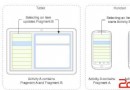 Android Fragment 片段:模組化 UI 與生命週期指南
Fragment(片段)代表應用程式中的一塊使用者介面或行為,目的是讓 Activity 的設計更模組化、可以拆解重組。你可以把它理解成一種「子 Activity」。關於
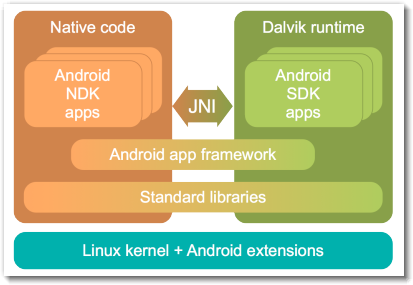 Google 工程師多圖詳解 Android 系統架構
近日,Google 工程師 Sans Serif 發表了一篇博文,相當清楚地描述了 Android 的系統架構,並獲得不少業界人士轉發推薦。以下為該文的整理。 Andro
 Android 與 Linux 的裂痕:授權之爭與開源社群的質疑
Android 包含一個核心庫,提供了 Java 語言核心庫的大部分功能。而論與 Linux 的距離,它比 Mac OS 之於 Linux 還要遠——這樣的形容並不誇張。
 深度剖析 Java 日誌框架:Logger、Handler 與 Filter 的分工
全球為數眾多的行動電話使用者從未用過任何基於 Android 的服務,而 Google 的目標是讓行動通訊不依賴於設備甚至平台。回到開發本身,本文要談的是一個容易被忽略卻