

編輯:進階開發
使用者介面就是使用者看得到、點得到的一切。前面章節談的是這些元件在 Activity 中如何被定位與排列,本章則把焦點放在元件本身。
兩個概念要先分清:View 是會在螢幕上畫出東西、使用者能與之互動的物件;ViewGroup 則是裝著其他 View 的容器,同時負責定義介面的排列方式。
View 可以寫在 XML 檔裡,這種寫法類似 HTML 的結構化描述,人類讀起來清楚明瞭。以下就是一個最直白的例子:一個垂直配置,裡頭放著一個 TextView 與一個 Button。
<?xml version="1.0" encoding="utf-8"?> <LinearLayout xmlns:android="https://schemas.android.com/apk/res/android" android:layout_width="fill_parent" android:layout_height="fill_parent" android:orientation="vertical" > <TextView android:id="@+id/text" android:layout_width="wrap_content" android:layout_height="wrap_content" android:text="I am a TextView" /> <Button android:id="@+id/button" android:layout_width="wrap_content" android:layout_height="wrap_content" android:text="I am a Button" /> </LinearLayout>
Android 內建了一批 UI 控制項,讓你不必從零打造,就能組出功能完整的圖形介面:
| 控制項 | 說明 |
|---|---|
| TextView | 最基礎的文字顯示元件。 |
| EditText | TextView 的預定義子類別,內建豐富的文字編輯能力。 |
| AutoCompleteTextView | 外觀近似 EditText,但使用者輸入時會跳出自動補全建議清單。 |
| Button | 可按下或點擊以觸發動作的按鈕。 |
| ImageButton | 以圖片呈現的按鈕。 |
| CheckBox | 可切換開/關的核取方塊,適合呈現一組彼此不互斥的選項。 |
| ToggleButton | 帶指示燈的開/關按鈕。 |
| RadioButton | 單選按鈕,有選取與取消選取兩種狀態。 |
| RadioGroup | 用來把一個或多個單選按鈕組織成互斥的群組。 |
| ProgressBar | 為背景執行的日常任務提供視覺進度回饋。 |
| Spinner | 下拉式清單,讓使用者從一組值中挑選一個,概念等同 HTML 的 select。 |
| TimePicker | 讓使用者以 24 小時制或 AM/PM 制挑選時間。 |
| DatePicker | 讓使用者挑選日期。 |
如前面章節所述,每個 View 都可以配上一個在整棵檢視樹中唯一的 ID。在 XML 標籤裡的寫法是:
android:id="@+id/text_id"
要建立一個控制項,先在布局檔中定義它並指定唯一 ID:
<?xml version="1.0" encoding="utf-8"?> <LinearLayout xmlns:android="https://schemas.android.com/apk/res/android" android:layout_width="fill_parent" android:layout_height="fill_parent" android:orientation="vertical" > <TextView android:id="@+id/text_id" android:layout_width="wrap_content" android:layout_height="wrap_content" android:text="I am a TextView" /> </LinearLayout>
最後在程式碼中取得它的實例,就能開始操作:
TextView myText = (TextView) findViewById(R.id.text_id);
這個「XML 定義外觀、程式碼取得實例」的分工,是 Android UI 開發最核心的模式。把布局交給 XML、把行為交給 Java,兩邊各自獨立演進,介面調整時不必動到邏輯,邏輯修改時也不必翻修布局——這也是為什麼 Android 能把 UI 描述得如此接近網頁的結構化寫法。
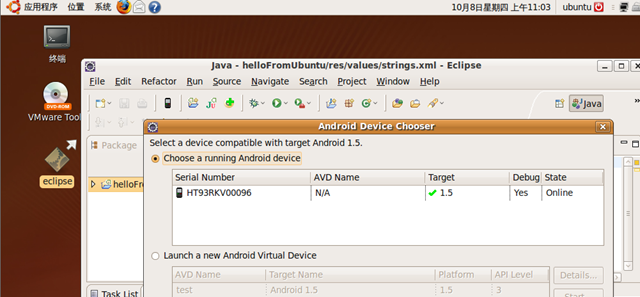 Ubuntu下的Android開發環境搭建:Eclipse、SDK與ADT配置
在Ubuntu建立Android開發環境 在Ubuntu下開發Android,常見組合是Eclipse、Android SDK與ADT插件。首先安裝Eclipse,再下載
 Android 手機作業系統是什麼?從甜点代號到版本演進
Google 有一個廣為人知的習慣:用甜點為 Android 版本命名。這套命名規則本身就是一部濃縮的版本演進史。 C、D、E、F:甜點字母表 歷代版本依序是:1.5
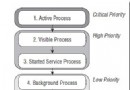 Android應用生命週期管理:進程優先級與資源回收機制
應用生命週期由系統掌控 與傳統桌面系統不同,Android應用無法完全掌控自己的生死。當系統資源不足時,Android會依進程重要性回收資源。開發者必須理解Activit
 Android 那些事兒(一):成長中的 Android
Android 是近年行動裝置行業最火熱的詞彙之一。本文從互動設計的角度出發,分三部分聊聊 Android 的那些事兒。 第一部分:成長中的 Android◆ 什麼是 A