

編輯:關於 Android 程式設計
下圖為列表多選與批量輸入的示意。
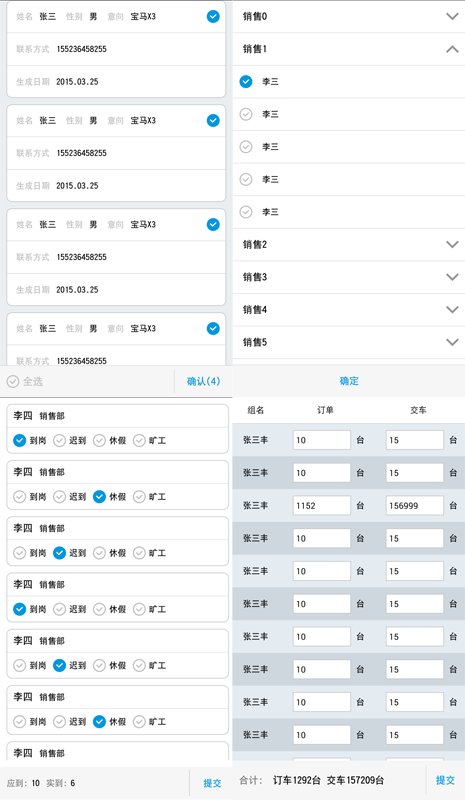
在 Adapter 中可用 Map 或 SparseArray 記錄每一列的勾選狀態。getView 時再依狀態設定 CheckBox。全選時,只要遍歷資料並把狀態設為 true,最後通知資料集更新即可。
若每一列需要單選,例如到崗、遲到、休假、曠工,可在 ViewHolder 中放入多個 RadioButton,並用 OnCheckedChangeListener 更新對應資料。由於列表會重用 View,必須在 getView 中重新設定狀態,避免顯示錯誤。
使用 ExpandableListView 時,可在 onChildClick 中記錄被點選的群組與子項位置,再呼叫 notifyDataSetChanged 更新背景或圖示。
若要在列表列輸入數量並即時加總,可為每個 EditText 加入 TextWatcher。因為 View 會重用,加入監聽前應先移除舊監聽,避免重複觸發。
 Android 自定義 View 實現支付寶支付成功風格的 Path 動畫
本文整理一套從圖片到 SVG,再到 Path 的動畫做法。核心概念是:先把想要的圖形轉成路徑資料,再交給支援 Path 動畫的自定義 View 播放。 效果預覽
 輕鬆實現 Android 自定義九宮格圖案解鎖
本文分享一個 Android 九宮格圖案解鎖的實現,自帶將滑動軌跡轉換成數字密碼的功能,代碼如下: LockPatternView.java package com.j
 百度地圖 Android 起步:打造一張會呼吸的基本地圖
一切地圖應用的起點,都是一張能顯示、能縮放、能平移的基本地圖。本文示範如何用 TextureMapView 建立最簡單的地圖頁面,並妥善管理它的生命週期,還能監聽地圖載入
 Android 實訓案例:自定義五子棋棋盤、棋子與勝負判斷
前言 自定義 View 是 Android 開發中非常能展現基本功的題目。本文以單機五子棋為例,從棋盤測量、線條繪製、棋子繪製、點擊落子,一路做到勝負判斷、狀態保存與重新