

編輯:關於 Android 程式設計
不少開發者在剛接觸 Android 時,會用 Java 物件導向的直覺去理解元件,例如嘗試直接建立 Activity 實例。然而,Android 的應用模型並不是單純的 Java 程式,而是建立在元件化架構之上。Activity、Service 等元件需要完整的執行環境才能正常運作,而支撐這個環境的關鍵,就是 Context。
Context 可以理解為應用程式中的「情境」或「環境」。它負責與系統互動,也參與資源載入、頁面啟動、系統服務取得、View 建立等常見操作。系統把使用者與應用程式的互動抽象成不同場景,例如打電話、傳送訊息、背景服務執行等,而這些場景都需要 Context 來承載。
在 Android 源碼中,Context 是一個抽象類別,真正的功能實作主要落在 ContextImpl。ContextWrapper 則像是一個包裝器,它必須持有真正的 Context 物件,並透過 attachBaseContext 完成綁定。ContextThemeWrapper 在此基礎上加入主題相關能力,因此 Activity 能處理與 UI 主題有關的設定,而 Service 與 Application 通常不需要主題。
常見的 Context 實例主要来自 Activity、Service 與 Application。也就是說,Context 數量大致等於 Activity 數量加上 Service 數量,再加上 Application。BroadcastReceiver 與 ContentProvider 本身並不是 Context 的子類,它們使用的 Context 通常由外部傳入,因此不列入 Context 數量計算。
Context 幾乎涵蓋了 Android 開發中的常見操作,例如顯示 Toast、啟動 Activity、啟動 Service、發送廣播、讀取資源、取得系統服務、操作資料庫與 SharedPreferences 等。可以說,只要涉及應用程式與系統互動,通常都離不開 Context。
不同來源的 Context 並不能完全互換。涉及 UI 的操作,例如啟動 Activity、彈出 Dialog,通常需要使用 Activity 的 Context。若使用 Application Context 啟動一般 Activity,可能因為缺少任務堆疊而發生錯誤。此外,長生命週期的物件如果持有 Activity 的 Context,容易造成記憶體洩漏。實務上建議:非 UI 且需要長時間存活的情境,優先使用 Application Context;與 UI 相關的操作,則使用 Activity Context,並避免靜態物件長期引用 Activity。
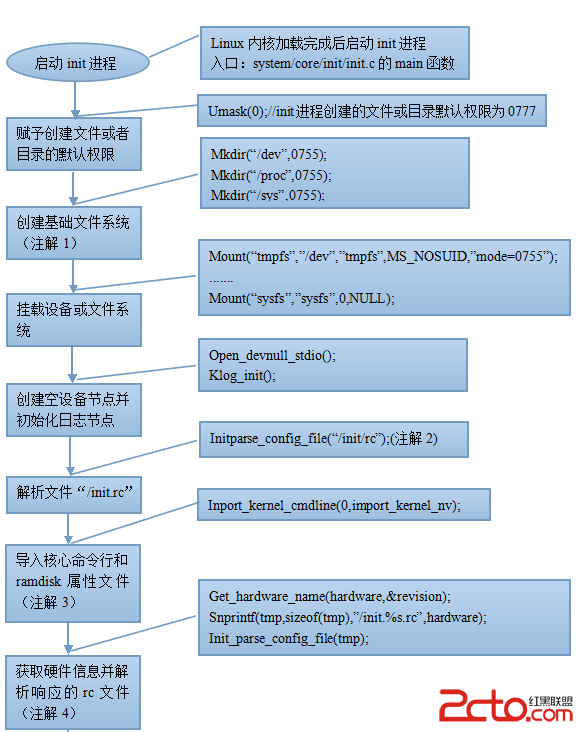 Android 核心服務解析(一):Android 系統的啟動流程
從宏觀角度來看,Android 系統的啟動可分為兩部分:Linux 核心的啟動與 Android 系統的啟動。前者包含系統引導、核心與驅動程式,不在本文討論範圍;本文聚焦
 Android 自定義時鐘指針
自定義時鐘是指針類 View 中很經典的練習題。透過它,可以熟悉 Canvas 繪圖、Paint 設定、角度計算與定時刷新等技巧。拆解需求一個時鐘可以拆成幾個部分:1.
 Android 模擬器啟動失敗的排查與解法
一、錯誤訊息 錯誤大意:連線到 adb(Android Debug Bridge)時發生嚴重錯誤,必須重新啟動 adb 與 Eclipse,並確認指定位置的 adb
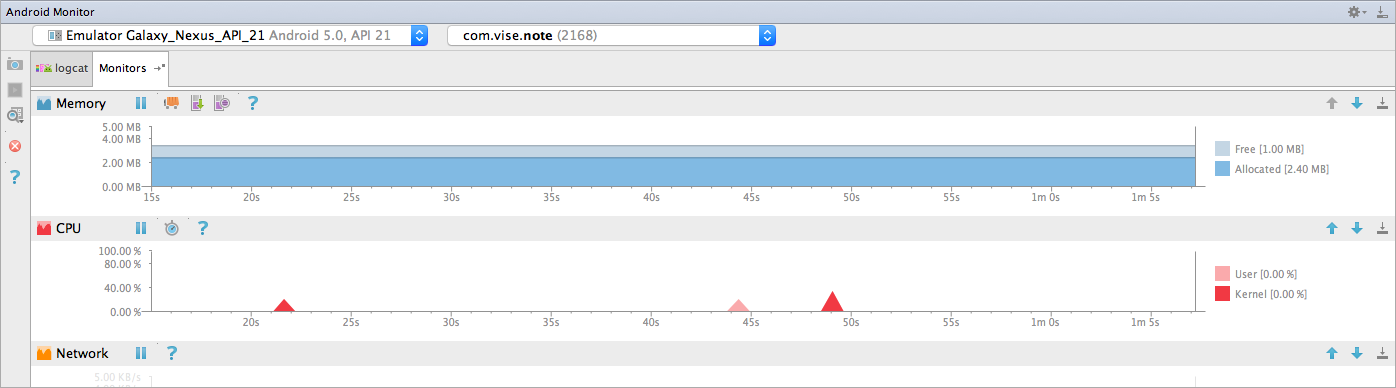 App 的打磨之路(上):從單元測試、性能分析到簽名配置
前言 俗話說「磨刀不誤砍柴工」。一個優秀的產品,從一閃而過的靈感,到真正交到用戶手中,往往需要整個團隊不遺餘力地協同打磨。同理,一款出色的 App 除了核心的程式碼撰寫之