

編輯:關於 Android 程式設計
普通的圓形進度條到處都有,但只要加上漸變配色與刻度,質感就差很多。本文示範如何從零畫一個帶刻度、漸變色的圓環進度條。
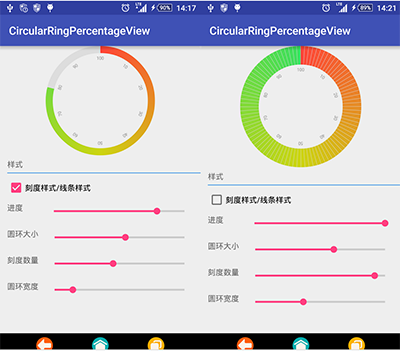
核心 API 是 drawArc:
public void drawArc(RectF oval, float startAngle, float sweepAngle,
                    boolean useCenter, Paint paint)
參數意義:oval 是圓弧所在的橢圓範圍;startAngle 為起始角度;sweepAngle 為掃過的角度;useCenter 決定是否畫出與圓心的連線;paint 是畫筆。
// circleCenter 為整體圓心,radius 為圓環半徑
RectF oval = new RectF(circleCenter - radius, circleCenter - radius,
                       circleCenter + radius, circleCenter + radius);
// -90 度才是從 12 點鐘方向起算,progress 為百分比
canvas.drawArc(oval, -90, (float) (progress * 3.6), false, paint);
漸變用 SweepGradient,它有兩個建構子:一個傳入顏色陣列與對應位置,另一個只給起始色與結束色。
// 傳入 colors 與 positions
public SweepGradient(float cx, float cy, int[] colors, float[] positions)
// 只給兩色
public SweepGradient(float cx, float cy, int color0, int color1)
cx、cy 是渲染中心座標;colors 至少要有兩種顏色;positions 為顏色的相對位置,可為 null(此時均勻分布)。
int[] colors = {0xffff4639, 0xffCDD513, 0xff3CDF5F};
SweepGradient sweepGradient = new SweepGradient(
        this.circleWidth / 2, this.circleWidth / 2, colors, null);
但有個坑:SweepGradient 的漸變起點固定在 0 度,而我們要的是 -90 度。解法是用 Matrix 旋轉漸變本身:
Matrix matrix = new Matrix();
matrix.setRotate(-90, this.circleWidth / 2, this.circleWidth / 2);
sweepGradient.setLocalMatrix(matrix);
paint.setShader(sweepGradient);
用完記得清掉,否則會污染後續繪製:
paint.setShader(null);
反向畫一段即可:
canvas.drawArc(oval, -90, (float) (-(100 - progress) * 3.6), false, paint);
把整個圓依刻度數量等分,算出每段佔的角度,再依進度決定畫幾段。刻度本身就是一段極短的圓弧:
float start = -90f;
float p = ((float) maxColorNumber / (float) 100);
p = (int) (progress * p);
for (int i = 0; i < p; i++) {
    paint.setColor(roundBackgroundColor);
    // 畫出間隔
    canvas.drawArc(oval, start + singlPoint - lineWidth, lineWidth,
            false, paint);
    start = (start + singlPoint);
}
靠 canvas 旋轉把數字均勻排到圓周上,畫完立刻 restore:
for (int i = 1; i <= 10; i++) {
    canvas.save();
    canvas.rotate(360 / 10 * i, circleCenter, circleCenter);
    canvas.drawText(i * 10 + "", circleCenter,
            circleCenter - radius + roundWidth / 2 + getDpValue(4) + textSize,
            mPaintText);
    canvas.restore();
}
把可調參數(圓環直徑、線寬、刻度數、漸變三色、文字大小)都開成自定義屬性,並在變更後呼叫 invalidate:
public class CircularRingPercentageView extends View {
    private Paint paint;
    private Paint mPaintText;
    private int circleWidth;
    private int roundBackgroundColor;
    private int textColor;
    private float textSize;
    private float roundWidth;
    private float progress = 0;
    private int[] colors = {0xffff4639, 0xffCDD513, 0xff3CDF5F};
    private int radius;
    private RectF oval;
    private int maxColorNumber = 100;
    private float singlPoint = 9;
    private float lineWidth = 0.3f;
    private int circleCenter;
    private SweepGradient sweepGradient;
    private boolean isLine;

    public CircularRingPercentageView(Context context, AttributeSet attrs,
                                      int defStyle) {
        super(context, attrs, defStyle);
        TypedArray mTypedArray =
                context.obtainStyledAttributes(attrs, R.styleable.CircularRing);
        maxColorNumber = mTypedArray.getInt(
                R.styleable.CircularRing_circleNumber, 40);
        circleWidth = mTypedArray.getDimensionPixelOffset(
                R.styleable.CircularRing_circleWidth, getDpValue(180));
        roundBackgroundColor = mTypedArray.getColor(
                R.styleable.CircularRing_roundColor, 0xffdddddd);
        textColor = mTypedArray.getColor(
                R.styleable.CircularRing_circleTextColor, 0xff999999);
        roundWidth = mTypedArray.getDimension(
                R.styleable.CircularRing_circleRoundWidth, 40);
        textSize = mTypedArray.getDimension(
                R.styleable.CircularRing_circleTextSize, getDpValue(8));
        colors[0] = mTypedArray.getColor(
                R.styleable.CircularRing_circleColor1, 0xffff4639);
        colors[1] = mTypedArray.getColor(
                R.styleable.CircularRing_circleColor2, 0xffcdd513);
        colors[2] = mTypedArray.getColor(
                R.styleable.CircularRing_circleColor3, 0xff3cdf5f);
        initView();
        mTypedArray.recycle();
    }

    private int getDpValue(int w) {
        return (int) TypedValue.applyDimension(TypedValue.COMPLEX_UNIT_DIP, w,
                getContext().getResources().getDisplayMetrics());
    }

    /** 漸變初始化,順便轉 -90 度 */
    public void sweepGradientInit() {
        sweepGradient = new SweepGradient(this.circleWidth / 2,
                this.circleWidth / 2, colors, null);
        Matrix matrix = new Matrix();
        matrix.setRotate(-90, this.circleWidth / 2, this.circleWidth / 2);
        sweepGradient.setLocalMatrix(matrix);
    }

    public void initView() {
        circleCenter = circleWidth / 2;
        singlPoint = (float) 360 / (float) maxColorNumber;
        radius = (int) (circleCenter - roundWidth / 2);
        sweepGradientInit();

        mPaintText = new Paint();
        mPaintText.setColor(textColor);
        mPaintText.setTextAlign(Paint.Align.CENTER);
        mPaintText.setTextSize(textSize);
        mPaintText.setAntiAlias(true);

        paint = new Paint();
        paint.setColor(roundBackgroundColor);
        paint.setStyle(Paint.Style.STROKE);
        paint.setStrokeWidth(roundWidth);
        paint.setAntiAlias(true);
        oval = new RectF(circleCenter - radius, circleCenter - radius,
                circleCenter + radius, circleCenter + radius);
    }

    @Override
    protected void onDraw(Canvas canvas) {
        super.onDraw(canvas);
        // 進度圓環,漸變上色
        paint.setShader(sweepGradient);
        canvas.drawArc(oval, -90, (float) (progress * 3.6), false, paint);
        paint.setShader(null);

        // 刻度間隔
        if (!isLine) {
            float start = -90f;
            float p = ((float) maxColorNumber / (float) 100);
            p = (int) (progress * p);
            for (int i = 0; i < p; i++) {
                paint.setColor(roundBackgroundColor);
                canvas.drawArc(oval, start + singlPoint - lineWidth,
                        lineWidth, false, paint);
                start = (start + singlPoint);
            }
        }

        // 剩餘空白
        paint.setColor(roundBackgroundColor);
        canvas.drawArc(oval, -90, (float) (-(100 - progress) * 3.6),
                false, paint);

        // 文字刻度
        for (int i = 1; i <= 10; i++) {
            canvas.save();
            canvas.rotate(360 / 10 * i, circleCenter, circleCenter);
            canvas.drawText(i * 10 + "", circleCenter,
                    circleCenter - radius + roundWidth / 2
                            + getDpValue(4) + textSize,
                    mPaintText);
            canvas.restore();
        }
    }

    public synchronized void setProgress(final float p) {
        progress = p;
        postInvalidate();
    }
}
幾個設計上的小細節值得注意:漸變初始化獨立成 sweepGradientInit(),因為直徑或顏色變動時都要重建一次;setRoundWidth 中對線寬做了上限保護,避免寬度超過半徑導致繪製異常;進度更新統一走 postInvalidate 而非在子執行緒直接操作畫布。
 Android Service 與 IntentService 的差異
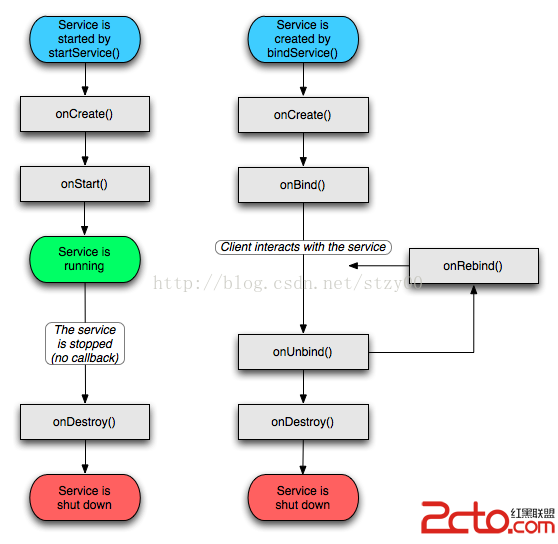
Service 是 Android 四大元件之一,適合執行不需要使用者互動的背景工作。它沒有畫面,但可由 Activity 或其他元件啟動與控制。Service 生命週期
 Android SQLite 與 SQL 基礎:從建表到增刪改查
SQLite 的定位 SQLite 是 Android 中常見的輕量級資料庫,適合儲存設定、小型結構化資料與本地快取。它本質上是一個檔案,不需要啟動服務,使用 SQL 語
 用 Gallery 與 ImageSwitcher 打造可左右無限循環的圖片瀏覽器
Gallery 天生就是拿來做橫向圖片列表的,但它有個惱人的限制:滑到頭就停了,沒辦法無限循環。要突破這個限制,關鍵在於自訂 Adapter——只要讓 getCount
 Android 自訂 Shape 圓形 ImageView:背景與圖片分開設定
先看效果示意: 一、需求說明 專案裡希望做到一個圓形的圖片顯示效果,而且圓形底色的背景要能與中間的圖示分開設定,最後再合併呈現於同一個 ImageView 上。 二、實