

編輯:關於 Android 程式設計
Hey~大家好,出來創業已經快三個月了,一切還算順利。前陣子利用業餘時間做了一個問答類網站 YQMA,想打造中國版的 Stack Overflow,哈哈,只是先妄想一下,還請大家多多支持!
好了,今天要分享的是 Path 菜單的簡單實作。它能自定義展開方向(左上、右上、右下、左下),也能自定義菜單的數量。真正的難點在於菜單的擺放位置(動態設定 margin)以及動畫的呈現——動畫其實只是簡單運用了 TranslateAnimation,但當 N 個菜單同時移動時,那種視覺效果真的很酷!
這裡也用到了自定義屬性,不熟悉的同學可以參考我寫過的《Android 高手進階教程(四)之 Android 中自定義屬性(attr.xml、TypedArray)的使用!》這篇文章。廢話不多說,開始動手:
首先建立一個 Android 工程,命名為 PathTest,目錄結構如下圖:
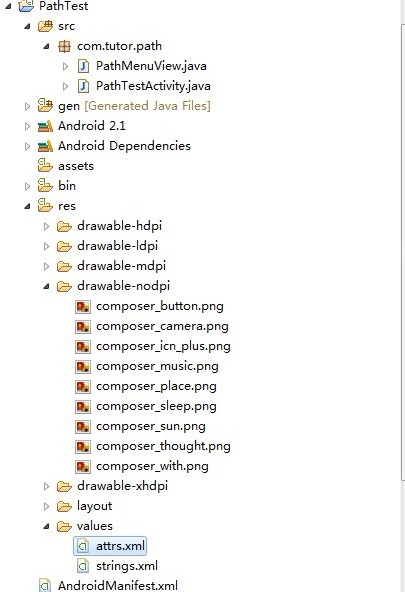
第二步:在 values 資料夾下新建一個 attrs.xml 檔案,程式碼如下:
<?xml version="1.0" encoding="utf-8"?> <resources> <declare-styleable name="PathMenuView"> <attr name="position"> <enum name="left_top" value="0"></enum> <enum name="right_top" value="1"></enum> <enum name="right_bottom" value="2"></enum> <enum name="left_bottom" value="3"></enum> </attr> </declare-styleable> </resources>
第三步:新建 PathMenuView.java,這就是我們自定義的 Path 菜單控件,程式碼如下:
package com.tutor.path; import androidcontentContext; import androidcontentresTypedArray; import androidutilAttributeSet; import androidviewGravity; import androidviewView; import androidviewViewGroup; import androidviewanimationAnimation; import androidviewanimationAnticipateInterpolator; import androidviewanimationOvershootInterpolator; import androidviewanimationTranslateAnimation; import androidwidgetFrameLayout; import androidwidgetImageView; /** * @author frankiewei * 超級仿path菜單 * position定義菜單的位置,目前支持:左上;右上;右下;左下四個方向。 * menuResIds定義出現的菜單的資源ID */ public class PathMenuView extends FrameLayout { private static final int LEFT_TOP = 0; private static final int RIGHT_TOP = 1; private static final int RIGHT_BOTTOM = 2; private static final int LEFT_BOTTOM = 3; /** * 默認的位置是在右下角 */ private int position = 3; /** * 那個圓形菜單 */ private ImageView mHome; /** * 上下文 */ private Context mContext; /** * 設備的寬度 */ private int mWIDTH = 0; /** * 設備的高度 */ private int mHEIGHT = 0; /** * 設備的density */ private float mDensity; /** * 菜單是否顯示 */ private boolean bMenuShow; private static int xOffset = 15; private static int yOffset = -13; /** * 菜單的資源個數 */ private int[] menuResIds = {Rdrawablecomposer_camera,Rdrawablecomposer_music, Rdrawablecomposer_sleep,Rdrawablecomposer_music,Rdrawablecomposer_place}; public PathMenuView(Context context){ super(context); setupViews(); } public PathMenuView(Context context, AttributeSet attrs) { super(context, attrs); TypedArray a = contextobtainStyledAttributes(attrs, RstyleablePathMenuView); position = agetInt(RstyleablePathMenuView_position,3); arecycle(); setupViews(); } private void setupViews(){ mContext = getContext(); mHEIGHT = mContextgetResources()getDisplayMetrics()heightPixels; mWIDTH = mContextgetResources()getDisplayMetrics()widthPixels; mDensity = mContextgetResources()getDisplayMetrics()density; xOffset = (int) (667 * mDensity); yOffset = (int) (667 * mDensity); mHome = new ImageView(mContext); mHomesetImageResource(Rdrawablecomposer_button); mHomesetOnClickListener(listener); addView(mHome); LayoutParams mHomeparams = (FrameLayoutLayoutParams)mHomegetLayoutParams(); mHomeparamswidth = LayoutParamsWRAP_CONTENT; mHomeparamsheight = LayoutParamsWRAP_CONTENT; switch (position) { case LEFT_TOP: mHomeparamsgravity = GravityLEFT | GravityTOP; for (int i = 0; i < menuResIdslength; i++) { int width_padding = mWIDTH / ((menuResIdslength - 1) * 2); int height_padding = mHEIGHT / ((menuResIdslength - 1) * 2); ImageView imageView = new ImageView(mContext); imageViewsetImageResource(menuResIds[i]); addView(imageView); LayoutParams params = (FrameLayoutLayoutParams) imageView getLayoutParams(); paramswidth = LayoutParamsWRAP_CONTENT; paramsheight = LayoutParamsWRAP_CONTENT; paramsleftMargin = mWIDTH / 2 - ((menuResIdslength - i - 1) * width_padding); paramstopMargin = mHEIGHT / 2 - i * height_padding; paramsgravity = GravityLEFT | GravityTOP; imageViewsetLayoutParams(params); } break; case RIGHT_TOP: mHomeparamsgravity = GravityRIGHT | GravityTOP; for (int i = 0; i < menuResIdslength; i++) { int width_padding = mWIDTH / ((menuResIdslength - 1) * 2); int height_padding = mHEIGHT / ((menuResIdslength - 1) * 2); ImageView imageView = new ImageView(mContext); imageViewsetImageResource(menuResIds[i]); addView(imageView); LayoutParams params = (FrameLayoutLayoutParams) imageView getLayoutParams(); paramswidth = LayoutParamsWRAP_CONTENT; paramsheight = LayoutParamsWRAP_CONTENT; paramsrightMargin = mWIDTH / 2 - ((menuResIdslength - i - 1) * width_padding); paramstopMargin = mHEIGHT / 2 - i * height_padding; paramsgravity = GravityRIGHT | GravityTOP; imageViewsetLayoutParams(params); } break; case RIGHT_BOTTOM: mHomeparamsgravity = GravityRIGHT | GravityBOTTOM; for (int i = 0; i < menuResIdslength; i++) { int width_padding = mWIDTH / ((menuResIdslength - 1) * 2); int height_padding = mHEIGHT / ((menuResIdslength - 1) * 2); ImageView imageView = new ImageView(mContext); imageViewsetImageResource(menuResIds[i]); addView(imageView); LayoutParams params = (FrameLayoutLayoutParams) imageView getLayoutParams(); paramswidth = LayoutParamsWRAP_CONTENT; paramsheight = LayoutParamsWRAP_CONTENT; paramsrightMargin = mWIDTH / 2 - ((menuResIdslength - i - 1) * width_padding); paramsbottomMargin = mHEIGHT / 2 - i * height_padding; paramsgravity = GravityRIGHT | GravityBOTTOM; imageViewsetLayoutParams(params); } break; case LEFT_BOTTOM: mHomeparamsgravity = GravityLEFT | GravityBOTTOM; for(int i = 0; i < menuResIdslength; i++){ int width_padding = mWIDTH / ((menuResIdslength - 1) * 2); int height_padding = mHEIGHT / ((menuResIdslength -1) * 2); ImageView imageView = new ImageView(mContext); imageViewsetImageResource(menuResIds[i]); addView(imageView); LayoutParams params = (FrameLayoutLayoutParams)imageViewgetLayoutParams(); paramswidth = LayoutParamsWRAP_CONTENT; paramsheight = LayoutParamsWRAP_CONTENT; paramsleftMargin = mWIDTH / 2 - ((menuResIdslength - i - 1) * width_padding); paramsbottomMargin = mHEIGHT / 2 - i * height_padding; paramsgravity = GravityLEFT | GravityBOTTOM; imageViewsetLayoutParams(params); } break; default: break; } mHomesetLayoutParams(mHomeparams); } private OnClickListener listener = new OnClickListener() { public void onClick(View v) { if (!bMenuShow) { startAnimationIn(PathMenuViewthis, 300); } else { startAnimationOut(PathMenuViewthis, 300); } bMenuShow = !bMenuShow; } }; /** * 菜單隱藏動畫 * * @param group * @param duration */ private void startAnimationIn(ViewGroup group, int duration) { for (int i = 1; i < groupgetChildCount(); i++) { ImageView imageview = (ImageView) groupgetChildAt(i); imageviewsetVisibility(0); MarginLayoutParams mlp = (MarginLayoutParams) imageview getLayoutParams(); Animation animation = null; switch (position) { case LEFT_TOP: animation = new TranslateAnimation(0F,-mlpleftMargin+xOffset,0F,-mlptopMargin + yOffset); break; case RIGHT_TOP: animation = new TranslateAnimation(mlprightMargin - xOffset,0F,-mlptopMargin + yOffset,0F); break; case LEFT_BOTTOM: animation = new TranslateAnimation(0F, -mlpleftMargin+ xOffset, 0F, -yOffset + mlpbottomMargin); break; case RIGHT_BOTTOM: animation = new TranslateAnimation(mlprightMargin-xOffset,0F,-yOffset + mlpbottomMargin, 0F); break; default: break; } animationsetFillAfter(true); animationsetDuration(duration); animationsetStartOffset((i * 100) / (-1 + groupgetChildCount())); animationsetInterpolator(new OvershootInterpolator(2F)); imageviewstartAnimation(animation); } } /** * 菜單顯示動畫 * * @param group * @param duration */ private void startAnimationOut(ViewGroup group,int duration){ for (int i = 1; i < groupgetChildCount(); i++) { final ImageView imageview = (ImageView) group getChildAt(i); MarginLayoutParams mlp = (MarginLayoutParams) imageviewgetLayoutParams(); Animation animation = null; switch (position) { case LEFT_TOP: animation = new TranslateAnimation(-mlpleftMargin+xOffset,0F,-mlptopMargin + yOffset,0F); break; case RIGHT_TOP: animation = new TranslateAnimation(0F,mlprightMargin - xOffset,0F,-mlptopMargin + yOffset); break; case LEFT_BOTTOM: animation = new TranslateAnimation(-mlpleftMargin+xOffset,0F, -yOffset + mlpbottomMargin,0F); break; case RIGHT_BOTTOM: animation = new TranslateAnimation(0F,mlprightMargin-xOffset, 0F,-yOffset + mlpbottomMargin); break; default: break; } animationsetFillAfter(true);animationsetDuration(duration); animationsetStartOffset(((groupgetChildCount()-i) * 100) / (-1 + groupgetChildCount())); animationsetInterpolator(new AnticipateInterpolator(2F)); imageviewstartAnimation(animation); } } } 第四步:PathTestActivity.java 以及所使用的佈局檔 main.xml 如下。
PathTestActivity.java(基本沒有修改)程式碼如下:
package comtutorpath; import androidappActivity; import androidosBundle; public class PathTestActivity extends Activity { @Override public void onCreate(Bundle savedInstanceState) { superonCreate(savedInstanceState); setContentView(Rlayoutmain); } main.xml 程式碼如下:
<?xml version="0" encoding="utf-8"?> <LinearLayout xmlns:android="https://schemasandroidcom/apk/res/android" xmlns:tutor="https://schemasandroidcom/apk/res/comtutorpath" android:layout_width="fill_parent" android:layout_height="fill_parent" android:orientation="vertical" > <comtutorpathPathMenuView android:id="@+id/text" android:layout_width="fill_parent" android:layout_height="fill_parent" tutor:position="right_bottom" /> </LinearLayout>
執行的點擊效果如下:
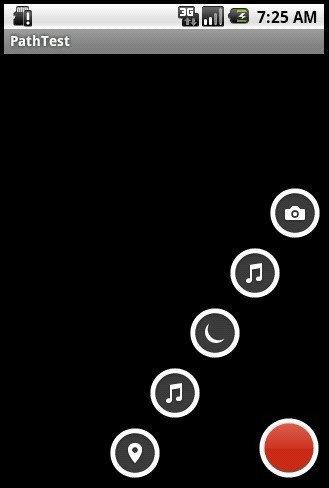
圖一:預設在右下方,這裡 menuResIds 定義了五個菜單。
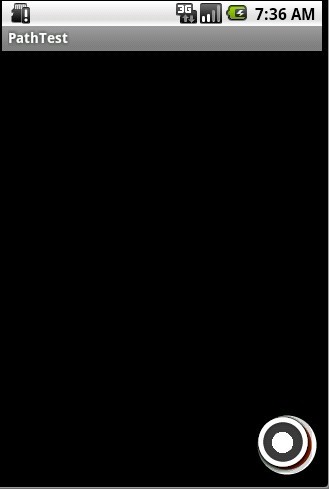
圖二:點擊紅色菜單後,菜單收回。
接著我們把 main.xml 中的 tutor 屬性改為 left_bottom,並修改 PathMenuView.java 中的 menuResIds。
tutor:position="left_bottom"
效果如下:
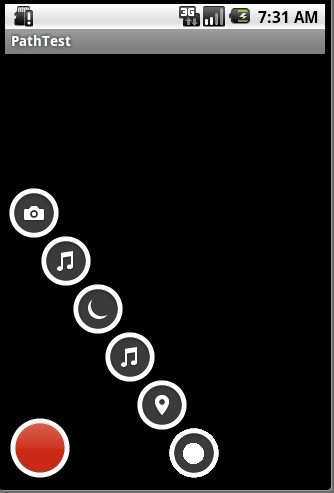
圖三:自定義在左下角,共六個菜單。
以上就是本文的全部內容,希望對大家的學習有所幫助,也歡迎大家多多支持本站。
 自訂 ListView 頂部與底部箭頭指示器的實作教學
本文要做的效果,是在 ListView 上下加一對箭頭:捲到頂端時上方箭頭消失,往下捲動(上面有內容被遮住)時才出現;底部同理。系統預設的 ListView / Scro
 Android Studio 整合百度語音合成服務教學
語音合成又稱 TTS,顧名思義就是把文字轉換成語音,讓應用可以「說話」。在 Android 中,可以整合第三方語音服務來快速實現這個能力。本文以百度語音合成為例,說明在
 Android 設計模式:工廠方法與抽象工廠模式實戰
工廠模式的核心價值 工廠模式用來封裝物件建立過程,讓呼叫端不需要關心產品如何被組裝。它能降低模組間的耦合,也方便未來擴充新產品。在 Android 開發中,常見於建立不同
 Android 消息機制重點整理:Looper、Handler、Message 與 MessageQueue
Android 的消息機制幾乎是面試必考,但更值得學的理由是它在實際開發中無處不在——非同步回調、線程通訊、延遲任務,背後都是這套東西。本文用問答形式把關鍵點逐一拆開。