

編輯:關於 Android 程式設計
本文講解 Android 編程實現向桌面添加快捷方式的兩種方法,分享給大家參考。
有時候為了使用方便,需要在桌面上添加快捷方式,下面介紹兩種做法。
void setshortCut() { Intent addShortcut = new Intent(); //設置快捷方式的名字 addShortcut.putExtra(Intent.EXTRA_SHORTCUT_NAME, "快捷方式練習"); //構建快捷方式中專門的圖標 Parcelable icon = Intent.ShortcutIconResource.fromContext( ShortcutTest.this, R.drawable.icon); //添加快捷方式圖標 addShortcut.putExtra(Intent.EXTRA_SHORTCUT_ICON_RESOURCE, icon); //構建快捷方式執行的 Intent Intent mailto = new Intent(this, ShortcutTest.class); //添加快捷方式 Intent addShortcut.putExtra(Intent.EXTRA_SHORTCUT_INTENT, mailto); //正常 setResult(RESULT_OK, addShortcut); }
通過以上代碼添加的快捷方式,只能在程序啟動中添加,不能加入到事件中,目前我也沒完全想明白原因,知道的朋友歡迎告知。並且這樣添加時不直接加到桌面,而是添加到「添加快捷方式」的窗口中,如圖:
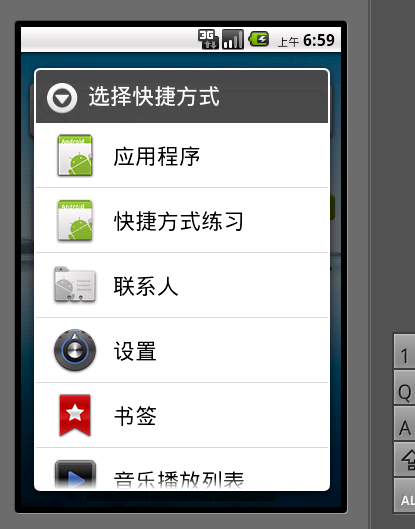
private void addShortcut(){ Intent shortcut = new Intent("com.android.launcher.action.INSTALL_SHORTCUT"); //快捷方式的名稱 shortcut.putExtra(Intent.EXTRA_SHORTCUT_NAME, getString(R.string.app_name)); // shortcut.putExtra("duplicate", false); //不允許重復創建 //指定當前的 Activity 為快捷方式啟動的對象: 如 com.everest.video.VideoPlayer //注意: ComponentName 的第二個參數必須加上點號(.),否則快捷方式無法啟動相應程序 // ComponentName comp = new ComponentName(this.getPackageName(), "."+this.getLocalClassName()); // shortcut.putExtra(Intent.EXTRA_SHORTCUT_INTENT, new Intent(Intent.ACTION_MAIN).setComponent(comp)); shortcut.putExtra(Intent.EXTRA_SHORTCUT_INTENT, new Intent(this,ShortcutTest.class)); //快捷方式的圖標 ShortcutIconResource iconRes = Intent.ShortcutIconResource.fromContext(this, R.drawable.icon); shortcut.putExtra(Intent.EXTRA_SHORTCUT_ICON_RESOURCE, iconRes); sendBroadcast(shortcut); }
其中:
shortcut.putExtra("duplicate", false);
表示不允許重復設置。這種代碼會直接添加到桌面,並且在圖所示的地方顯示,但需要添加以下權限:
<uses-permission android:name="com.android.launcher.permission.INSTALL_SHORTCUT" />
更多關於 Android Manifest 權限控制,可參考本站在線工具「Android Manifest 功能與權限描述大全」。希望本文對你的 Android 程序設計有所幫助。
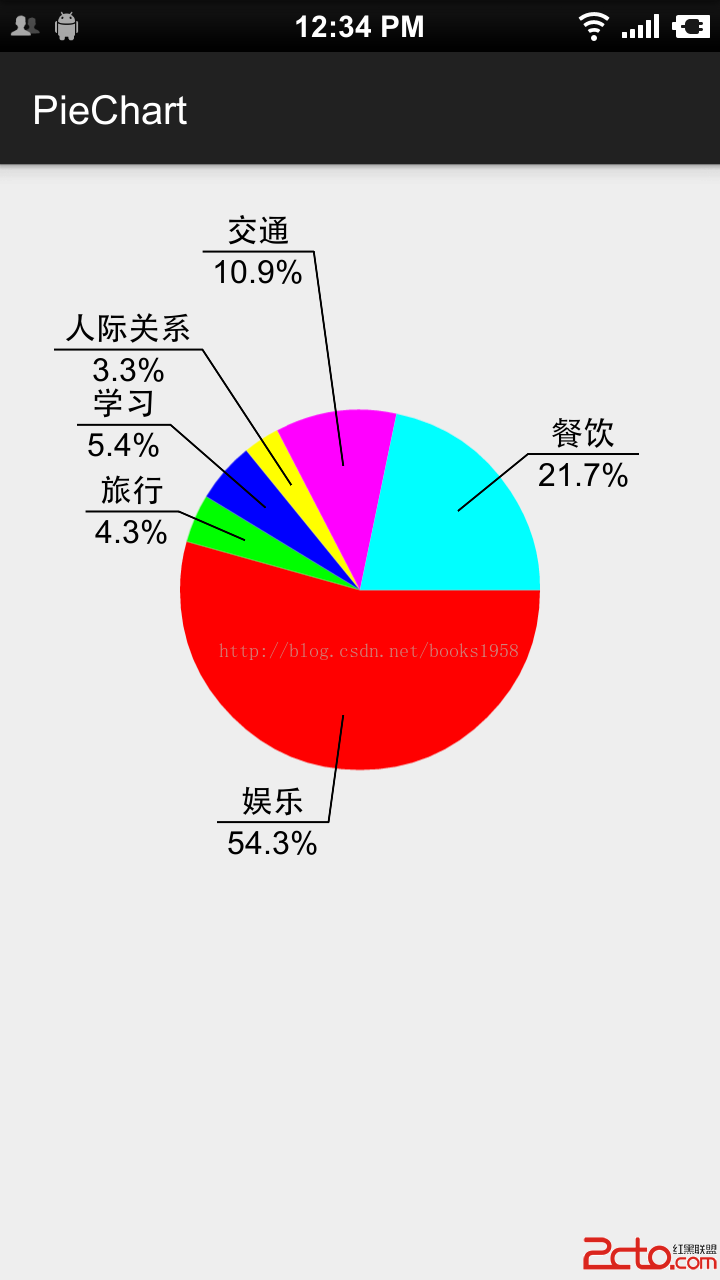 用 Canvas 打造自適應的餅狀統計圖
本例的目標是實作一個簡潔好用的餅狀統計圖,效果如下:它的特點在於:1. 使用非常方便,可直接放進 XML 佈局,再在程式碼中設定資料:PieChartView pieCh
 Android 記事本手寫功能:畫筆大小與顏色的設定
在記事本或手寫板類應用中,除了基本繪製,使用者通常還希望能調整筆跡粗細與顏色。這類功能可 reuse 畫板模組的設計思路,讓手寫體驗更完整。以 Paint 保存筆跡狀態手
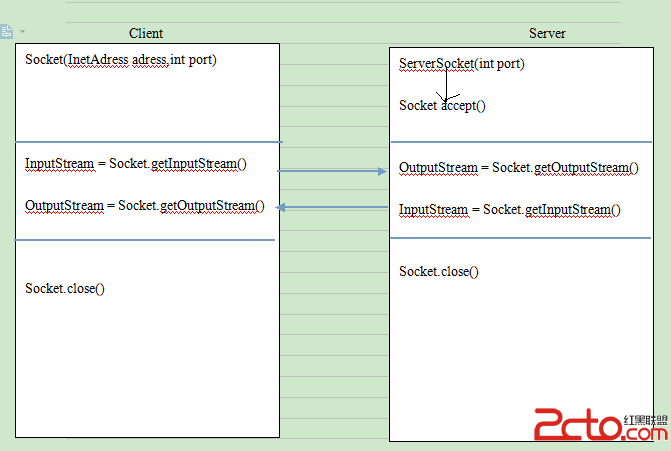 Android 網路應用開發完全解析:Socket 與 HTTP 通訊
在 Android 上做網路應用開發,主要可以分成兩大路線:一是 Socket(對 TCP/UDP 協定的封裝),二是 HTTP 協定。其中 HTTP 在 Android
 Android SQLite 基本操作:建立資料庫與增刪改查
SQLite 是 Android 內建的輕量級關聯式資料庫,適合儲存結構化資料。即使不熟 SQL,也可透過 SQLiteOpenHelper 與 SQLiteDataba