

編輯:關於 Android 程式設計
本例的目標是實作一個簡潔好用的餅狀統計圖,效果如下:
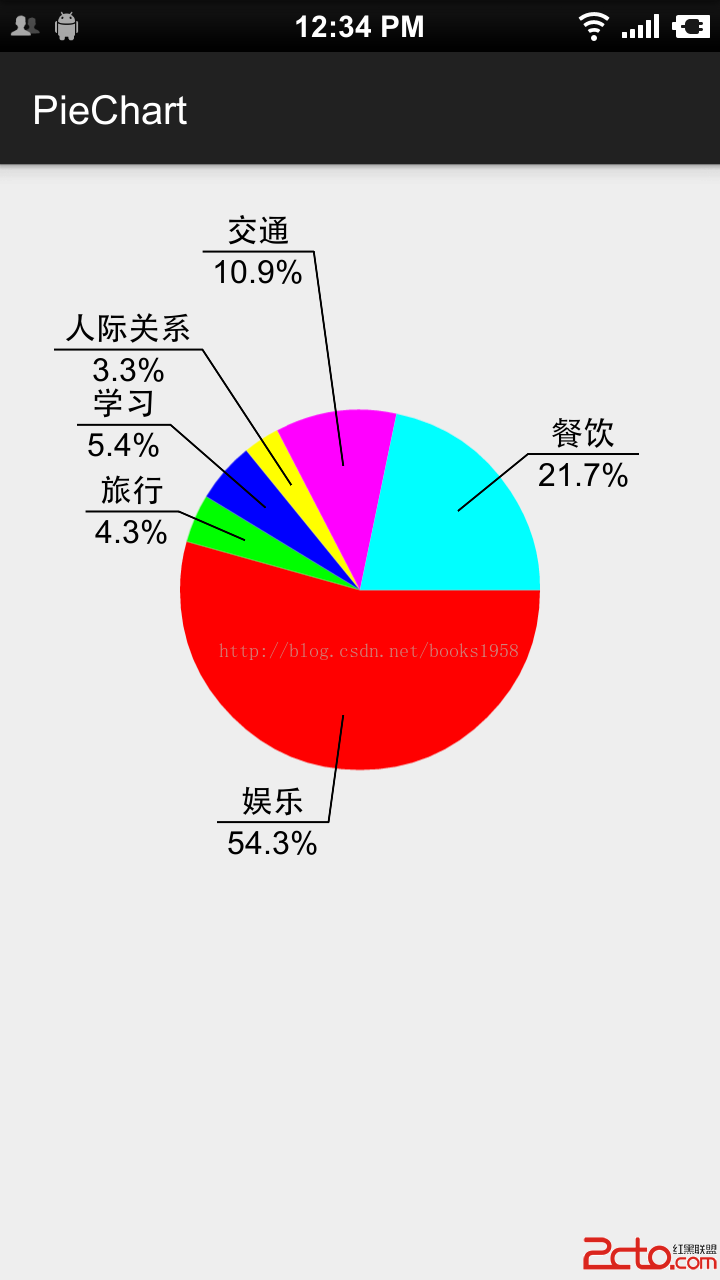
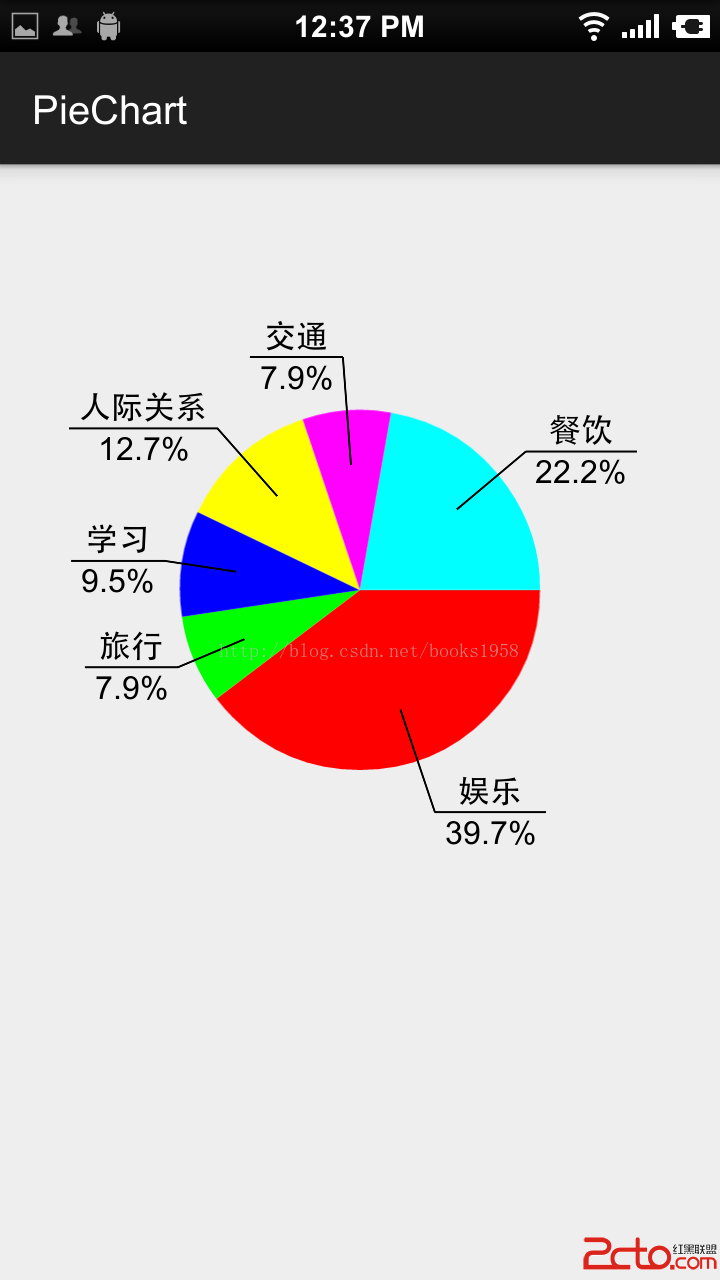
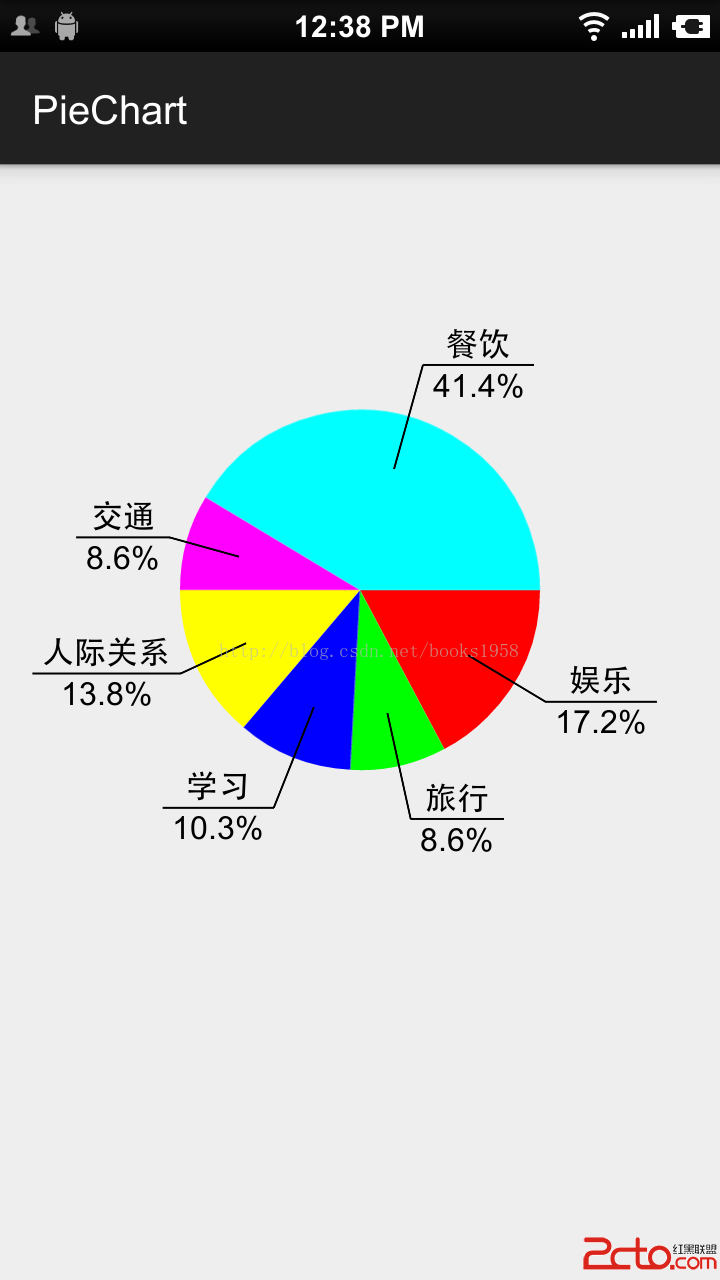
它的特點在於:
1. 使用非常方便,可直接放進 XML 佈局,再在程式碼中設定資料:
PieChartView pieChartView = (PieChartView) findViewById(R.id.pie_chart);
PieChartView.PieItemBean[] items = new PieChartView.PieItemBean[]{
        new PieChartView.PieItemBean("娛樂", 200),
        new PieChartView.PieItemBean("旅行", 100),
        new PieChartView.PieItemBean("學習", 120),
        new PieChartView.PieItemBean("人際關係", 160),
        new PieChartView.PieItemBean("交通", 100),
        new PieChartView.PieItemBean("餐飲", 480)
};
pieChartView.setPieItems(items);
2. 條目數量、大小以及折線位置與長度都能自適應。左側條目往左側劃線、右側條目往右側劃線,文字描述與百分比居中對齊,文字底線長度也隨文字自適應。對於特別小的扇區,會自動延長折線,盡量避免文字互相遮蓋。
核心程式碼 PieChartView.java:
public class PieChartView extends View {
    private int screenW, screenH;
    /** 繪製文字、扇形與線條的畫筆 */
    private Paint textPaint, piePaint, linePaint;
    /** 圓餅的中心與半徑 */
    private int pieCenterX, pieCenterY, pieRadius;
    /** 用於繪製圓形的橢圓區域 */
    private RectF pieOval;
    private float smallMargin;
    private int[] mPieColors = new int[]{Color.RED, Color.GREEN, Color.BLUE, Color.YELLOW, Color.MAGENTA, Color.CYAN};
    private PieItemBean[] mPieItems;
    private float totalValue;

    public PieChartView(Context context) { super(context); init(context); }
    public PieChartView(Context context, AttributeSet attrs) { super(context, attrs); init(context); }
    public PieChartView(Context context, AttributeSet attrs, int defStyleAttr) { super(context, attrs, defStyleAttr); init(context); }

    private void init(Context context) {
        // 初始化螢幕參數
        screenW = ScreenUtils.getScreenW(context);
        screenH = ScreenUtils.getScreenH(context);
        pieCenterX = screenW / 2;
        pieCenterY = screenH / 3;
        pieRadius = screenW / 4;
        smallMargin = ScreenUtils.dp2px(context, 5);
        pieOval = new RectF();
        pieOval.left = pieCenterX - pieRadius;
        pieOval.top = pieCenterY - pieRadius;
        pieOval.right = pieCenterX + pieRadius;
        pieOval.bottom = pieCenterY + pieRadius;
        // 繪製文字的畫筆
        textPaint = new Paint();
        textPaint.setAntiAlias(true);
        textPaint.setTextSize(ScreenUtils.dp2px(context, 16));
        // 繪製圓形的畫筆
        piePaint = new Paint();
        piePaint.setAntiAlias(true);
        piePaint.setStyle(Paint.Style.FILL);
        // 繪製指示線的畫筆
        linePaint = new Paint();
        linePaint.setAntiAlias(true);
        linePaint.setStrokeWidth(ScreenUtils.dp2px(context, 1));
    }

    // 上一個條目扇區中心的角度位置
    private float lastDegree = 0;
    // 連續「小條目」的計數
    private int addTimes = 0;

    @Override
    protected void onDraw(Canvas canvas) {
        super.onDraw(canvas);
        if (mPieItems != null && mPieItems.length > 0) {
            float start = 0.0f;
            for (int i = 0; i < mPieItems.length; i++) {
                // 繪製扇形
                piePaint.setColor(mPieColors[i % mPieColors.length]);
                float sweep = mPieItems[i].getItemValue() / totalValue * 360;
                canvas.drawArc(pieOval, start, sweep, true, piePaint);
                // 繪製遠離圓餅的指示線
                float radians = (float) ((start + sweep / 2) / 180 * Math.PI);
                float lineStartX = pieCenterX + pieRadius * 0.7f * (float) (Math.cos(radians));
                float lineStartY = pieCenterY + pieRadius * 0.7f * (float) (Math.sin(radians));
                float lineStopX, lineStopY;
                float rate;
                if (getOffset(start + sweep / 2) > 60) {
                    rate = 1.3f;
                } else if (getOffset(start + sweep / 2) > 30) {
                    rate = 1.2f;
                } else {
                    rate = 1.1f;
                }
                // 若條目很小,讓文字離圓餅更遠,避免被其他文字遮蓋
                if (start + sweep / 2 - lastDegree < 30) {
                    addTimes++;
                    rate += 0.2f * addTimes;
                } else {
                    addTimes = 0;
                }
                lineStopX = pieCenterX + pieRadius * rate * (float) (Math.cos(radians));
                lineStopY = pieCenterY + pieRadius * rate * (float) (Math.sin(radians));
                canvas.drawLine(lineStartX, lineStartY, lineStopX, lineStopY, linePaint);
                // 繪製文字
                String itemTypeText = mPieItems[i].getItemType();
                String itemPercentText = Utility.formatFloat(mPieItems[i].getItemValue() / totalValue * 100) + "%";
                float itemTypeTextLen = textPaint.measureText(itemTypeText);
                float itemPercentTextLen = textPaint.measureText(itemPercentText);
                float lineTextWidth = Math.max(itemTypeTextLen, itemPercentTextLen);
                float textStartX = lineStopX;
                float textStartY = lineStopY - smallMargin;
                float percentStartX = lineStopX;
                float percentStartY = lineStopY + textPaint.getTextSize();
                if (lineStartX > pieCenterX) {
                    textStartX += (smallMargin + Math.abs(itemTypeTextLen - lineTextWidth) / 2);
                    percentStartX += (smallMargin + Math.abs(itemPercentTextLen - lineTextWidth) / 2);
                } else {
                    textStartX -= (smallMargin + lineTextWidth - Math.abs(itemTypeTextLen - lineTextWidth) / 2);
                    percentStartX -= (smallMargin + lineTextWidth - Math.abs(itemPercentTextLen - lineTextWidth) / 2);
                }
                canvas.drawText(itemTypeText, textStartX, textStartY, textPaint);
                // 繪製百分比文字
                canvas.drawText(itemPercentText, percentStartX, percentStartY, textPaint);
                // 繪製文字底線
                float textLineStopX = lineStopX;
                if (lineStartX > pieCenterX) {
                    textLineStopX += (lineTextWidth + smallMargin * 2);
                } else {
                    textLineStopX -= (lineTextWidth + smallMargin * 2);
                }
                canvas.drawLine(lineStopX, lineStopY, textLineStopX, lineStopY, linePaint);
                lastDegree = start + sweep / 2;
                start += sweep;
            }
        }
    }

    public PieItemBean[] getPieItems() { return mPieItems; }

    public void setPieItems(PieItemBean[] pieItems) {
        this.mPieItems = pieItems;
        totalValue = 0;
        for (PieItemBean item : mPieItems) {
            totalValue += item.getItemValue();
        }
        invalidate();
    }

    private float getOffset(float radius) {
        int a = (int) (radius % 360 / 90);
        switch (a) {
            case 0: return radius;
            case 1: return 180 - radius;
            case 2: return radius - 180;
            case 3: return 360 - radius;
        }
        return radius;
    }

    static class PieItemBean {
        private String itemType;
        private float itemValue;
        PieItemBean(String itemType, float itemValue) {
            this.itemType = itemType;
            this.itemValue = itemValue;
        }
        public String getItemType() { return itemType; }
        public void setItemType(String itemType) { this.itemType = itemType; }
        public float getItemValue() { return itemValue; }
        public void setItemValue(float itemValue) { this.itemValue = itemValue; }
    }
}
 觀察者模式在 Android 中的落地實踐:以購物車支付狀態同步為例
觀察者模式(Observer)屬於物件行為型模式,也被稱為「模型—視圖」模式。它定義了一對多的依賴關係:多個觀察者同時盯著同一個被觀察對象,一旦後者狀態改變,所有觀察者都
 Android 記憶體檢視方法與常用 adb 指令整理
1. 從 IDE 的 Log 中觀察 每次虛擬機執行垃圾回收時,都會打印一條日誌,格式如下: D/dalvikvm: <GC_Reason>, <Amo
 Android 對話框圓角實作:用 shape 拆分標題欄與內容區
剛接手公司的 Android 專案,設計稿丟來的需求是這樣: 彈出視窗四角要圓角,標題欄顏色與下方內容區不同,中間還要用藍色線分隔。 基本思路:shape + corn
 Android RxJava 與 Retrofit 初體驗
RxJava 是一套以 observable 序列來組織異步與事件資料的函式庫;Retrofit 則把網路請求描述成介面,讓開發者以宣告式方式完成 API 呼叫。兩者搭配