

編輯:關於 Android 程式設計
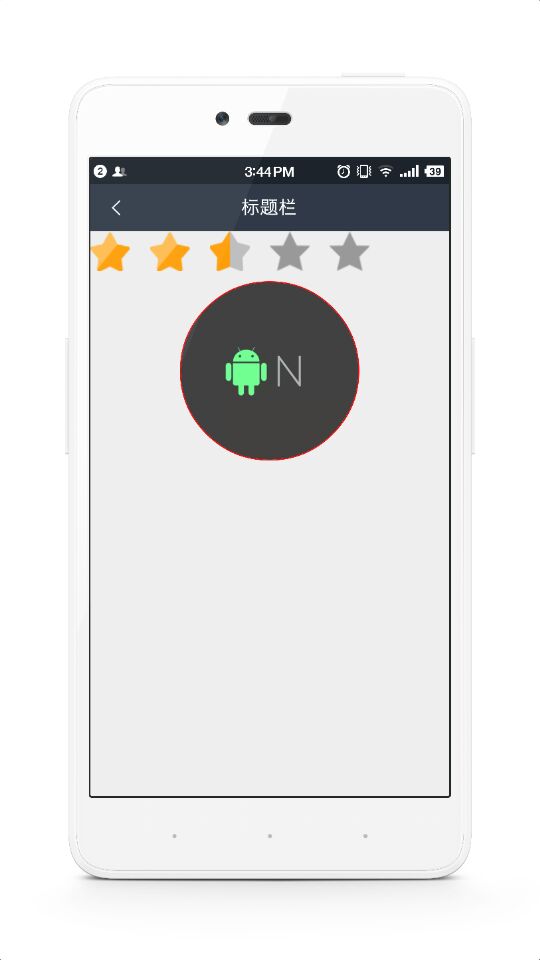
圓形頭像幾乎每個 App 都要用。若每次加載後再手動裁剪,既麻煩又浪費。與其如此,不如寫一個自帶裁剪能力的 ImageView,把網絡圖片直接塞進去就是圓的。
/**
 * 自定義圓形頭像
 */
public class CircleImageView extends ImageView {
}
透過 obtainStyledAttributes 取得 XML 中聲明的邊框寬度與顏色,並用 mReady / mSetupPending 兩個標誌處理「屬性尚未就緒就要繪製」的時序問題:
public CircleImageView(Context context) {
    super(context);
}

public CircleImageView(Context context, AttributeSet attrs) {
    this(context, attrs, 0);
}

public CircleImageView(Context context, AttributeSet attrs, int defStyle) {
    super(context, attrs, defStyle);
    super.setScaleType(SCALE_TYPE);

    /** 獲取在 xml 中聲明的屬性 */
    TypedArray a = context.obtainStyledAttributes(
            attrs, R.styleable.CircleImageView, defStyle, 0);
    mBorderWidth = a.getDimensionPixelSize(
            R.styleable.CircleImageView_border_width, DEFAULT_BORDER_WIDTH);
    mBorderColor = a.getColor(
            R.styleable.CircleImageView_border_color, DEFAULT_BORDER_COLOR);
    a.recycle();

    mReady = true;
    if (mSetupPending) {
        setup();
        mSetupPending = false;
    }
}
核心是用 BitmapShader 把位圖變成可填充的渲染器,再用矩陣控制縮放與居中:
/** 畫圓形圖的初始化工作 */
private void setup() {
    if (!mReady) {
        mSetupPending = true;
        return;
    }
    if (mBitmap == null) {
        return;
    }
    /**
     * 產生一個帶位圖的渲染器(Shader)
     * TileMode 有三種:
     * CLAMP  —— 超出原始邊界時複製邊緣像素染色
     * REPEAT —— 橫向縱向平鋪重複
     * MIRROR —— 以鏡像方式平鋪
     */
    mBitmapShader = new BitmapShader(mBitmap, Shader.TileMode.CLAMP, Shader.TileMode.CLAMP);

    mBitmapPaint.setAntiAlias(true);          // 抗鋸齒
    mBitmapPaint.setShader(mBitmapShader);    // 繪製時套用渲染器
    mBorderPaint.setStyle(Paint.Style.STROKE);
    mBorderPaint.setAntiAlias(true);
    mBorderPaint.setColor(mBorderColor);
    mBorderPaint.setStrokeWidth(mBorderWidth);

    mBitmapHeight = mBitmap.getHeight();
    mBitmapWidth = mBitmap.getWidth();

    /** 邊框矩形坐標 */
    mBorderRect.set(0, 0, getWidth(), getHeight());
    /** 邊框圓半徑取寬高可用值的一半中的較大者 */
    mBorderRadius = Math.max((mBorderRect.height() - mBorderWidth) / 2,
            (mBorderRect.width() - mBorderWidth) / 2);
    /** 圖片矩形坐標,向內收縮一個邊框寬度 */
    mDrawableRect.set(mBorderWidth, mBorderWidth,
            mBorderRect.width() - mBorderWidth, mBorderRect.height() - mBorderWidth);
    /** 圖片圓半徑 */
    mDrawableRadius = Math.max(mDrawableRect.height() / 2, mDrawableRect.width() / 2);

    updateShaderMatrix();
    invalidate();
}

/** 更新位圖渲染矩陣 */
private void updateShaderMatrix() {
    float scale;
    float dx = 0;
    float dy = 0;
    mShaderMatrix.set(null); // 重置

    /**
     * 計算縮放比,讓圖片按容器尺寸等比鋪滿,
     * 同時確定需要平移的 xy 坐標以實現居中
     */
    if (mBitmapWidth * mDrawableRect.height() > mDrawableRect.width() * mBitmapHeight) {
        scale = mDrawableRect.width() / (float) mBitmapWidth;
        dy = (mDrawableRect.height() - mBitmapHeight * scale) * 0.5f;
    } else {
        scale = mDrawableRect.height() / (float) mBitmapHeight;
        dx = (mDrawableRect.width() - mBitmapWidth * scale) * 0.5f;
    }
    mShaderMatrix.setScale(scale, scale);
    mShaderMatrix.postTranslate((int) (dx + 0.5f) + mBorderWidth, (int) (dy + 0.5f) + mBorderWidth);
    mBitmapShader.setLocalMatrix(mShaderMatrix);
}
@Override
protected void onDraw(Canvas canvas) {
    if (getDrawable() == null) {
        return;
    }
    /** 畫圓形圖片 */
    canvas.drawCircle(getWidth() / 2, getHeight() / 2, mDrawableRadius, mBitmapPaint);
    /** 畫圓形邊框 */
    canvas.drawCircle(getWidth() / 2, getHeight() / 2, mBorderRadius, mBorderPaint);
}
import android.content.Context;
import android.content.res.TypedArray;
import android.graphics.Bitmap;
import android.graphics.BitmapShader;
import android.graphics.Canvas;
import android.graphics.Color;
import android.graphics.Matrix;
import android.graphics.Paint;
import android.graphics.RectF;
import android.graphics.Shader;
import android.graphics.drawable.BitmapDrawable;
import android.graphics.drawable.ColorDrawable;
import android.graphics.drawable.Drawable;
import android.util.AttributeSet;
import android.widget.ImageView;

/**
 * 自定義圓形頭像
 */
public class CircleImageView extends ImageView {
    /** 等比例縮放後截取圓形部分顯示 */
    private static final ScaleType SCALE_TYPE = ScaleType.CENTER_CROP;
    /** 位圖配置:ARGB_8888 為 32 位,畫質最佳但佔用最多內存 */
    private static final Bitmap.Config BITMAP_CONFIG = Bitmap.Config.ARGB_8888;
    /** 默認 ColorDrawable 的寬高 */
    private static final int COLORDRAWABLE_DIMENSION = 1;
    private static final int DEFAULT_BORDER_WIDTH = 0;
    private static final int DEFAULT_BORDER_COLOR = Color.BLACK;

    private final RectF mDrawableRect = new RectF();  // 畫圖片的矩形
    private final RectF mBorderRect = new RectF();    // 畫邊框的矩形
    private final Matrix mShaderMatrix = new Matrix(); // 縮放與平移矩陣
    private final Paint mBitmapPaint = new Paint();
    private final Paint mBorderPaint = new Paint();

    private int mBorderColor = DEFAULT_BORDER_COLOR;
    private int mBorderWidth = DEFAULT_BORDER_WIDTH;

    private Bitmap mBitmap;
    private BitmapShader mBitmapShader;
    private int mBitmapWidth;
    private int mBitmapHeight;
    private float mDrawableRadius;
    private float mBorderRadius;
    private boolean mReady;
    private boolean mSetupPending;

    public CircleImageView(Context context) {
        super(context);
    }

    public CircleImageView(Context context, AttributeSet attrs) {
        this(context, attrs, 0);
    }

    public CircleImageView(Context context, AttributeSet attrs, int defStyle) {
        super(context, attrs, defStyle);
        super.setScaleType(SCALE_TYPE);
        TypedArray a = context.obtainStyledAttributes(
                attrs, R.styleable.CircleImageView, defStyle, 0);
        mBorderWidth = a.getDimensionPixelSize(
                R.styleable.CircleImageView_border_width, DEFAULT_BORDER_WIDTH);
        mBorderColor = a.getColor(
                R.styleable.CircleImageView_border_color, DEFAULT_BORDER_COLOR);
        a.recycle();
        mReady = true;
        if (mSetupPending) {
            setup();
            mSetupPending = false;
        }
    }

    @Override
    public ScaleType getScaleType() {
        return SCALE_TYPE;
    }

    @Override
    protected void onDraw(Canvas canvas) {
        if (getDrawable() == null) {
            return;
        }
        canvas.drawCircle(getWidth() / 2, getHeight() / 2, mDrawableRadius, mBitmapPaint);
        canvas.drawCircle(getWidth() / 2, getHeight() / 2, mBorderRadius, mBorderPaint);
    }

    @Override
    protected void onSizeChanged(int w, int h, int oldw, int oldh) {
        super.onSizeChanged(w, h, oldw, oldh);
        setup();
    }

    public int getBorderColor() {
        return mBorderColor;
    }

    public void setBorderColor(int borderColor) {
        if (borderColor == mBorderColor) {
            return;
        }
        mBorderColor = borderColor;
        mBorderPaint.setColor(mBorderColor);
        invalidate();
    }

    public int getBorderWidth() {
        return mBorderWidth;
    }

    public void setBorderWidth(int borderWidth) {
        if (borderWidth == mBorderWidth) {
            return;
        }
        mBorderWidth = borderWidth;
        setup();
    }

    @Override
    public void setImageBitmap(Bitmap bm) {
        super.setImageBitmap(bm);
        mBitmap = bm;
        setup();
    }

    @Override
    public void setImageDrawable(Drawable drawable) {
        super.setImageDrawable(drawable);
        mBitmap = getBitmapFromDrawable(drawable);
        setup();
    }

    @Override
    public void setImageResource(int resId) {
        super.setImageResource(resId);
        mBitmap = getBitmapFromDrawable(getDrawable());
        setup();
    }

    /** 從 Drawable 取出 Bitmap,非 BitmapDrawable 則自行繪製生成 */
    private Bitmap getBitmapFromDrawable(Drawable drawable) {
        if (drawable == null) {
            return null;
        }
        if (drawable instanceof BitmapDrawable) {
            return ((BitmapDrawable) drawable).getBitmap();
        }
        try {
            Bitmap bitmap;
            if (drawable instanceof ColorDrawable) {
                bitmap = Bitmap.createBitmap(COLORDRAWABLE_DIMENSION,
                        COLORDRAWABLE_DIMENSION, BITMAP_CONFIG);
            } else {
                ImageSizeUtil.ImageSize imageSize = ImageSizeUtil.getImageViewSize(this);
                bitmap = Bitmap.createBitmap(imageSize.width, imageSize.height, BITMAP_CONFIG);
            }
            Canvas canvas = new Canvas(bitmap);
            drawable.setBounds(0, 0, canvas.getWidth(), canvas.getHeight());
            drawable.draw(canvas);
            return bitmap;
        } catch (OutOfMemoryError e) {
            return null;
        }
    }

    /** 畫圓形圖的方法 */
    private void setup() {
        if (!mReady) {
            mSetupPending = true;
            return;
        }
        if (mBitmap == null) {
            return;
        }
        mBitmapShader = new BitmapShader(mBitmap, Shader.TileMode.CLAMP, Shader.TileMode.CLAMP);
        mBitmapPaint.setAntiAlias(true);
        mBitmapPaint.setShader(mBitmapShader);
        mBorderPaint.setStyle(Paint.Style.STROKE);
        mBorderPaint.setAntiAlias(true);
        mBorderPaint.setColor(mBorderColor);
        mBorderPaint.setStrokeWidth(mBorderWidth);
        mBitmapHeight = mBitmap.getHeight();
        mBitmapWidth = mBitmap.getWidth();
        mBorderRect.set(0, 0, getWidth(), getHeight());
        mBorderRadius = Math.max((mBorderRect.height() - mBorderWidth) / 2,
                (mBorderRect.width() - mBorderWidth) / 2);
        mDrawableRect.set(mBorderWidth, mBorderWidth,
                mBorderRect.width() - mBorderWidth, mBorderRect.height() - mBorderWidth);
        mDrawableRadius = Math.max(mDrawableRect.height() / 2, mDrawableRect.width() / 2);
        updateShaderMatrix();
        invalidate();
    }

    /** 更新位圖渲染矩陣 */
    private void updateShaderMatrix() {
        float scale;
        float dx = 0;
        float dy = 0;
        mShaderMatrix.set(null);
        if (mBitmapWidth * mDrawableRect.height() > mDrawableRect.width() * mBitmapHeight) {
            scale = mDrawableRect.width() / (float) mBitmapWidth;
            dy = (mDrawableRect.height() - mBitmapHeight * scale) * 0.5f;
        } else {
            scale = mDrawableRect.height() / (float) mBitmapHeight;
            dx = (mDrawableRect.width() - mBitmapWidth * scale) * 0.5f;
        }
        mShaderMatrix.setScale(scale, scale);
        mShaderMatrix.postTranslate((int) (dx + 0.5f) + mBorderWidth,
                (int) (dy + 0.5f) + mBorderWidth);
        mBitmapShader.setLocalMatrix(mShaderMatrix);
    }
}
非 BitmapDrawable 需要自行計算尺寸,這個工具類按「實際寬高 → 佈局寬高 → 系統最大值 → 屏幕尺寸」逐層降級:
public class ImageSizeUtil {
    /** 根據 ImageView 取得合適的壓縮寬高 */
    public static ImageSize getImageViewSize(ImageView imageView) {
        ImageSize imageSize = new ImageSize();
        DisplayMetrics displayMetrics = imageView.getContext().getResources().getDisplayMetrics();
        LayoutParams lp = imageView.getLayoutParams();

        int width = imageView.getWidth(); // 實際寬度
        if (width <= 0) {
            if (lp != null) {
                width = lp.width; // 佈局中聲明的寬度
            }
        }
        if (width <= 0) {
            width = getImageViewFieldValue(imageView, "mMaxWidth"); // 檢查最大值
        }
        if (width <= 0) {
            width = displayMetrics.widthPixels;
        }

        int height = imageView.getHeight(); // 實際高度
        if (height <= 0) {
            if (lp != null) {
                height = lp.height;
            }
        }
        if (height <= 0) {
            height = getImageViewFieldValue(imageView, "mMaxHeight");
        }
        if (height <= 0) {
            height = displayMetrics.heightPixels;
        }

        imageSize.width = width;
        imageSize.height = height;
        return imageSize;
    }

    public static class ImageSize {
        public int width;
        public int height;
    }
}
佈局文件中直接當普通 ImageView 用,額外宣告兩個自定義屬性:
 <com.bulemobi.yuandl.view.CircleImageView
    android:id="@+id/ci"
    android:layout_width="180dp"
    android:layout_height="180dp"
    android:scaleType="centerCrop"
    android:layout_gravity="center_horizontal"
    app:border_width="1dp"
    app:border_color="#FF0000" />
代碼中用任意圖片庫加載即可,示例以 xUtils3 為例:
CircleImageView circleImageView = (CircleImageView) findViewById(R.id.ci);
x.image().bind(circleImageView, url,
        new ImageOptions.Builder().setImageScaleType(ImageView.ScaleType.CENTER_CROP).build());
第一,setScaleType 被固定為 CENTER_CROP,因為只有等比例鋪滿後裁圓才不會出現變形或空白;第二,getBitmapFromDrawable 對 OutOfMemoryError 做了防護,這在加載網絡大圖時是必要的;第三,如果專案裡已有 Glide 或 Fresco,其實可以直接用它們提供的 circle transformation,自定義 View 的價值主要在需要特殊邊框或漸變描邊時。
 Android 高仿雅虎天氣(一):項目緣起與效果展示
引言: 記得去年下半年我曾上傳過一份代碼(超逼真仿雅虎天氣界面),但那僅僅只是一個界面,還存在幾個比較嚴重的 bug。印象最深的一個是:那個可以換位置的 ListView
 Android 進階:SAX 解析與 XML 生成的完整實例
Android 裡解析 XML,常見的選擇是 SAX 和 DOM。DOM 要把整份文件讀進記憶體再開始解析,檔案一大就很吃記憶體;SAX 走的是事件驅動路線,每遇到一個節
 [Android] 一次搞懂 Activity 的四種啟動模式
Android 為 Activity 提供了四種啟動模式:standard、singleTop、singleTask 與 singleInstance。開發時只要在 A
 Android JNI 初探:從 Java 呼叫 C 的完整流程
本文用一個小例子帶大家初探 JNI。開始之前,請先確認 NDK 環境已建置完成(可參考《Android NDK 環境建置》)。 一、實作目標 這個範例的功能很單純:在 A