

編輯:關於 Android 程式設計
TabHost 曾經是多標籤頁界面的標準答案。雖然新項目更推薦用 Fragment 加 ViewPager,但理解 TabHost 對維護老項目仍有價值,何況它對「一個容器承載多組佈局」的思路依然適用。
TabHost 允許在一個窗口上放置多個標籤頁,每個標籤頁相當於獲得了一塊與外部容器等大的組件擺放區域,於是可以在一個容器裡塞進更多內容。
與它搭檔工作的還有兩個角色:TabWidget 代表選項卡的標籤條;TabSpec 代表其中一個標籤頁。
TabHost 本身只是個簡單容器,提供兩個方法來創建與添加選項卡:
newTabSpec(String tag):創建選項卡addTab(TabHost.TabSpec tabSpec):添加選項卡TabActivityTabActivity.getTabHost() 取得 TabHost 物件TabHost 內部需要組合兩個組件:TabWidget 定義標題條,FrameLayout 負責「層疊」多個選項頁面。
TabHost、TabWidget、FrameLayout 這三個組件的 ID 是系統約定好的,必須引用 Android 已有的 ID:
@android:id/tabhost@android:id/tabs@android:id/tabcontent寫錯或不寫,運行時會直接拋出「TabHost must have a TabWidget」之類的異常。
package com.gc.tabhost;

import android.app.TabActivity;
import android.os.Bundle;
import android.widget.TabHost;
import android.widget.TabHost.TabSpec;

public class MainActivity extends TabActivity {

    @Override
    protected void onCreate(Bundle savedInstanceState) {
        super.onCreate(savedInstanceState);
        setContentView(R.layout.activity_main);

        // 獲取該 Activity 裡面的 TabHost 組件
        TabHost tabHost = getTabHost();

        // 第一個 Tab 頁
        TabSpec tab1 = tabHost.newTabSpec("tab1")
                .setIndicator("Android將軍1")
                .setContent(R.id.tab01);
        tabHost.addTab(tab1);

        // 第二個 Tab 頁,帶圖標
        TabSpec tab2 = tabHost.newTabSpec("tab2")
                .setIndicator("Android將軍2", getResources().getDrawable(R.drawable.ic_launcher))
                .setContent(R.id.tab02);
        tabHost.addTab(tab2);

        // 第三個 Tab 頁
        TabSpec tab3 = tabHost.newTabSpec("tab3")
                .setIndicator("Android將軍3")
                .setContent(R.id.tab03);
        tabHost.addTab(tab3);
    }
}
    <LinearLayout
        android:layout_width="match_parent"
        android:layout_height="match_parent"
        android:orientation="vertical" >

        <RelativeLayout
            android:layout_width="fill_parent"
            android:layout_height="fill_parent" >

            <frameLayout
                android:id="@android:id/tabcontent"
                android:layout_width="match_parent"
                android:layout_height="match_parent" >

                <!-- 第一個標簽頁的內容 -->
                <LinearLayout
                    android:id="@+id/tab01"
                    android:orientation="vertical"
                    android:layout_width="fill_parent"
                    android:layout_height="fill_parent" >
                    <TextView
                        android:layout_width="fill_parent"
                        android:layout_height="wrap_content"
                        android:text="Android將軍" />
                    <TextView
                        android:layout_width="fill_parent"
                        android:layout_height="wrap_content"
                        android:text="赳赳老秦,共赴國難,秦朝將軍" />
                </LinearLayout>

                <!-- 第二個標簽頁的內容 -->
                <LinearLayout
                    android:id="@+id/tab02"
                    android:orientation="vertical"
                    android:layout_width="fill_parent"
                    android:layout_height="fill_parent" >
                    <TextView
                        android:layout_width="fill_parent"
                        android:layout_height="wrap_content"
                        android:text="Android將軍2" />
                    <TextView
                        android:layout_width="fill_parent"
                        android:layout_height="wrap_content"
                        android:text="赳赳老秦,共赴國難,秦朝將軍2" />
                </LinearLayout>

                <!-- 第三個標簽頁的內容 -->
                <LinearLayout
                    android:id="@+id/tab03"
                    android:orientation="vertical"
                    android:layout_width="fill_parent"
                    android:layout_height="fill_parent" >
                    <TextView
                        android:layout_width="fill_parent"
                        android:layout_height="wrap_content"
                        android:text="Android將軍3" />
                    <TextView
                        android:layout_width="fill_parent"
                        android:layout_height="wrap_content"
                        android:text="赳赳老秦,共赴國難,秦朝將軍3" />
                </LinearLayout>

            </frameLayout>

            <TabWidget
                android:id="@android:id/tabs"
                android:layout_width="match_parent"
                android:layout_height="wrap_content"
                android:layout_alignParentBottom="true" />

        </RelativeLayout>

    </LinearLayout>

</TabHost>
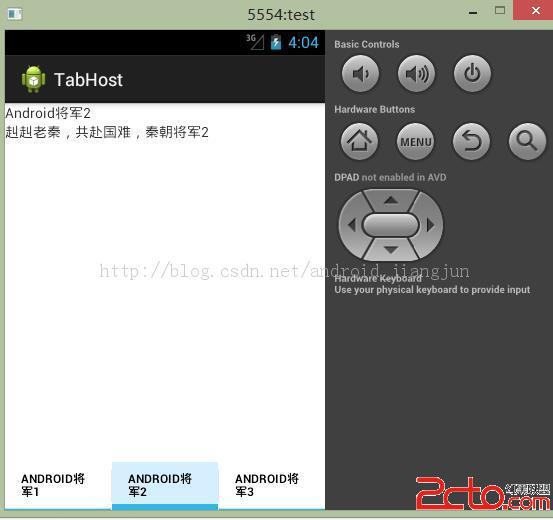
TabActivity 已被標記為 Deprecated。它要求 Activity 必須走繼承體系,破壞了代碼的靈活性;而且每個標籤頁的內容全部寫在同一個佈局裡,頁面一多佈局層級會變得很深。現代做法是用 Fragment 配合 FragmentPagerAdapter 或 ViewPager2,每個標籤頁獨立管理自己的生命周期,好處是視圖可以被延遲創建與回收,切換時也更省記憶體。
轉載請注明出處:https://blog.csdn.net/android_jiangjun/article/details/25346627
 Android 手勢識別:GestureOverlayView 與手勢庫
手勢識別在 Android 中並不如點擊、滑動那樣常見,但在一些特殊場景中仍然非常有趣。例如密碼手勢、繪圖簽名或快捷操作。Android 提供了 GestureOverl
 Android 自定義倒計時 View 實作全解析
本篇將手把手帶你實作一個帶陰影、帶指引小圓點的自定義倒計時 View。別被效果圖嚇到,真正的難點其實只有「白色小圓圈的動態定位」一處,其餘都是自定義 View 中常見的知
 如何運用工具提升你的 Android 程式碼品質(Checkstyle、Findbugs、PMD)
本文將透過 CheckStyle、FindBugs、PMD 以及 Android Lint 等自動化工具,介紹如何提升你的 Android 程式碼品質。以自動化方式檢查程
 仿直播送禮特效:屬性動畫與自訂版面配置實作
需求拆解 直播送禮特效通常由多個動畫組成:禮物區塊飛入、禮物圖示飛入、數量累加、粒子效果、整體上浮淡出。動畫之間有先後順序,也可能需要佇列管理,避免多個禮物同時發生時互相