

編輯:關於 Android 程式設計
Intent 是 Android 中用來表達「啟動意圖」的物件。無論要啟動 Activity、Service,還是送出 Broadcast,都可以透過 Intent 封裝。它讓元件之間不必直接耦合,也能完成導向與資料傳遞。
Intent 常見屬性包含 Component、Action、Category、Data、Type、Extra 與 Flag。其中 Component 用於明確指定目標元件,Extra 則用於攜帶資料。
若明確知道要啟動哪個 Activity,可以直接建立 Intent 並指定目標類別。
Intent intent = new Intent(this, SecondActivity.class);
startActivity(intent);
被啟動的 Activity 可以用 getIntent 取得這個 Intent,再讀取其中的資料。
Action 是字串,用來描述要執行的動作。Category 則用來補充說明執行的環境。若在 AndroidManifest.xml 中為 Activity 設定 intent-filter,系統就能依 Action 與 Category 找到合適的元件。
intent.setAction("org.someaction.SOME_ACTION");
startActivity(intent);
這種寫法沒有指定具體 Activity,而是讓系統依 filter 決定要啟動哪一個。
Data 通常以 Uri 表示,例如網址、電話號碼或內容提供者 URI。
Uri uri = Uri.parse("https://3g.renren.com");
Intent intent = new Intent(Intent.ACTION_VIEW, uri);
startActivity(intent);
Type 則用來描述資料的 MIME 類型,常與 ACTION_SEND 搭配使用。
Intent 可以透過 Bundle 或 putExtra 攜帶鍵值資料。
intent.putExtra("user_name", "小明");
String name = getIntent().getStringExtra("user_name");
Android 內建許多 Action,例如 ACTION_MAIN 作為應用程式入口、ACTION_VIEW 用來檢視資料、ACTION_SEND 用來分享內容、ACTION_DIAL 用來開啟撥號面板。開發時可依需求選擇系統提供的常數,也能自行定義 Action。
使用 Intent 時,最需要注意的是 intent-filter 的設定。若 filter 中有多餘空白或筆誤,可能導致 Activity 無法被啟動。建議使用 IDE 工具協助產生與檢查設定。
 UI 組件之 ImageView 及其子類(一):ImageView 顯示圖片
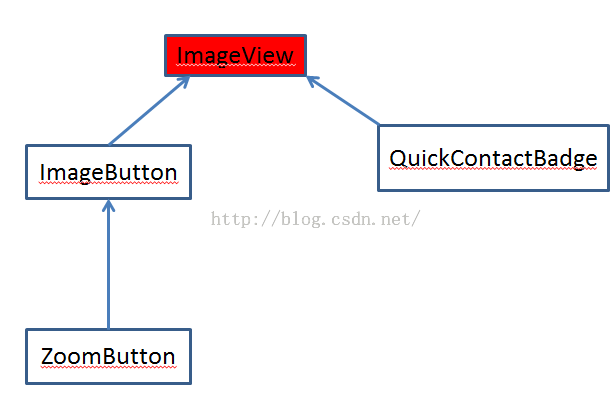
先來看看 ImageView 家族的繼承關系: ImageView 繼承自 View 組件,主要功能是顯示圖片,也可以顯示 Drawable 對象。它的直接子類是 Im
 Android 表單實作:融合各類簡易控件、FloatingActionButton 與 ButterKnife(一)
轉載請注明出處王亟亟的大牛之路 空了兩個禮拜,終於有事可做了。利用午休時間加上下午大約一個小時,完成了這個範例,讓各位夥伴對一些常用表單所需的控件做個溫故知新,再搭配炫酷
 Android 中的訊息通知:NotificationManager 與 Notification 用法整理
來談談 Notification。它最常見的場景是電話、簡訊、郵件、鬧鐘——手機狀態條上會浮現一個小圖示提示使用者處理,從上方滑下狀態條就能展開並處理這則快訊。Andro
 Android ViewStub 延遲加載解析:用源碼視角理解輕量級佔位元件
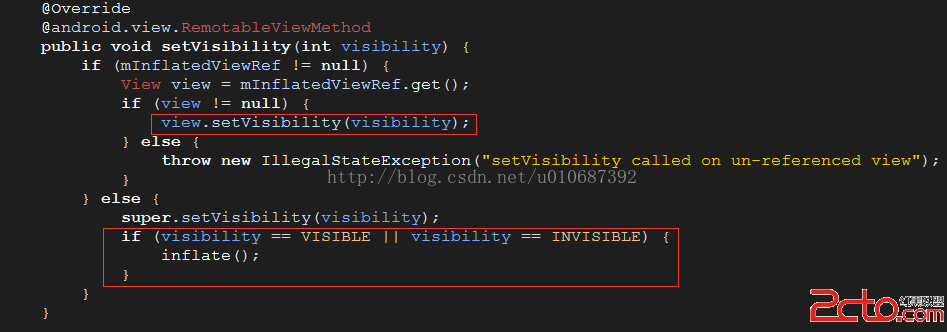
為什麼需要延遲加載在 Android 介面中,有些 View 並不是一開始就需要顯示,而是在特定條件下才會出現。若將這些元件全部预先加入版面,會增加記憶體與渲染負擔。Vi