

編輯:關於 Android 程式設計
在 Android 開發中,View 是我們必須接觸的展示技術。隨著視圖越來越複雜,整體佈局的性能也會下降。本文介紹一個能在特定場景提升佈局性能的 View——ViewStub。
1. ViewStub 是 View 的子類;2. 它不可見,大小為 0;3. 用來延遲加載佈局資源。在 Java 中,樁(stub)是指用來代替關聯或未實現代碼的代碼。
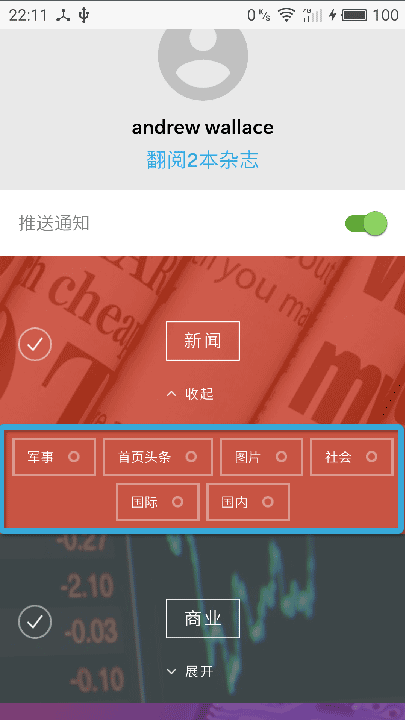
如圖,一個 ListView 包含新聞、商業、科技等 Item,每個 Item 又有各自的子話題,而子話題的 View(藍色區域)只有在點擊展開時才真正需要加載。若默認加載則會佔用內存與消耗 CPU,此時 ViewStub 就能派上用場。
在佈局中使用 ViewStub 標籤:
<ViewStub android:id="@+id/myViewStub" android:inflatedId="@+id/myInflatedViewId" android:layout="@layout/include_merge" android:layout_width="wrap_content" android:layout_height="wrap_content" android:layout_below="@id/clickMe" />
在代碼中 inflate 佈局:
ViewStub myViewStub = (ViewStub)findViewById(R.id.myViewStub); if (myViewStub != null) { myViewStub.inflate(); //或 myViewStub.setVisibility(View.VISIBLE); } 除了 inflate,還可調用 setVisibility() 加載佈局。一旦加載完成,ViewStub 會從當前佈局層級中刪除。其中 android:id 用於查找 ViewStub,android:layout 指定延遲加載的佈局,android:inflatedId 指定加載後重寫的 id。
官方文檔提到:ViewStub 目前不支援要 inflate 的佈局中使用 <merge> 標籤。
驗證一:直接使用 <merge>
<merge xmlns:android="https://schemas.android.com/apk/res/android"> <Button android:layout_width="fill_parent" android:layout_height="wrap_content" android:text="Yes"/> <Button android:layout_width="fill_parent" android:layout_height="wrap_content" android:text="No"/> </merge>
替換 android:layout 後運行會崩潰:<merge /> can be used only with a valid ViewGroup root and attachToRoot=true。可見直接的 <merge> 是不被支援的。
驗證二:間接使用 ViewStub,用一個 LinearLayout 包住 include:
<LinearLayout xmlns:android="https://schemas.android.com/apk/res/android" android:orientation="vertical" android:layout_width="match_parent" android:layout_height="match_parent"> <include layout="@layout/merge_layout"/> </LinearLayout>
修改 ViewStub 的 android:layout 值後運行一切正常,可見 ViewStub 對 <include> 標籤支持良好。
inflate 與 setVisibility 的共同點是都能加載佈局。setVisibility 只是在 ViewStub 第一次延遲初始化且 visibility 非 GONE 時,才呼叫 inflate。而 inflate 的源碼展現了:android:inflatedId 的用途、ViewStub 初始化後從視圖層級移除、layoutParams 的應用,以及 mInflatedViewRef 以弱引用建立 ViewStub 與加載 View 的聯繫。
以上就是關於 ViewStub 的研究,希望對大家優化視圖有所幫助和啟發。
 安卓日記:自製 RecyclerView 實現仿 QQ 左滑顯示選單
要做出一個類似 QQ 的效果——在列表項上左滑,露出「置頂」與「刪除」兩個選項——核心只需要一個 Scroller,再加上對觸摸事件的細緻處理。 一、自訂 Recycl
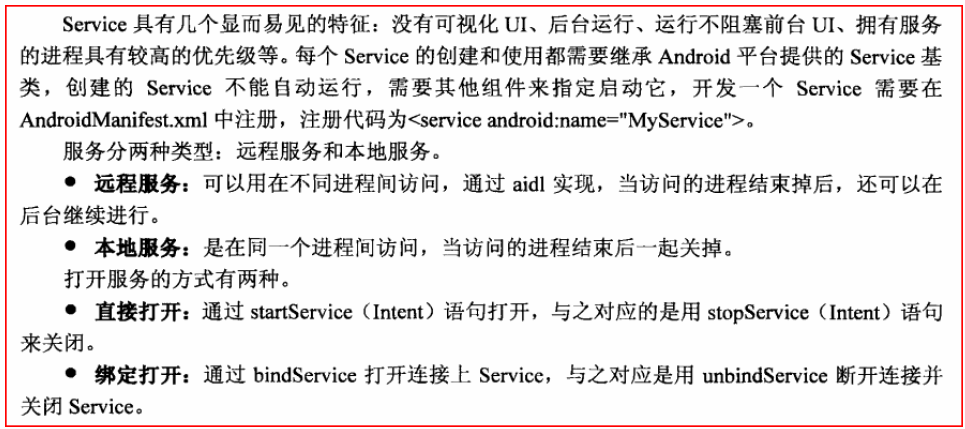 Android Service 詳解:生命周期、start 與 bind、AIDL 跨進程通信
本文參考《Android 開發全程實錄》的示例並整合多方資料,希望給學習 Service 的同學一份較為完整的說明與實踐參考。 一、Service 簡介 Serv
 Android AsyncTask 異步任務機制詳解:用法、注意事項與原始碼原理
AsyncTask 是 Android 早期常用的異步任務工具,封裝了 Thread 與 Handler,讓開發者能在背景執行工作,再把結果回传到主線程更新 UI。 基
 Android ViewPager 翻頁動畫實作:JazzyViewPager 上手
想讓 ViewPager 的切頁效果不只是死板的平移,可以參考這個開源專案:JazzyViewPager。 https://github.com/jfeinstein10