

編輯:關於 Android 程式設計
先給大家展示效果圖,如果感興趣,歡迎參考下面的實現思路:
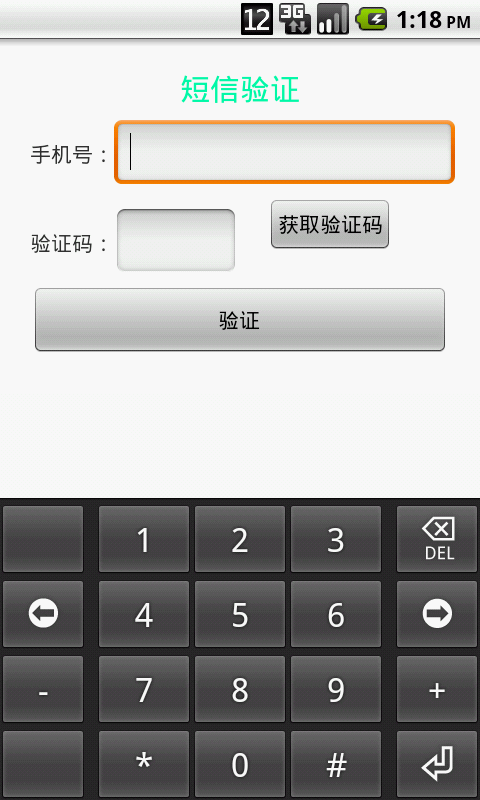
在 Android 開發中,短信驗證碼的設計層出不窮。越來越多的應用為了提升安全性,採用服務器向用戶手機發送驗證碼的方式來保護個人信息。無論是註冊時的信息驗證,還是找回密碼時的短信驗證,其工作原理大致一致。本篇就帶大家一起實現這一流行的方案。
眾所周知,短信驗證需要服務器生成驗證碼並主動發送到用戶手機,這就需要運營商的短信發送接口。由於接口權限不易獲得,這裡選擇借助移動開發服務平台(如 Mob)來完成,它能顯著縮短開發週期。
官方提供了兩種實現方式:一是調用內建 GUI,二是自定義 GUI。第一種官方文檔已有詳細步驟,照做即可;本篇重點介紹自定義 GUI 的實現。開發前可先查閱官方無 GUI API 並下載示例。具體步驟如下:
1、將 demo 的 libs 下的 SMSSDK-1.1.5.jar 和 armeabi 文件夾拷貝到項目的 libs 目錄。
2、在 AndroidManifest.xml 中添加權限並聲明 Action:
<?xml version="1.0" encoding="utf-8"?> <manifest xmlns:android="https://schemas.android.com/apk/res/android" package="com.example.android_sms" android:versionCode="1" android:versionName="1.0" > <uses-sdk android:minSdkVersion="8" android:targetSdkVersion="18" /> <uses-permission android:name="android.permission.READ_CONTACTS" /> <uses-permission android:name="android.permission.READ_PHONE_STATE" /> <uses-permission android:name="android.permission.WRITE_EXTERNAL_STORAGE" /> <uses-permission android:name="android.permission.ACCESS_NETWORK_STATE" /> <uses-permission android:name="android.permission.ACCESS_WIFI_STATE" /> <uses-permission android:name="android.permission.INTERNET" /> <uses-permission android:name="android.permission.RECEIVE_SMS" /> <uses-permission android:name="android.permission.GET_TASKS" /> <uses-permission android:name="android.permission.ACCESS_FINE_LOCATION" /> <application android:allowBackup="true" android:icon="@drawable/ic_launcher" android:label="@string/app_name" android:theme="@style/AppTheme" > <activity android:name="com.example.android_sms.MainActivity" android:label="@string/app_name" > <intent-filter> <action android:name="android.intent.action.MAIN" /> <category android:name="android.intent.category.LAUNCHER" /> </intent-filter> </activity> <activity android:name="cn.smssdk.SMSSDKUIShell" android:configChanges="keyboardHidden|orientation|screenSize" android:theme="@android:style/Theme.Translucent.NoTitleBar" android:windowSoftInputMode="stateHidden|adjustResize" /> </application> </manifest>
3、設計佈局文件:
<RelativeLayout xmlns:android="https://schemas.android.com/apk/res/android" xmlns:tools="https://schemas.android.com/tools" android:layout_width="match_parent" android:layout_height="match_parent" tools:context=".MainActivity" > <TextView android:id="@+id/textView2" android:layout_width="wrap_content" android:layout_height="wrap_content" android:layout_centerHorizontal="true" android:layout_marginTop="20dp" android:text="短信驗證" android:textColor="#00ffaa" android:textSize="20dp" /> <TextView android:id="@+id/textView1" android:layout_width="wrap_content" android:layout_height="wrap_content" android:layout_alignParentLeft="true" android:layout_below="@+id/textView2" android:layout_marginLeft="20dp" android:layout_marginTop="20dp" android:text="手機號:" /> <EditText android:id="@+id/phone" android:layout_width="wrap_content" android:layout_height="wrap_content" android:layout_alignBaseline="@+id/textView1" android:layout_alignBottom="@+id/textView1" android:layout_toRightOf="@+id/textView1" android:maxLength="11" android:ems="11" android:inputType="phone" > <requestFocus /> </EditText> <TextView android:id="@+id/textView3" android:layout_width="wrap_content" android:layout_height="wrap_content" android:layout_alignLeft="@+id/textView1" android:layout_marginTop="40dp" android:layout_below="@+id/phone" android:text="驗證碼:"/> <EditText android:id="@+id/cord" android:layout_width="wrap_content" android:layout_height="wrap_content" android:layout_marginTop="20dp" android:layout_alignBaseline="@+id/textView3" android:layout_alignBottom="@+id/textView3" android:layout_alignLeft="@+id/phone" android:ems="4" android:maxLength="4" android:inputType="phone" /> <Button android:id="@+id/getcord" android:layout_width="wrap_content" android:layout_height="wrap_content" android:layout_alignTop="@+id/cord" android:layout_marginLeft="20dp" android:layout_marginTop="10dp" android:layout_toRightOf="@+id/cord" android:visibility="visible" android:text="獲取驗證碼" /> <Button android:id="@+id/savecord" android:layout_width="fill_parent" android:layout_height="wrap_content" android:layout_below="@+id/cord" android:layout_margin="20dp" android:text="驗證" /> <TextView android:id="@+id/now" android:layout_width="fill_parent" android:layout_height="wrap_content" android:layout_above="@+id/savecord" android:layout_toRightOf="@+id/cord" android:gravity="center_horizontal" android:visibility="gone" android:text="提示信息" android:textColor="#aaaaaa" /> </RelativeLayout>
4、MainActivity 的實現:
/** * 自定義GUI短信驗證 * @time: 2015年7月4日 */ public class MainActivity extends Activity implements OnClickListener{ private EditText phone; private EditText cord; private TextView now; private Button getCord; private Button saveCord; private String iPhone; private String iCord; private int time = 60; private boolean flag = true; @Override protected void onCreate(Bundle savedInstanceState) { super.onCreate(savedInstanceState); requestWindowFeature(Window.FEATURE_NO_TITLE); setContentView(R.layout.activity_main); init(); SMSSDK.initSDK(this, "<您的appkey>", "<您的appsecret>"); EventHandler eh=new EventHandler(){ @Override public void afterEvent(int event, int result, Object data) { Message msg = new Message(); msg.arg1 = event; msg.arg2 = result; msg.obj = data; handler.sendMessage(msg); } }; SMSSDK.registerEventHandler(eh); } private void init() { phone = (EditText) findViewById(R.id.phone); cord = (EditText) findViewById(R.id.cord); now = (TextView) findViewById(R.id.now); getCord = (Button) findViewById(R.id.getcord); saveCord = (Button) findViewById(R.id.savecord); getCord.setOnClickListener(this); saveCord.setOnClickListener(this); } @Override public void onClick(View v) { switch (v.getId()) { case R.id.getcord: if(!TextUtils.isEmpty(phone.getText().toString().trim())){ if(phone.getText().toString().trim().length()==11){ iPhone = phone.getText().toString().trim(); SMSSDK.getVerificationCode("86",iPhone); cord.requestFocus(); getCord.setVisibility(View.GONE); }else{ Toast.makeText(MainActivity.this, "請輸入完整電話號碼", Toast.LENGTH_LONG).show(); phone.requestFocus(); } }else{ Toast.makeText(MainActivity.this, "請輸入您的電話號碼", Toast.LENGTH_LONG).show(); phone.requestFocus(); } break; case R.id.savecord: if(!TextUtils.isEmpty(cord.getText().toString().trim())){ if(cord.getText().toString().trim().length()==4){ iCord = cord.getText().toString().trim(); SMSSDK.submitVerificationCode("86", iPhone, iCord); flag = false; }else{ Toast.makeText(MainActivity.this, "請輸入完整驗證碼", Toast.LENGTH_LONG).show(); cord.requestFocus(); } }else{ Toast.makeText(MainActivity.this, "請輸入驗證碼", Toast.LENGTH_LONG).show(); cord.requestFocus(); } break; default: break; } } //驗證碼送成功後提示文字 private void reminderText() { now.setVisibility(View.VISIBLE); handlerText.sendEmptyMessageDelayed(1, 1000); } Handler handlerText =new Handler(){ public void handleMessage(Message msg) { if(msg.what==1){ if(time>0){ now.setText("驗證碼已發送"+time+"秒"); time--; handlerText.sendEmptyMessageDelayed(1, 1000); }else{ now.setText("提示信息"); time = 60; now.setVisibility(View.GONE); getCord.setVisibility(View.VISIBLE); } }else{ cord.setText(""); now.setText("提示信息"); time = 60; now.setVisibility(View.GONE); getCord.setVisibility(View.VISIBLE); } }; }; Handler handler=new Handler(){ @Override public void handleMessage(Message msg) { // TODO Auto-generated method stub super.handleMessage(msg); int event = msg.arg1; int result = msg.arg2; Object data = msg.obj; Log.e("event", "event="+event); if (result == SMSSDK.RESULT_COMPLETE) { //短信注冊成功後,返回MainActivity,然後提示新好友 if (event == SMSSDK.EVENT_SUBMIT_VERIFICATION_CODE) {//提交驗證碼成功,驗證通過 Toast.makeText(getApplicationContext(), "驗證碼校驗成功", Toast.LENGTH_SHORT).show(); handlerText.sendEmptyMessage(2); } else if (event == SMSSDK.EVENT_GET_VERIFICATION_CODE){//服務器驗證碼發送成功 reminderText(); Toast.makeText(getApplicationContext(), "驗證碼已經發送", Toast.LENGTH_SHORT).show(); }else if (event ==SMSSDK.EVENT_GET_SUPPORTED_COUNTRIES){//返回支持發送驗證碼的國家列表 Toast.makeText(getApplicationContext(), "獲取國家列表成功", Toast.LENGTH_SHORT).show(); } } else { if(flag){ getCord.setVisibility(View.VISIBLE); Toast.makeText(MainActivity.this, "驗證碼獲取失敗,請重新獲取", Toast.LENGTH_SHORT).show(); phone.requestFocus(); }else{ ((Throwable) data).printStackTrace(); int resId = getStringRes(MainActivity.this, "smssdk_network_error"); Toast.makeText(MainActivity.this, "驗證碼錯誤", Toast.LENGTH_SHORT).show(); cord.selectAll(); if (resId > 0) { Toast.makeText(MainActivity.this, resId, Toast.LENGTH_SHORT).show(); } } } } }; @Override protected void onDestroy() { super.onDestroy(); SMSSDK.unregisterAllEventHandler(); } }
注:appkey 和 appsecret 需在 mob.com 註冊帳號後,創建一個發送短信的應用,系統會自動生成。handlerText 是自定義的 Handler 對象,用於在服務器發送驗證碼後提示用戶注意,並實現倒計時。
以上就是本次分享的 Android 獲取短信驗證碼實現方法,希望對大家有所幫助,如有疑問歡迎留言,也感謝大家對本站的支持!
 Android 學習筆記(十一)——從 Intent 返回結果
從 Intent 返回結果 startActivity() 方法會呼叫另一個 Activity,但並不會把結果回傳給當前 Activity。若你想從一個 Activit
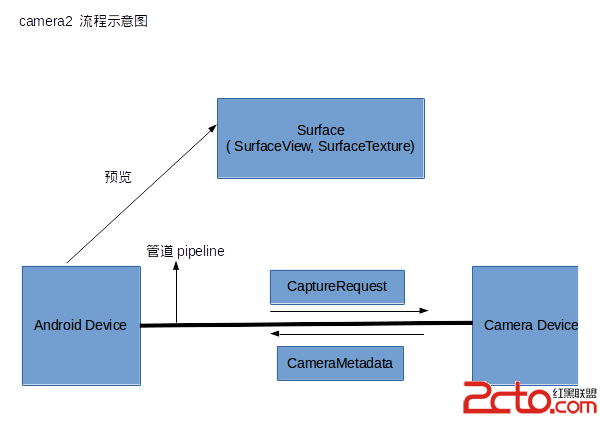 Android camera2 API 使用指南:從架構到相機預覽與拍照實作
從 API 21 開始,原有的 Camera API 被標記為棄用,官方轉而推薦新的 camera2。這是一次大動作——新 API 換了整套架構,學習曲線明顯變陡,但也換
 Android 打飛機遊戲實戰:無限滾動的背景圖(2)
先來盤點一下遊戲畫面裡會出現的元素:可無限滾動的背景、可操作的主角、主角的子彈、主角的血量、兩種怪物(敵機),還有一個 Boss 以及 Boss 的爆炸效果。本篇先從最基
 Android 刮刮卡效果實作解析
刮刮卡效果原理 刮刮卡效果的核心是「底圖加上可刮除的遮罩層」。底層顯示獎項或圖片,上層蓋著灰色遮罩。當使用者用手指滑動時,遮罩會沿著手勢路徑被刮開,露出底圖。 Xfer