

編輯:關於 Android 程式設計
在 App 裡開啟網頁是很普遍的行為。本文整理三種最常見的實作方式:喚起系統預設瀏覽器、指定特定瀏覽器開啟,以及載入本機的 HTML 檔案。
Intent intent = new Intent();
intent.setAction("android.intent.action.VIEW");
Uri content_url = Uri.parse("https://www.cnblogs.com");
intent.setData(content_url);
startActivity(intent);
這樣 Android 就會自動挑選使用者設定的預設瀏覽器來開啟該網址。
關鍵在於 setClassName():套件名稱為 com.android.browser,啟動的 Activity 為 com.android.browser.BrowserActivity。
Intent intent = new Intent();
intent.setAction("android.intent.action.VIEW");
Uri content_url = Uri.parse("https://www.jizhuomi.com/android");
intent.setData(content_url);
intent.setClassName("com.android.browser", "com.android.browser.BrowserActivity");
startActivity(intent);
只要把套件名與主 Activity 換掉即可,前提是該瀏覽器已安裝在裝置上:
intent.setClassName("套件名稱", "主啟動 Activity");
com.uc.browser / com.uc.browser.ActivityUpdatecom.opera.mini.android / com.opera.mini.android.Browsercom.tencent.mtt / com.tencent.mtt.MainActivity載入本機檔案時,必須明確指定瀏覽器,不能沿用第一種「交給系統挑」的做法:
Intent intent = new Intent();
intent.setAction("android.intent.action.VIEW");
Uri content_url = Uri.parse("content://com.android.htmlfileprovider/sdcard/help.html");
intent.setData(content_url);
intent.setClassName("com.android.browser", "com.android.browser.BrowserActivity");
startActivity(intent);
重點是使用了 content:// 這個 scheme。
有 Win32 開發經驗的人可能會想用 file://sdcard/help.html。可以確定的是,預設瀏覽器並未針對 file 這個 scheme 做解析。若要讓系統瀏覽器支援,得自行修改原始碼重新編譯:
packages/apps/Browser/AndroidManifest.xml,在對應的 <intent-filter> 後補上 file scheme:<intent-filter>
<action android:name="android.intent.action.VIEW" />
<category android:name="android.intent.category.DEFAULT" />
<category android:name="android.intent.category.BROWSABLE" />
<data android:scheme="file" />
</intent-filter>
以上三種寫法涵蓋了日常開發中絕大多數「開網頁」的需求。實作時別忘了在需要存讀外部儲存空間的情境下補上相應的執行期權限請求。
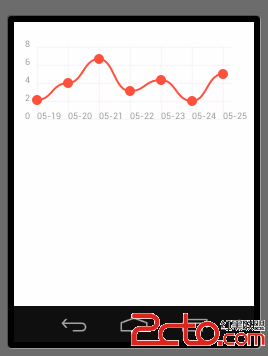 Android 自定義 View 繪製曲線圖
項目裡需要一個簡單的曲線圖來展示數據趨勢。一開始以為現成的庫隨手拈來——aChartEngine、HelloChart、MPAndroidChart 都很成熟,但把 De
 Android 手勢密碼進階實作:初始設定、單點觸發與軌跡補點
手勢密碼除了基本解鎖,還可以延伸到首次設定、單點確認與軌跡補齊等互動細節。本篇以前作基礎,說明如何讓控制元件更貼近實際產品需求。 加入初始密碼設定 首次設定密碼時,使用者
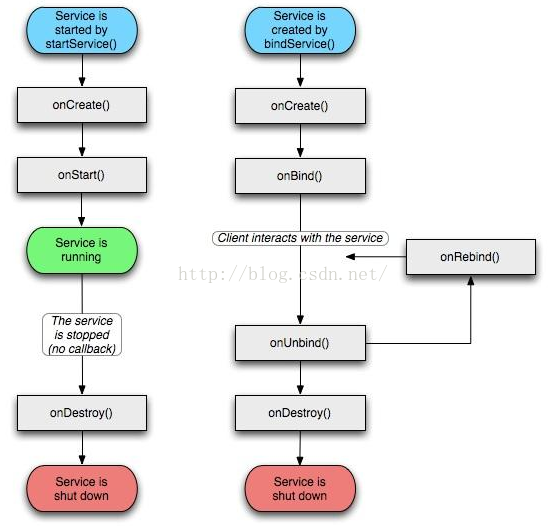 Android Service 你必須掌握的五件事
Service 是 Android 四大元件之一,通常在後台執行較耗時的工作。要真正用好它,需要掌握:生命週期、建立方式、AIDL 跨進程通信,以及提高存活率的手段。以下
 Android登錄時的密碼保護實現
在絕大多數Android項目中,用戶登錄與註冊都是必不可少的環節,因此如何在開發中保護好用戶密碼就顯得尤為重要。這裡我把自己的密碼保護方法記錄下來。 我建了一個保存密碼的