

編輯:關於 Android 程式設計
有些布局屬性平時不太起眼,關鍵時刻卻能出奇效,clipChildren 就是其中之一。本文通過一個直觀的例子,講解它如何讓子 View 突破父容器的邊界顯示。
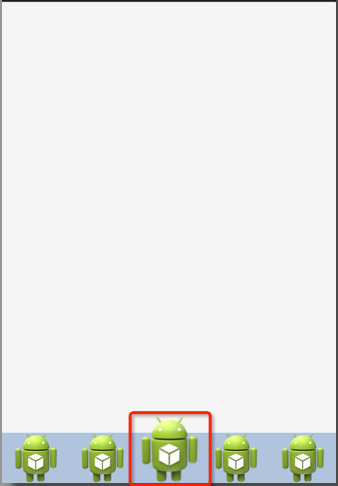
看到這個效果,你可能會先想到用 RelativeLayout 疊加實現,但其實借助 clipChildren 能更省事。
<LinearLayout xmlns:android="https://schemas.android.com/apk/res/android" android:layout_width="match_parent" android:layout_height="match_parent" android:clipChildren="false" android:orientation="vertical" > <android.support.v4.view.ViewPager android:id="@+id/view_pager" android:layout_width="match_parent" android:layout_height="0dip" android:layout_weight="1.0" /> <LinearLayout android:layout_width="match_parent" android:layout_height="48dip" android:background="#B0C4DE" android:orientation="horizontal" > <ImageView android:layout_width="0dip" android:layout_height="fill_parent" android:layout_weight="1.0" android:scaleType="fitCenter" android:src="@drawable/ic_launcher" /> <ImageView android:layout_width="0dip" android:layout_height="fill_parent" android:layout_weight="1.0" android:scaleType="fitCenter" android:src="@drawable/ic_launcher" /> <ImageView android:layout_width="0dip" android:layout_height="64dip" android:layout_gravity="bottom" android:layout_weight="1.0" android:scaleType="fitCenter" android:src="@drawable/ic_launcher" /> <ImageView android:layout_width="0dip" android:layout_height="fill_parent" android:layout_weight="1.0" android:scaleType="fitCenter" android:src="@drawable/ic_launcher" /> <ImageView android:layout_width="0dip" android:layout_height="fill_parent" android:layout_weight="1.0" android:scaleType="fitCenter" android:src="@drawable/ic_launcher" /> </LinearLayout> </LinearLayout>
1. 只需在根節點設置 android:clipChildren="false" 即可,該屬性默認值為 true。
2. 可以通過 android:layout_gravity 控制超出部分如何顯示。
3. clipChildren 的含義是:是否限制子 View 在其自身範圍內繪製。設為 false 後,子 View 就能畫到父容器邊界之外。
這個屬性在製作 Android 動畫、尤其是需要元素溢出容器呈現立體效果時非常有用,有需要的朋友可以參考實踐。
 Android 事件分發機制(十三):dispatchTouchEvent 源碼逐段解析
事件分發的本質是一種委託:上層委託下層、父容器委託子元件去處理。要理解它,只需盯住一個類——MotionEvent,以及三個方法。 三個核心方法 dispatchTo
 疑難:部分機型(三星 S3)SQLite 資料庫莫名被鎖住
今天在三星 S3 上開發時遇到一個怪問題:資料庫老是鎖住,換到其他機型卻完全正常。查資料庫所在目錄時發現,除了 db 檔本身,還多出一個同名的、以 -journal 結尾
 用 Volley 解決列表圖片加載:ImageRequest、ImageLoader 與 NetworkImageView 三種方案
搜芽的開發這幾天進度相當快,唯一美中不足的是網路圖片的加載環節。我先試過兩條路,都不太理想: 第一套是沿用迅雷動漫的圖片加載方案。那也是個開源庫,但不知道是我不會用還是
 Android 內部儲存讀寫檔案實作教學
實務開發裡,「把一個檔案寫進手機」幾乎是必備技能。要談寫檔,先把儲存空間的輪廓交代清楚。 零、儲存空間的分類 內部儲存空間 • RAM:執行用的記憶體,等同電腦